The "Contacts" button on the website
The "Contacts" button is a round floating button at the bottom of the website (above the cart). When clicked, it reveals subbuttons for WhatsApp, Telegram, phone, and your links. It works in any website mode.
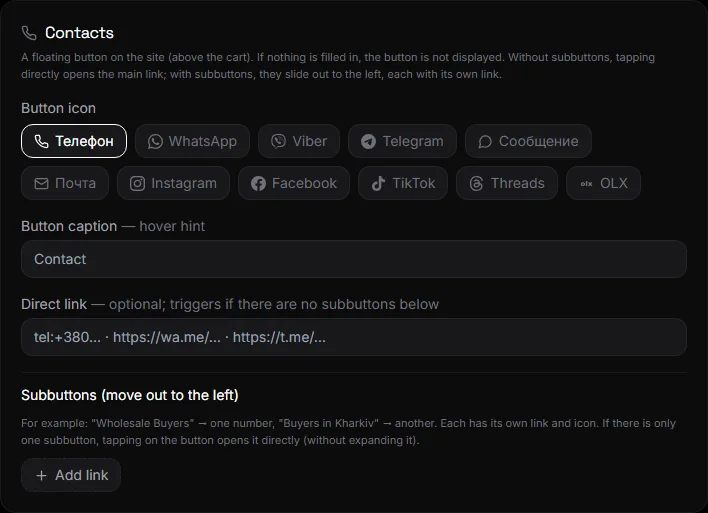
How to set up#
Settings → Contacts.
- Button icon - phone, chat, message and others.
- Button label - a hint when hovering over the button, such as "Contact."
- Direct link - if there are no subbuttons, the button immediately opens this link (phone, WhatsApp, Telegram, website).
- Subbuttons - Click "Add Link": name and link. WhatsApp, Viber, and Telegram automatically add a branded icon.
- Click Save.
If nothing is filled in, the button will not be displayed on the website.
Link formats#
- Phone:
tel:+380671234567or just the number. - WhatsApp:
https://wa.me/380671234567. - Telegram:
https://t.me/usernameor@username. - Any website or form:
https://….
One-button mode#
Fill out only the "Direct Link" field and do not add any subbuttons—the button will become single and will open the link directly.
Questions and answers#
The button covers the basket#
The button is positioned above the basket on purpose. On the phone, both buttons are visible and don't interfere with each other.
Is it possible to add a feedback form?#
Yes, as a subbutton with a link to the form. Or use the "Contacts" block on the website page. See Home and Menu.