Auto-publishing to Telegram and WhatsApp
Auto-publishing — the bot automatically publishes each new ad or product to your Telegram channel and/or WhatsApp group. The author receives a link to the post.
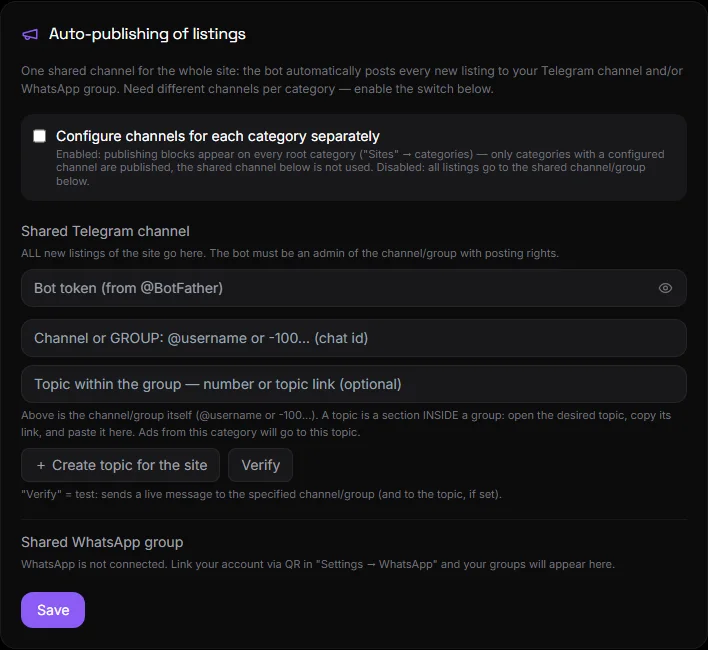
How to set up a shared channel#
Settings → Auto-publishing.
- Telegram: Enter the bot token (from @BotFather) and the channel name or chat_id. The bot must be a channel administrator with publishing permissions. Click "Check token" to see the bot's name. The "Create a topic for the site" button creates a topic in the group.
- WhatsApp: Select a group from the connected number's list. See WhatsApp.
- Click Save.
All new ads, including those without a category, are sent to the general channel.
Channels by category#
The "Configure channels for each category separately" toggle. This option creates a separate Telegram channel or topic for each category in the "Catalog" section, as well as a WhatsApp group. Subcategories inherit the category's channel. Ads in a category with push-button selection are published after the author selects the category.
What does a post look like?#
Using the template from the "Posts" section: photo, title, price, specifications, buttons, and an optional payment button. See Posts.
Reliability#
- Posts are queued and retried if an error occurs. An ad is only considered published after a successful post.
- If a channel is specified but the bot is not confirmed, the post is not silently disabled—a warning and the reason are visible in the block.
- The ad author receives a link to the post in the channel within a couple of minutes after publication.
- Bot tokens are stored encrypted.
Questions and answers#
The bot does not publish#
Please check the following: the channel admin bot; the token is working (the "Check token" button is clicked); there is no "channel not confirmed" warning in the block; the ad has been published on the website (auto-publishing occurs after moderation).
Can I post to both the channel and the WhatsApp group?#
Yes, at the same time. Fill out both blocks.
How to disable?#
Click "Unlink token" (Telegram) or clear the group (WhatsApp) and save.