Type of cards
A card is a tile for an ad or product in the feed. The "Card Appearance" section in Settings determines how photos are displayed and the tile's shape. Changes are visible in the preview of your actual product.
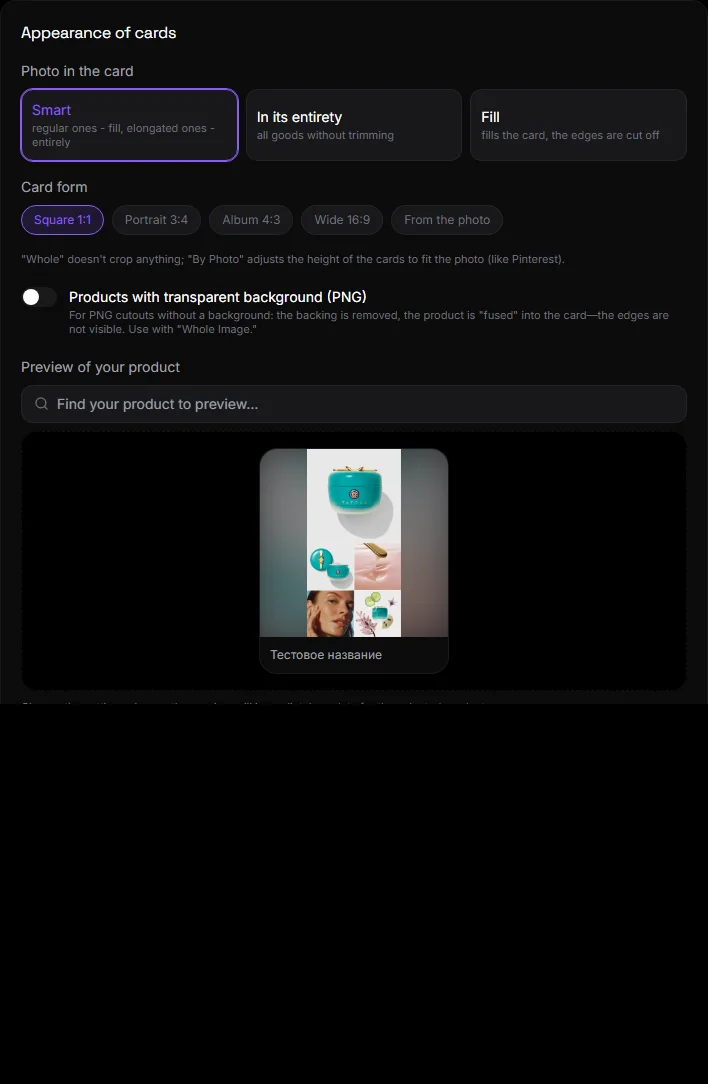
Photo in the card#
| Option | What's happening |
|---|---|
| Smart | Regular photos fill the card, while stretched photos are shown in full. A good option for a bulletin board. |
| In its entirety | All products are uncut. Recommended for retail use. |
| Fill | The photo fills the card, the edges are cropped. For identical square photos |
Card form#
Square 1:1, portrait 3:4, album 4:3, wide 16:9, or "from a photo." A single format for all cards ensures a smooth ribbon.
Additionally#
- Products with a transparent background (PNG) – the card becomes the product's background, without a backing. For catalogs with cropped photos.
- Subcategories — buttons — display flat buttons instead of circles with stickers. This is convenient when there are many subcategories and they don't have images.
- "Seller" banner — display the seller block on the ad page. Can be disabled for stores with only one seller.
- Hide the address/warehouse information for ads - if the warehouse or address is not needed by the visitor.
Preview#
The section features a search function for your products. Select a product, and all settings will be immediately displayed. Don't forget to click "Save" at the bottom of the page.
Questions and answers#
Photos in my feed are loading slowly. What should I do?#
The site automatically displays thumbnails of photos in the feed, and full-size ones only on the product page. If the photos are very large, please reupload them in a smaller size.
Is it possible to have different forms for different categories?#
No. There is only one form for the entire site.