Lub pob "Contacts" ntawm lub vev xaib
Lub pob "Contacts" yog lub pob puag ncig uas nyob hauv qab ntawm lub vev xaib (saum lub laub). Thaum koj nias, nws yuav qhia cov pob me rau WhatsApp, Telegram, xov tooj, thiab koj cov kev sib txuas. Nws ua haujlwm hauv txhua hom vev xaib.
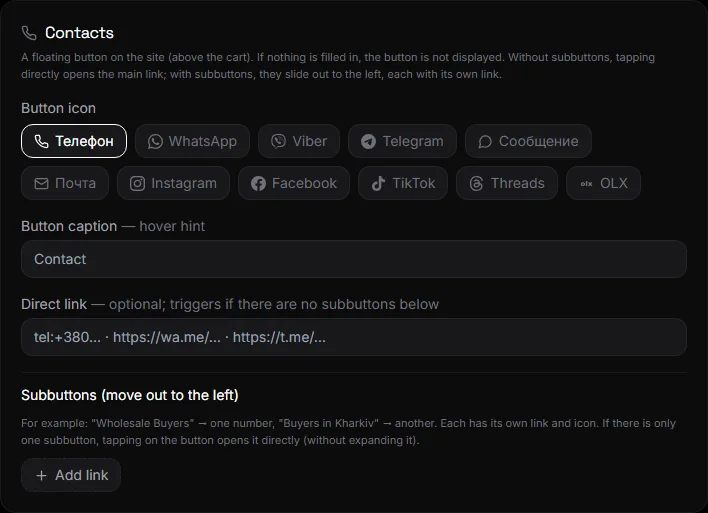
Yuav teeb tsa li cas#
Chaw → Cov Neeg Sib Txuas Lus.
- Khawm icon - xov tooj, sib tham, lus thiab lwm yam.
- Daim ntawv lo rau ntawm lub pob - ib qho lus qhia thaum koj hovering hla lub pob, xws li "Tiv tauj."
- Qhov txuas ncaj qha - yog tias tsis muaj cov nyees khawm me, lub khawm tam sim ntawd qhib qhov txuas no (xov tooj, WhatsApp, Telegram, lub vev xaib).
- Cov Khawm Pab - Nyem "Ntxiv Qhov Txuas": lub npe thiab qhov txuas. WhatsApp, Viber, thiab Telegram yuav ntxiv ib lub cim lag luam rau koj.
- Nyem Txuag.
Yog tsis muaj dab tsi sau rau hauv, lub pob yuav tsis tshwm sim rau ntawm lub vev xaib.
Cov hom ntawv txuas#
- Xov tooj:
tel:+380671234567los yog tus lej xwb. - WhatsApp:
https://wa.me/380671234567. - Telegram:
https://t.me/usernamelos yog@username. - Txhua lub vev xaib lossis daim foos:
https://….
Ib-khawm hom#
Tsuas yog sau rau hauv daim teb "Direct Link" xwb thiab tsis txhob ntxiv cov subbuttons—lub pob yuav dhau los ua ib qho thiab yuav qhib qhov txuas ncaj qha.
Cov Lus Nug thiab Cov Lus Teb#
Lub pob khawm npog lub pob tawb#
Lub pob no tau muab tso rau saum lub pob tawb raws li lub hom phiaj. Hauv xov tooj, ob lub pob no pom tseeb thiab tsis cuam tshuam rau ib leeg.
Puas muaj peev xwm ntxiv daim ntawv tawm tswv yim?#
Yog, ua ib lub pob me me nrog qhov txuas mus rau daim foos. Los yog siv lub thaiv "Contacts" ntawm nplooj ntawv lub vev xaib. Saib Tsev thiab Cov Ntawv Qhia Zaub Mov.