Headings and attributes
Categories are sections of your website: "Clothing," "Electronics," and "Services." A category can have subcategories, an icon or animated sticker, and attributes—product characteristics.
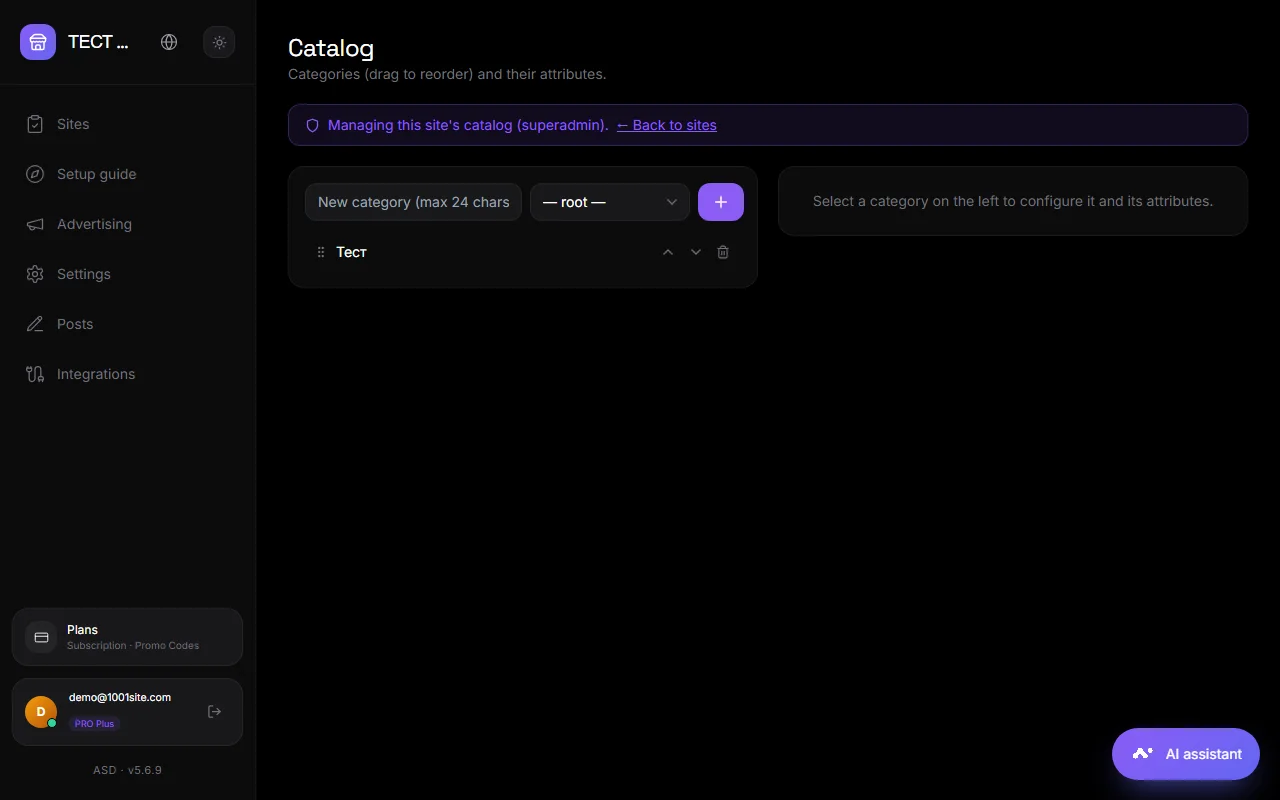
Where#
Dashboard → Home → "Categories and Attributes" button (or /board/catalog). The fastest way to create categories is with the AI assistant: "Create categories for an auto parts store."
Headings#
- Add: Enter a title (up to 24 characters), select a parent (root or category), and click Add Category.
- Order: Drag and drop the category or use Move Up/Move Down.
- Icon: An animated sticker from a set, your own photo (PNG, JPG, SVG, WebP, or GIF), or a sticker code from a bot. Free animated icons are available on Flaticon.
- SEO: Each category has its own SEO title and description for search engines. If blank, this will be filled in automatically.
- Free Submission - If the site offers paid packages, you can enable free submission in a specific category.
- Limits: length of ad title and description, number of photos, number of AI-processed photos.
- Delete: Deletes the category and all subcategories. Ads are not deleted—they remain uncategorized.
Empty categories can be hidden on the website: Settings → Card View → “Hide categories without ads.”
Attributes (characteristics)#
An attribute is a field filled out by the seller when submitting a request: "Size," "Color," "Year," "Mileage." Types: select from list, number, text. Category attributes are inherited by subcategories. On the website, attributes are displayed on the product page and used in filters.
Attributes create variations: for example, “Size: S, M, L” – the buyer selects the option in the card.
Codes for external systems#
If products come from your own inventory system (CRM, warehouse), attributes and their values have codes. The external system sends the codes, and the website displays the labels. Unclear values are reported as warnings rather than interrupting the upload. See Integrations → Inventory Management.
Telegram channel section#
You can connect a Telegram channel or group thread to a category to automatically publish ads for that category. The "Create Thread" button automatically creates a thread in your group. See Auto-Publishing.
Questions and answers#
How many levels of nesting are there?#
Category → subcategory → sub-subcategory, no hard limit. For visitor convenience, it's best to limit the number of categories to three.
Is it possible to move ads to another category?#
Yes, you can choose a category in your account when moderating an ad.
The AI auto-categorization is creating unnecessary categories. How can I disable it?#
Account → Home → Moderation Settings → "Strict: Only existing categories."