Cov ntawv tshaj tawm thiab tus kws kho ntawv tshaj tawm
Ntu "Cov Lus Tshaj Tawm" yog ib qho cuab yeej kho cov lus tshaj tawm rau Telegram, WhatsApp, thiab koj lub vev xaib. Ntawm no koj tuaj yeem kho qhov tsos ntawm cov tshaj tawm uas tau tshaj tawm tsis siv neeg thiab sau cov lus tshaj tawm ib zaug xwb, xws li kev tshaj tawm, xov xwm, thiab cov ntawv xov xwm.
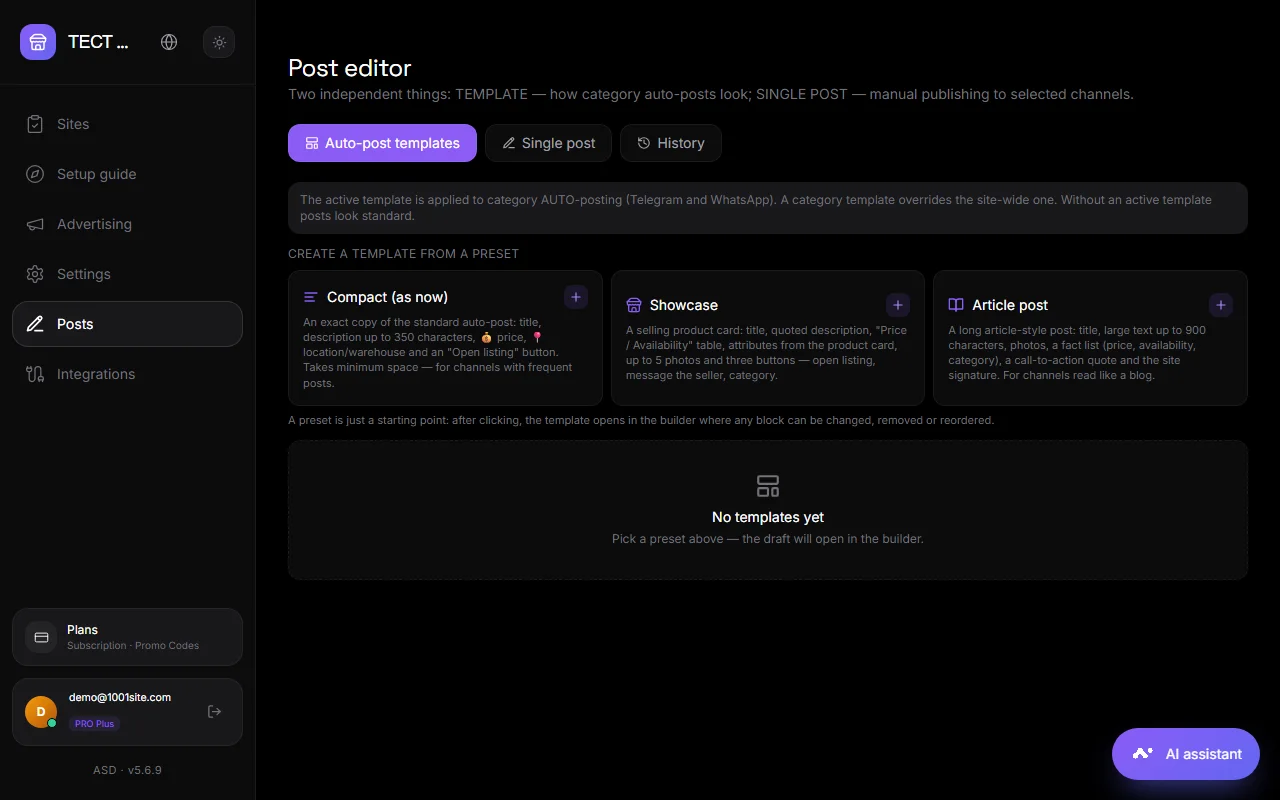
Peb lub tabs#
Cov qauv luam tawm tsis siv neeg#
Ib daim template yog li cas tus bot tsim ib daim ntawv tshaj tawm hauv ib qho channel lossis pawg. Muaj cov presets uas tau npaj tseg: "Compact," "Showcase," thiab "Article Post." Daim template yog sib sau ua ke los ntawm cov blocks hauv qab no:
- Lub npe, cov ntawv nyeem, nqe lus, cov lus hais, daim ntawv teev npe, daim ntawv teev npe lej, cov ntawv cais, cov thaiv code.
- Cov yam ntxwv yog cov hlua "Lub Npe - Tus Nqi"; tus nqi tuaj yeem coj los ntawm qhov hloov pauv tshaj tawm. Ib txoj hlua nrog qhov hloov pauv khoob tsis suav nrog hauv qhov kev tshaj tawm.
- Cov duab khoom thiab "Kuv Cov Ntaub Ntawv" — cov duab, cov yeeb yaj kiab, suab, PDFs txog li 50 MB, thiab 10 cov ntaub ntawv. Cov xov xwm saum toj lossis hauv qab cov ntawv nyeem.
- Cov nyees khawm yog cov kev sib txuas hauv qab cov ntawv tshaj tawm.
- Kev Them Nyiaj - lub pob them nyiaj ncaj qha hauv Telegram: xaiv tus nqi khoom lossis koj tus kheej, lossis thov kom muaj pes tsawg.
- Bot qhov kev teb rau qhov kev tshaj tawm.
Cov Hloov Pauv: lub npe, tus nqi, kev piav qhia, lub npe ntawm lub vev xaib, thiab lwm yam. Ib daim qauv tuaj yeem tsim rau tag nrho lub xaib lossis rau ib pawg tshwj xeeb; ib daim qauv pawg tseem ceeb dua li daim qauv dav dav. Lub pob "Test" xa ib qho qauv mus rau qhov channel uas xaiv.
Ib zaug xwb#
Ib tsab ntawv koj sau koj tus kheej: kev nce qib, xov xwm, tsab xov xwm.
- Tsim ib qho ntawv tshaj tawm los ntawm cov blocks lossis xaiv ib qho preset.
- Xaiv qhov twg los tshaj tawm: Telegram channels, WhatsApp pawg, lub vev xaib landing pages (home page feed). Koj tuaj yeem xaiv ntau lub hom phiaj ib zaug.
- Rau nplooj ntawv tsaws, teeb tsa lub npe ntawm cov ntawv tshaj tawm thiab pawg ntawv tshaj tawm.
- Nyem Luam Tawm los yog Teem Caij rau hnub tim thiab sijhawm.
Daim qauv ntawv raug khaws cia rau hauv lub tshuab thiab rov qab los rau hauv lub rooj sib tham tom ntej.
Zaj Dab Neeg#
Cov ntawv tshaj tawm thiab cov ntawv teem sijhawm. Ib qho ntawv tshaj tawm tuaj yeem raug rho tawm ntawm ib txoj kev sib txuas lus. Rau cov nplooj ntawv tsaws, nws tuaj yeem raug rho tawm ntawm lub vev xaib.
Cov ntawv tshaj tawm hauv lub xaib#
Hauv hom "Landing", cov ntawv tshaj tawm raug tso tawm ua ib qho pub rau ntawm nplooj ntawv tseem ceeb, zoo ib yam li Threads: daim npav nrog daim duab, ntawv nyeem, nyiam, thiab khawm "Qhia". Cov ntawv tshaj tawm muaj URL /blog/название. Koj tuaj yeem sau cov ntawv tshaj tawm ncaj qha rau ntawm lub vev xaib siv lub pob "Sau", uas tus thawj coj pom.
Xa tsab ntawv xov xwm rau cov neeg sau npe bot#
Sib nrug ntawm cov ntawv tshaj tawm, koj tuaj yeem xa tsab ntawv xov xwm rau txhua tus neeg uas tau xa xov rau koj tus bot ntiag tug. Chaw → Telegram thiab WhatsApp → "Tshaj tawm rau cov neeg rau npe bot." Saib Telegram.
Cov Lus Nug thiab Cov Lus Teb#
Koj puas xav tau koj tus kheej lub bot?#
Rau Telegram, yog lawm, ib tug bot los ntawm @BotFather tau ntxiv rau koj qhov channel los ntawm tus admin. Nws tau teeb tsa ib zaug hauv "Auto-publishing" lossis hauv ntu "Custom bot thiab channel rau cov posts". Rau WhatsApp, nws yog tus xov tooj txuas nrog.
Puas muaj peev xwm ua tau hom ntawv tshaj tawm zoo li hauv Telegram—bold, links?#
Yog. Tus editor txhawb nqa Telegram formatting: bold, italics, links, quotes, thiab code.
Kuv tuaj yeem hloov cov ntawv tshaj tawm tsis siv neeg qhov twg?#
Lub tab "Auto-Publishing Templates". Kho cov blocks thiab txuag—cov tshaj tawm tshiab yuav raug tshaj tawm siv cov template tshiab.