
The short answer: to check for keyword cannibalization, export the "query, URL, clicks, impressions, position" strings from Google Search Console and paste them into PromoPilot's Cannibalization Checker. The tool will find queries for which two or more of your pages are showing up, assess the risk (high, medium, low), calculate the click share of the leading page, and generate a table of priority fixes. It's free and requires no registration. Below you'll find where to get the data, how to read the report, and what to do with each pair of pages.
I find cannibalization in almost every site with a blog older than a year: three articles about the same thing, written at different times, and not a single one makes it to the front page.
What does a cannibalization test show?
The tool works only with your data—it doesn't search for it automatically. However, it does calculate things that would take a long time to summarize manually in a spreadsheet.
| Indicator | What is he looking at? | Why is this for SEO? |
|---|---|---|
| Competing URLs | All your pages that received impressions for the same query | It's clear who is sharing traffic with whom. |
| Risk level | High/medium/low for each request | It's immediately clear where to start |
| Leader's share | What percentage of clicks and impressions does the strongest URL have? | 90% of one is tolerable, 50/50 is a problem |
| Distribution of impressions | How impressions are split between pages | Google 'can't decide' which page to consider the homepage |
| Table of corrections | Requests sorted by priority | A ready-made task list for a content manager |
The minimum impressions filter (default 20) filters out noise: a query with three impressions isn't worth reworking the pages.
You can suspect cannibalization without any tools. Signs include: ranking for an important query jumps 5-10 spots without apparent cause; Search Console shows two or three pages with similar results for the same query; your website's URL changes frequently in search results; a new article is published, but an older one on the same topic drops. If you recognize even one sign, checking it out will take less time than raising doubts.
How to read the risk level in practice. High: impressions are almost equally divided between the pages, and the average position of both is below tenth: this is a prime candidate for merging. Medium: the leader has significantly more clicks, but the second page still takes up a quarter to a third of impressions; interlinking and title editing are often sufficient. Low: the leader takes up almost all the impressions, the second page appears rarely; such queries can be saved for later.
How to check keyword cannibalization online?
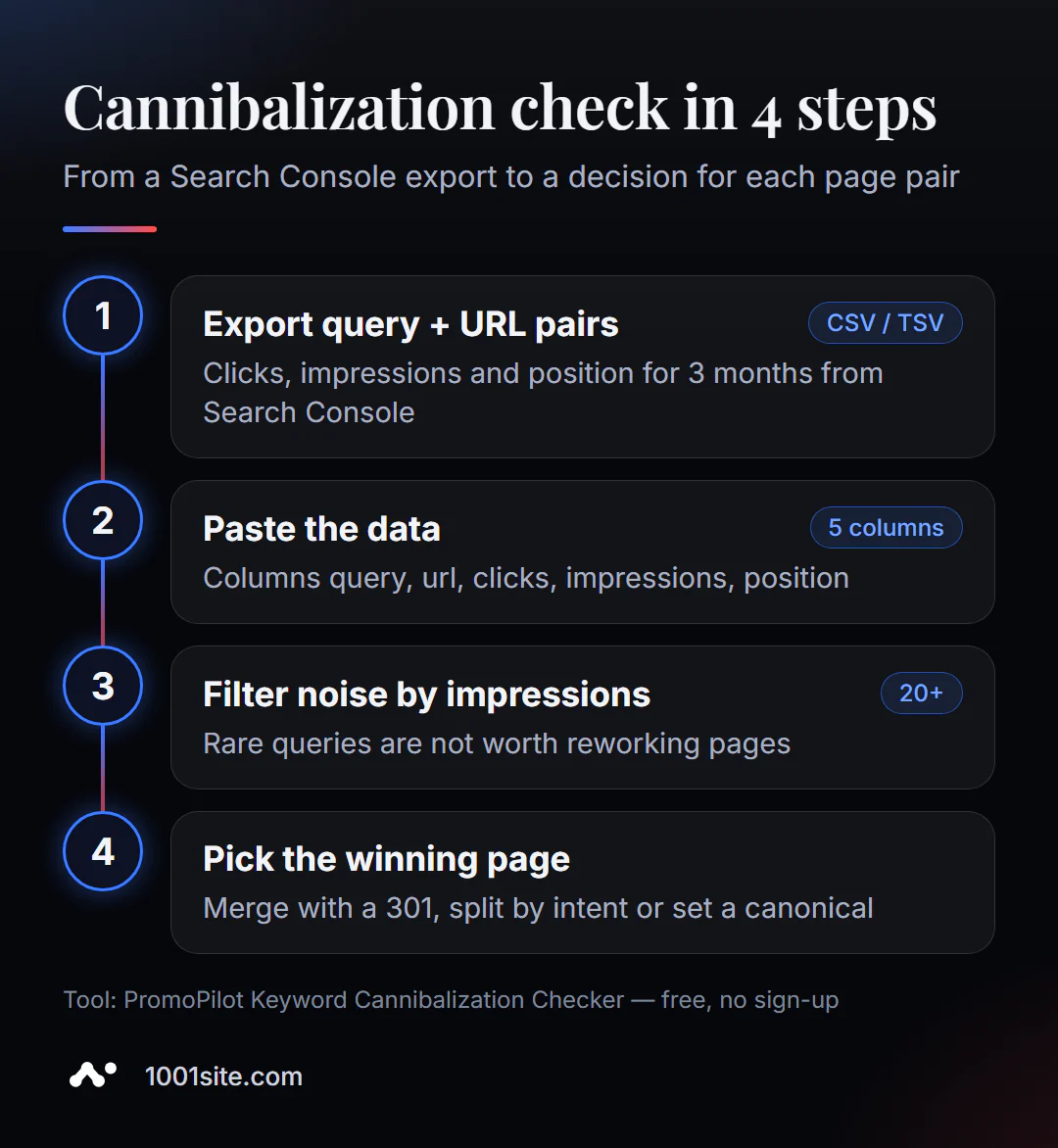
- Download data from Search Console. You'll need query + page pairs for three months. You can see this in the performance report by filtering by query and opening the "Pages" tab. For the entire site, Looker Studio with the Search Console connector or API is more convenient.
- Open Cannibalization Checker and paste rows in CSV or TSV format with columns query, url, clicks, impressions, position.
- Set the impression threshold: 20 for a small site, 50–100 for a large one.
- Click "Find cannibalization" and analyze high-risk queries.
- For each request, select the winning page and decide what to do with the rest.
This is what the tool page looks like: a data field with sample rows, an impression threshold, and a launch button.
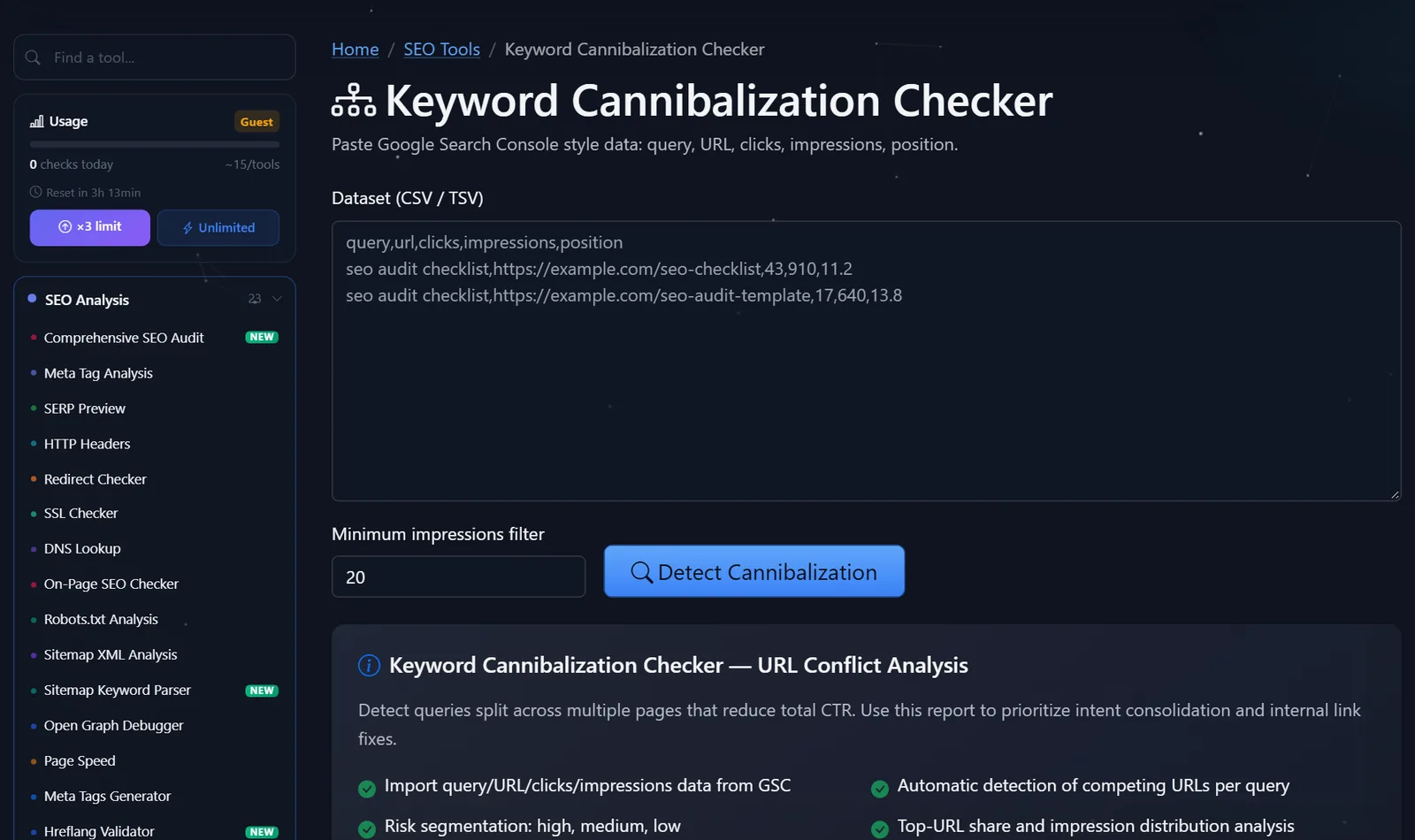
Example of lines to insert:
query,url,clicks,impressions,position
seo audit checklist,https://example.com/seo-checklist,43,910,11.2
seo audit checklist,https://example.com/seo-audit-template,17,640,13.8
Here, two pages share the same query, and both are stuck on the second page of results - a classic case.
How to choose the winning page and what to do with the rest?
The winner isn't necessarily the page with the most clicks. First, consider intent: what a person wants to get for this query. If they're searching for "template," the template will win, even if the checklist currently gets more traffic.
- Combine and set a 301 redirect. Two articles about the same thing—merge the best parts into one, and set a 301 redirect on the second. This is the strongest and most common option.
- Separate by intent. If the pages are actually about different things (a service and a how-to article), rewrite the title, H1, and first paragraph so that each one answers its own question.
- Canonical. When both pages are needed by users (for example, a catalog filter and a category), we canonicalize the primary page.
- Interlinking. All internal links with the query anchor point to the winner, not randomly.
- Noindex for service. Tag pages, archives, and site search results often steal impressions from categories—we'll hide them from the index.
Typical mistakes: deleting a weak page without a redirect (its links are lost), setting a canonical between pages with different content ( Google will ignore it), and fixing low-risk queries before high-risk ones.
Comparison: PromoPilot Cannibalization Check and Alternatives
There are few dedicated free tools for cannibalization; it is usually searched for manually in large services.
| Tool | What's free? | Restrictions | Who is it suitable for? |
|---|---|---|---|
| PromoPilot - Cannibalization check | Analyze your data, risk, leader's share, priorities | You need to download the data and paste it yourself. | Quickly find conflicts in a finished download |
| Google Search Console | All queries and pages of your website | Request-page pairs must be looked at in one request | Primary data source |
| Ahrefs Webmaster Tools | Organic search queries for your websites | Verified sites only, data - Ahrefs rating | For website owners already in the Ahrefs ecosystem |
| Semrush Position Tracking | Project Cannibalization Report | An account and a project are required; full functionality is available on paid plans. | For agencies and those who already pay for Semrush |
Conclusion: Search Console provides data, and this tool turns it into a task list in a minute. Paid services are convenient if you're already using them, but they're not necessary for a one-time check of your site.
In addition to this check, PromoPilot offers 87 free SEO tools. If cannibalization occurred because articles were written without a plan, check out the adjacent article in the section on keyword selection using Google suggestions—it explains how to immediately distribute queries across pages.
Limitations of the cannibalization test tool?
The key is that the tool doesn't connect to Search Console. The quality of the results is equal to the quality of the download: choose a period of at least three months, otherwise random fluctuations will look like a conflict.
Second, it evaluates the distribution of impressions and clicks, but doesn't analyze the pages themselves. You decide whether to merge or split based on the content. Third, on small sites with dozens of impressions per month, statistics may not be enough—in that case, grow traffic first and return to cannibalization later.
And finally: after making corrections, don't expect results overnight. Google needs time to re-crawl your pages, account for redirects, and recalculate rankings. Re-upload and check your pages after 4-6 weeks—this way, the before-and-after comparison will be fair and not just a random fluctuation in search results.
When is a free tool not enough?
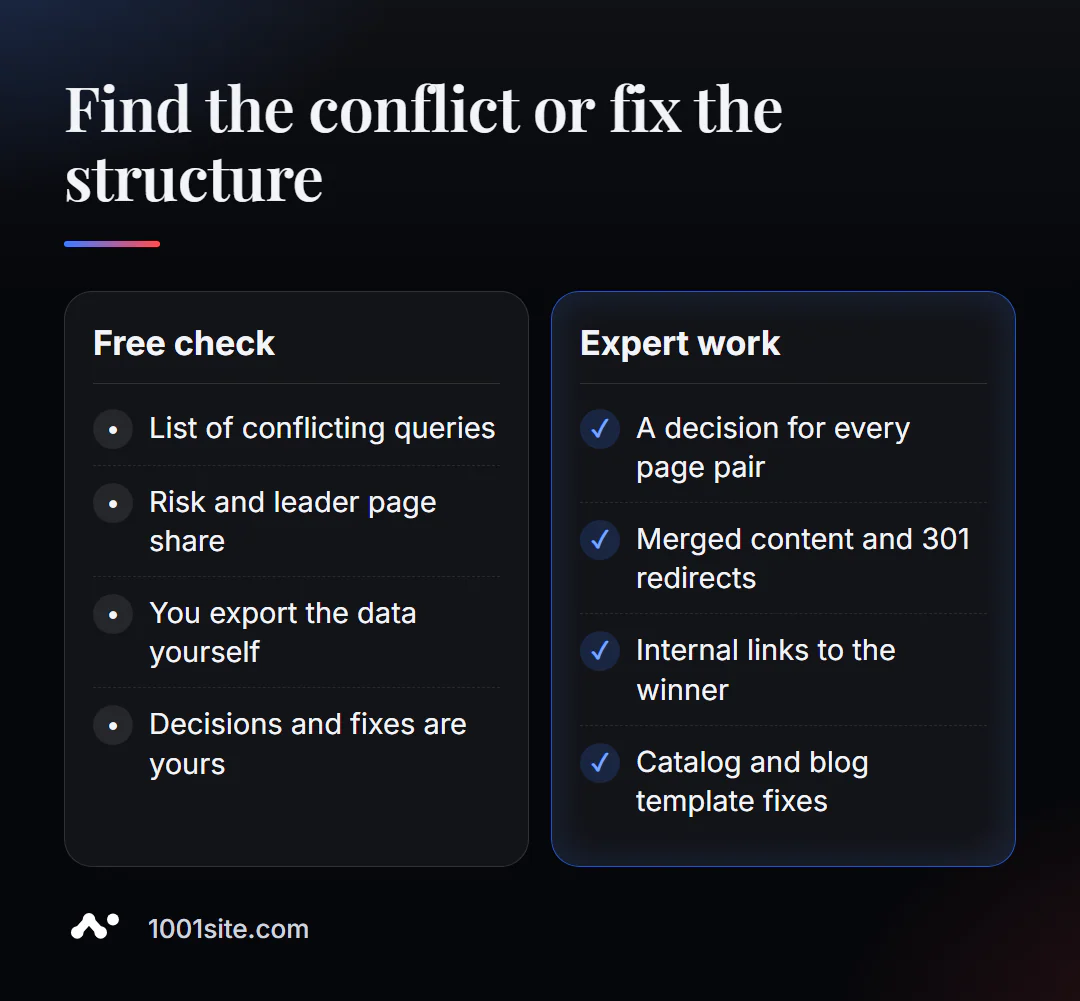
The tool displays conflicts. Fixes include redirects, text wrapping, rewritten headings, and site-wide link editing. You need a specialist if:
- there are dozens of conflicts and they stem from catalog or blog templates;
- you need to combine pages with external links without losing their weight;
- the site is multilingual and queries overlap between language versions;
- After merging, you need to rebuild the menu, categories and interlinking.
What can I do for your website?
My name is Valeriy Danyuk, and I'm a developer and SEO specialist with 12 years of experience and over 200 clients. Cannibalization is one of the first things I check when auditing content sites and stores.
SEO and promotion
- Turnkey website SEO audit: I find pairs of competing pages, decide which to merge, and set up redirects and canonicals myself.
- A blog without internal competition: an AI-powered SEO blog that brings in organic leads, and an AI-powered autoblog where every topic is checked for duplicates before being written.
- Multilingual structure without intersections - a tourist portal in 33 languages.
Websites and online stores
- A WooCommerce online store with proper categories and filters that prevent duplicates.
- A website on 1001site: a clean page structure, sitemap, and markup out of the box. We'll break down the cost of different options and explain how much a turnkey website costs.
CRM, accounting and automation
- Accounting, bookkeeping, and a store with 30,000 products —a large catalog where category structure is everything.
Send me a download or a link to your website in Telegram – I'll tell you which pages should be merged first.
Result
- Cannibalization is when your pages share a single query and prevent each other from ranking.
- Look for it in Search Console data for 3+ months, with a threshold for impressions to cut out noise.
- For each conflict, choose a winner by intent, then merge, separate, or canonicalize.
- If there are many conflicts or they are in templates, an audit is needed, and sometimes it is easier to rebuild the site on 1001site with a clean structure.
Insert your download and check for cannibalization for free —the first high-risk queries are usually found within a couple of minutes.
Sources
- PromoPilot Keyword Cannibalization Checker tool page - data format, impression threshold, and report metrics.
- Google Search Console Help - Search Performance Report.
- Ahrefs Webmaster Tools - Description of free access for your websites.