
Cov lus teb luv luv: koj tsis tas yuav them nqi kim heev los xyuas koj lub vev xaib dawb. PromoPilot cov ntawv teev npe muaj 87 cov cuab yeej online dawb thoob plaws rau pawg: SEO kev tshuaj xyuas, txuas thiab indexing, kev ua cov ntawv nyeem, AI kev tshuaj xyuas, network diagnostics, thiab cov khoom siv. Hauv qab no yog daim ntawv teev npe tag nrho nrog peb qhov kev tshuaj xyuas ntawm txhua lub cuab yeej, cov txheej txheem tshuaj xyuas lub xaib, thiab kev sib piv nrog Search Console, Ahrefs, thiab Semrush.
Kuv yog Valery Danyuk, thiab kuv tau tsim cov vev xaib, cov khw muag khoom hauv online, thiab SEO rau cov lag luam me tau 12 xyoos. Kuv siv cov cuab yeej no kuv tus kheej - ua ntej txhua qhov project thiab thaum tshuaj xyuas lwm tus neeg lub vev xaib - yog li kuv tshuaj xyuas lawv tsis yog los ntawm kev piav qhia, tab sis los ntawm kuv tus kheej kev paub.
Tus tswv lub vev xaib xav tau cov cuab yeej SEO dawb dab tsi?

Txhua yam cuab yeej qhib rau hauv browser; tsis tas yuav tsum tau nruab dab tsi. Cov qhua muaj kev txwv txhua hnub rau kev kuaj xyuas, uas peb npaug tom qab kev sau npe dawb. Kuj tseem muaj ib txoj kev npaj Pro them rau cov koom haum. Feem ntau cov tswv lub vev xaib tsuas yog xav tau peb pawg: SEO kev tshuaj xyuas, cov kev sib txuas thiab kev ntsuas, thiab qhov ceev. Lwm tus yuav tuaj yeem pab tau thaum lub xaib txav mus los, thaum cov email los ntawm daim ntawv thov tsis tau xa tuaj, lossis thaum koj sau cov ntawv siv AI.
Yuav pib tshawb xyuas lub vev xaib qhov twg?
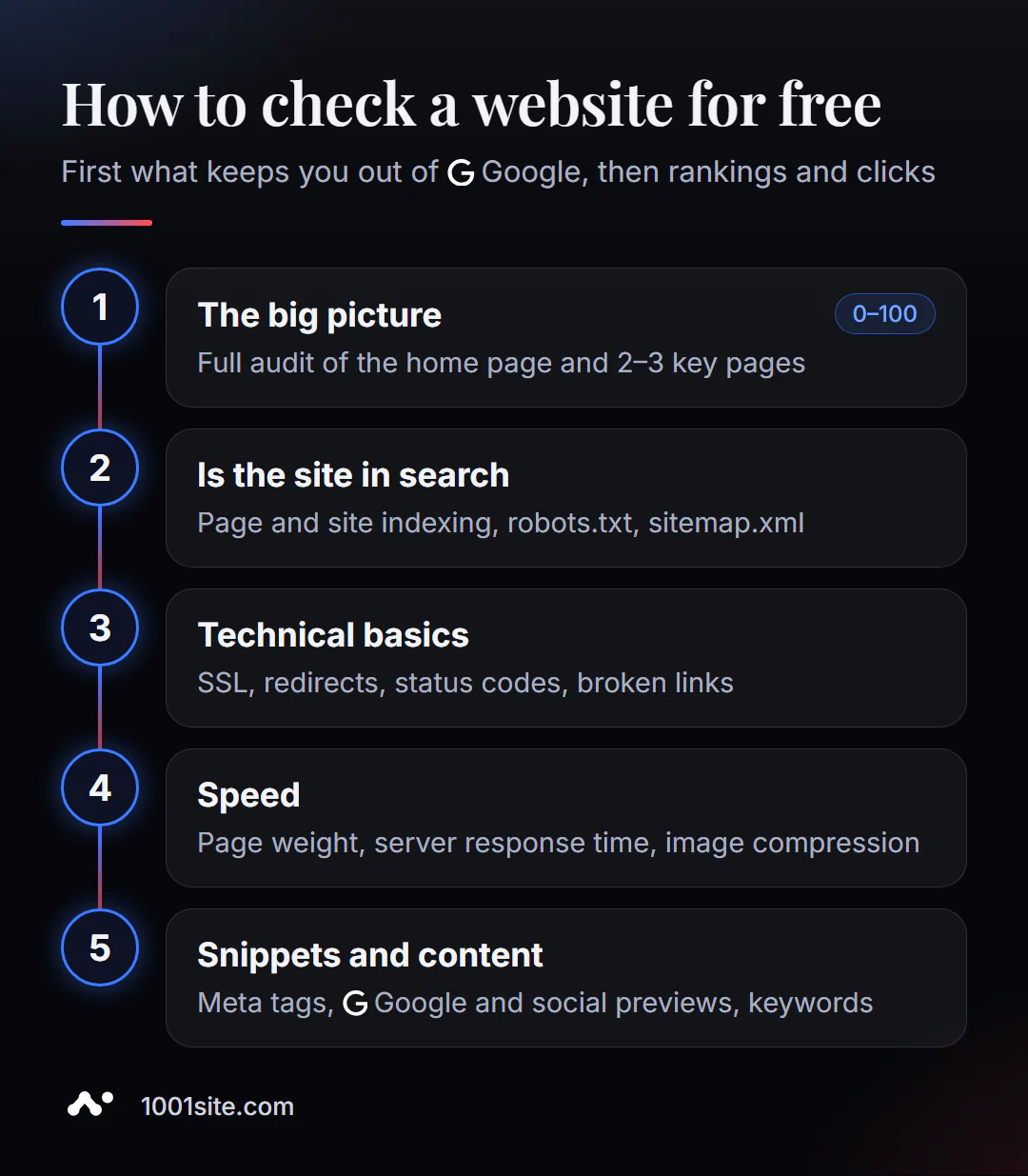
- Daim duab loj. Kev tshuaj xyuas SEO kom ntxaws ntawm nplooj ntawv tseem ceeb thiab 2-3 nplooj ntawv tseem ceeb—qhab nia 0-100 thiab daim ntawv teev cov yuam kev.
- Koj lub xaib puas tau muab indexed lawm? Tshawb xyuas nplooj ntawv indexation, site indexation, robots.txt, thiab sitemap.xml.
- Keeb kwm kev txawj ntse. Daim ntawv pov thawj SSL, kev xa rov qab, cov lej teb ntawm lub server, cov kev sib txuas tawg.
- Kev Ceev. Kev tshuaj xyuas qhov ceev ntawm nplooj ntawv, lub sijhawm teb, kev nias duab.
- Cov ntu me me thiab cov ntsiab lus. Meta tags, SERP saib ua ntej, Open Graph, kev xaiv cov lus tseem ceeb.
Qhov kev txiav txim no xub ntes qhov uas ua rau koj tsis nkag mus rau hauv Google, thiab tsuas yog tom qab ntawd qhov twg txhim kho koj qhov kev qeb duas thiab tus nqi nyem.
Cov cuab yeej twg nyob hauv phau ntawv teev khoom?
Daim ntawv teev tag nrho los ntawm pawg. Qhov txuas hauv kab thawj qhib lub cuab yeej, thiab kab kawg muaj peb qhov kev tshuaj xyuas ntxaws ntxaws: nws xyuas dab tsi, yuav siv nws li cas, thiab yuav ua li cas nrog cov txiaj ntsig. Cov kev tshuaj xyuas tshiab raug tshaj tawm txhua hnub.
Kev tshuaj xyuas SEO - 23 cov cuab yeej
Kev tshuaj xyuas kev txawj ntse thiab kev tshuaj xyuas ntawm ib nplooj ntawv lossis ib lub npe sau: meta tags, qhov ceev, robots.txt, sitemap, markup, keywords.
| Cov cuab yeej | Nws ua dab tsi? | Peb qhov kev tshuaj xyuas |
|---|---|---|
| Kev tshuaj xyuas SEO tag nrho | Kev tshuaj xyuas SEO online dawb kuaj xyuas koj nplooj ntawv hla 30+ qhov ntsuas hauv ib feeb xwb. | Kev Tshuaj Xyuas |
| Kev tshuaj xyuas Meta tag | Ib qho kev kuaj xyuas meta tag dawb qhia txog yam uas ib nplooj ntawv qhia rau cov cav tshawb nrhiav thiab cov tes hauj lwm hauv zej zog: lub npe, piav qhia, canonical, hreflang, thiab Open Graph | Kev Tshuaj Xyuas |
| SERP saib ua ntej | SERP saib ua ntej qhia ib nplooj ntawv snippet zoo li ib tus neeg yuav pom nws hauv Google, ob qho tib si ntawm lub khoos phis tawj thiab ntawm lub xov tooj. | Kev Tshuaj Xyuas |
| Tshawb xyuas HTTP Headers | Ib qho HTTP header checker pub dawb qhia txog yam uas lub server ua rau lub browser thiab lub tshuab tshawb nrhiav crawler: kev ruaj ntseg, cache, compression, CORS. | Kev Tshuaj Xyuas |
| Tshawb xyuas cov kev xa mus | Ib qho kev kuaj xyuas kev hloov pauv dawb qhia tag nrho cov saw hlau ntawm kev hloov pauv los ntawm qhov chaw nyob qub mus rau nplooj ntawv kawg. | Kev Tshuaj Xyuas |
| Kev Txheeb Xyuas Daim Ntawv Pov Thawj SSL | Kev kuaj xyuas daim ntawv pov thawj SSL pub dawb qhia tus neeg muab daim ntawv pov thawj, hnub tas sij hawm, txoj saw ntawm kev ntseeg siab, thiab cov qauv TLS. | Kev Tshuaj Xyuas |
| Kev Tshawb Nrhiav DNS | Kev Tshawb Nrhiav DNS Dawb qhia txhua cov ntaub ntawv sau npe: qhov chaw uas lub xaib taw qhia, leej twg lees txais xa ntawv, cov kev pabcuam twg tau lees paub. | Kev Tshuaj Xyuas |
| Tus Tshawb Xyuas SEO Hauv Nplooj Ntawv | Kev Tshawb Xyuas Dawb Hauv Nplooj Ntawv qhia txog seb nplooj ntawv tau kho kom zoo li cas rau cov lus nug tshwj xeeb: lo lus tseem ceeb hauv lub npe, piav qhia thiab H1, cov qauv ntawm | Kev Tshuaj Xyuas |
| Kev tshuaj xyuas Robots.txt | Kev tshuaj xyuas robots.txt pub dawb txheeb xyuas cov ntaub ntawv los ntawm cov lus qhia thiab nrhiav cov cai uas thaiv cov ntu tseem ceeb los ntawm cov neeg hlau tshawb nrhiav. | Kev Tshuaj Xyuas |
| Kev Tshawb Fawb Txog XML Sitemap | Kev tshuaj xyuas sitemap.xml pub dawb nrhiav tau sitemap, xam cov URL, xyuas cov hnub tim lastmod, XML validity thiab nested sitemaps. | Kev Tshuaj Xyuas |
| Sitemap Keyword Parser | Ib qho parser pub dawb rho tawm cov lus thiab ob kab lus los ntawm URLs hauv sitemap.xml thiab qhia txog cov ncauj lus uas lub xaib twb tau npog lawm. | Kev Tshuaj Xyuas |
| Qhib Graph Debugger | Qhib Graph Debugger qhia koj tias koj qhov txuas nplooj ntawv yuav zoo li cas ntawm Facebook, X, thiab LinkedIn, thiab cov cim npe twg uas ploj lawm. | Kev Tshuaj Xyuas |
| Kev tshuaj xyuas qhov ceev ntawm nplooj ntawv | Kev tshuaj xyuas qhov ceev ntawm nplooj ntawv ntsuas TTFB, DNS thiab SSL lub sijhawm, qhov hnyav tag nrho, qhov hnyav, thiab tus lej ntawm cov lus thov. | Kev Tshuaj Xyuas |
| Tus tsim cov cim npe meta | Lub tshuab tsim cov meta tag tsim cov ntawv thaiv taub hau uas npaj txhij rau ntxig: lub npe, piav qhia, canonical, robots, Open Graph, thiab Twitter Card nrog kev saib ua ntej. | Kev Tshuaj Xyuas |
| Tus Neeg Txheeb Xyuas Hreflang | Tus neeg lees paub hreflang pom qhov yuam kev hauv qhov cim ntawm lub vev xaib ntau hom lus: cov lej tsis raug, x-default ploj lawm, lwm txoj hauv kev tawg thiab cov versions, uas | Kev Tshuaj Xyuas |
| Schema markup generator | Tus Schema markup generator tsim JSON-LD siv tau rau cov ntawv xov xwm, cov khoom lag luam, FAQs, cov koom haum, cov lag luam hauv zos, thiab cov khoom siv. | Kev Tshuaj Xyuas |
| Tshawb xyuas cov duab SEO | Tus Tshawb Xyuas Duab SEO tshuaj xyuas txhua daim duab ntawm nplooj ntawv—alt, lazy loading, dimensions, modern formats, thiab srcset—thiab muab qhab nia. | Kev Tshuaj Xyuas |
| Lub tshuab tsim Robots.txt | Lub tshuab tsim robots.txt pub dawb sib sau ua ke cov ntaub ntawv hauv tus tsim qauv pom: preset, Disallow thiab Allow paths, Sitemap, Crawl-delay, AI blocking | Kev Tshuaj Xyuas |
| Sitemap XML Generator | Tus tsim sitemap.xml pub dawb no nrhiav cov kev sib txuas sab hauv ntawm lub vev xaib, sau txog li 100 nplooj ntawv nrog hnub tim lastmod, thiab tsim cov XML uas npaj txhij lawm. | Kev Tshuaj Xyuas |
| Kev Tshawb Xyuas Favicon | Tus neeg kuaj xyuas favicon nrhiav tau txhua lub cim ntawm lub xaib—los ntawm HTML thiab cov kev txheem—thiab qhia lawv qhov loj me. | Kev Tshuaj Xyuas |
| Kev xaiv lo lus tseem ceeb | Kev tshawb nrhiav cov lus tseem ceeb pub dawb siv Google cov lus qhia: yuav ua li cas sau ntau pua cov lus nug tiag tiag, cais lawv los ntawm lub hom phiaj, thiab hloov lawv mus rau hauv cov qauv | Kev Tshuaj Xyuas |
| Tus Tshawb Xyuas Kev Noj Tshuaj Lo Lus Tseem Ceeb | Kev sib koom ua ke yog thaum ntau nplooj ntawv ntawm ib lub xaib sib tw rau ib qho kev thov. | Kev Tshuaj Xyuas |
| Daim duab ntawm lub vev xaib | Ib daim duab thaij online qhia nplooj ntawv thaum tus qhua tshiab pom nws - ntawm lub khoos phis tawj lossis xov tooj. | Kev Tshuaj Xyuas |
Cov Kev Sib Txuas thiab Kev Pom Kev - 8 Cov Cuab Yeej
Cov kev sib txuas tawg, cov ntaub ntawv txuas, kev ntseeg siab rau lub npe sau, Google indexing, cov neeg sib tw thiab cov kev sib txuas tuaj.
| Cov cuab yeej | Nws ua dab tsi? | Peb qhov kev tshuaj xyuas |
|---|---|---|
| Tshawb xyuas cov kev sib txuas uas tawg lawm | Yuav ua li cas nrhiav cov kev sib txuas tawg ntawm lub vev xaib online dawb: kuaj xyuas nplooj ntawv lossis txog li 10 nplooj ntawv ntawm lub vev xaib, cov lej yuam kev, cov anchors, redirects - thiab yuav ua li cas nrog lawv | Kev Tshuaj Xyuas |
| Kev tshuaj xyuas qhov txuas profile | Kev tshuaj xyuas dawb ntawm txhua qhov txuas ntawm ib nplooj ntawv: muaj pes tsawg sab hauv thiab sab nraud, uas yog nofollow, cov anchors twg siv, thiab qhov twg cov kua txiv txuas mus. | Kev Tshuaj Xyuas |
| Kev kuaj xyuas kev ntseeg siab ntawm lub npe sau | Kev kuaj xyuas kev ntseeg siab ntawm lub vev xaib pub dawb: 15 lub cim qhia txog kev siv tshuab, 0-100 qhab nia, thiab cov lus pom zoo. | Kev Tshuaj Xyuas |
| Kev kuaj xyuas nplooj ntawv indexing | Kev kuaj xyuas ib nplooj ntawv dawb: puas yog URL hauv Google thiab dab tsi tiv thaiv kev indexing - meta robots, X-Robots-Tag, robots.txt, canonical, sitemap | Kev Tshuaj Xyuas |
| Kev kuaj xyuas lub vev xaib indexing | Kev kuaj xyuas dawb ntawm qhov ntsuas ntawm tag nrho lub xaib: tus lej ntawm nplooj ntawv hauv Google, tus lej ntawm cov chaw nyob hauv daim ntawv qhia chaw thiab kev them nqi hauv feem pua. | Kev Tshuaj Xyuas |
| Kev sib piv nrog cov neeg sib tw | Kev sib piv dawb ntawm ob lub vev xaib raws li 20+ SEO metrics: yuav ua li cas tso tawm, yuav ua li cas nyeem lub rooj, yuav tsum tsom mus rau dab tsi ua ntej, thiab cov ntaub ntawv dab tsi txog kev sib tw | Kev Tshuaj Xyuas |
| Nrhiav cov kev sib txuas uas tuaj txog | Kev tshawb nrhiav backlink dawb hauv domain: yuav ua li cas lub cuab yeej nrhiav tau backlinks, vim li cas muaj tsawg dua ntawm lawv dua li hauv cov ntaub ntawv them nyiaj, yuav ua li cas nyeem cov anchors thiab nofol | Kev Tshuaj Xyuas |
| Nrhiav Kev Sib Txuas Sab Hauv | Cov cuab yeej pub dawb no nrhiav cov lus tseem ceeb ntawm nplooj ntawv uas tsis muaj qhov txuas mus rau URL lub hom phiaj thiab qhia cov ntsiab lus. | Kev Tshuaj Xyuas |
Cov Ntawv thiab Cov Ntsiab Lus - 9 Cov Cuab Yeej
Rov sau dua, xyuas thiab kho kom zoo dua cov ntawv nyeem: kev ua kom zoo li tib neeg, kev tshwj xeeb, kev ua kom zoo dua SEO, qhov ceev ntawm cov lus tseem ceeb.
| Cov cuab yeej | Nws ua dab tsi? | Peb qhov kev tshuaj xyuas |
|---|---|---|
| Kev ua kom tib neeg ntawm cov ntawv nyeem | Tus neeg ua kom lub cev rov sau dua daim ntawv qauv ntawm lub tshuab kom nws zoo li cov ntawv sau ntawm tib neeg. | Kev Tshuaj Xyuas |
| Txhais cov ntawv nyeem | Tus neeg sau cov lus piav qhia hloov cov lus sau raws li txoj cai, tsis yog lub neural network: qhov kev txiav txim ntawm cov ntu, lub suab, qhov ntev ntawm cov kab lus. | Kev Tshuaj Xyuas |
| Cov Ntsiab Lus Sib Tw | Spinner tsim tau txog li 10 hom ntawv sib txawv los ntawm kev hloov cov lus txhais tau zoo sib xws thiab cov qauv spintax. | Kev Tshuaj Xyuas |
| Kev kuaj xyuas qhov tshwj xeeb | Cov cuab yeej ntsuas qhov tseem ceeb ntawm cov ntawv nyeem raws li nws cov lus rov ua dua thiab muab ob daim ntawv sib piv. | Kev Tshuaj Xyuas |
| Kev kho kom zoo dua ntawm tsab xov xwm SEO | Tus optimizer siv koj daim qauv thiab xa rov qab ib qho version uas haum rau koj lo lus tseem ceeb nrog lub npe, cov lus piav qhia meta, thiab cov qauv ntawm lub npe. | Kev Tshuaj Xyuas |
| AI Tsab Xov Xwm Tsim Khoom | Tus tsim tawm AI sau ib tsab xov xwm SEO raws li lo lus tseem ceeb: H2-H3 qauv, cov npe, FAQ, lub npe, thiab piav qhia. | Kev Tshuaj Xyuas |
| Kev tshuaj xyuas kev xav | Cov cuab yeej ntsuas seb cov ntawv nyeem raug cai lossis hais lus li cas, nws yog tus neeg xav tau li cas, thiab tuaj yeem rov sau dua hauv lub suab xav tau. | Kev Tshuaj Xyuas |
| Kev tshuaj xyuas qhov ceev ntawm cov lus tseem ceeb | Tus kws tshuaj xyuas qhia tias cov lus thiab kab lus twg tseem ceeb tshaj plaws hauv cov ntawv nyeem, ua feem pua. | Kev Tshuaj Xyuas |
| Cov ntaub ntawv suav cov lus thiab cov ntawv nyeem | Lub txee suav cov lus, cov cim, cov kab lus thiab cov nqe lus tam sim ntawd, thiab ntsuas lub sijhawm nyeem ntawv thiab kev nyeem tau yooj yim. | Kev Tshuaj Xyuas |
Kev Tshawb Fawb Txog AI - 8 Cov Cuab Yeej
Paub txog cov ntawv nyeem uas siv AI, ntsuas seb nyeem tau yooj yim npaum li cas, thiab nrhiav pom cov cim dej zais hauv cov ntawv nyeem, cov duab, cov yeeb yaj kiab, thiab cov suab.
| Cov cuab yeej | Nws ua dab tsi? | Peb qhov kev tshuaj xyuas |
|---|---|---|
| AI nyeem ntawv nrhiav | Ib lub cuab yeej nrhiav AI pub dawb kwv yees seb koj cov ntawv nyeem zoo li cov ntawv uas tshuab tsim ntau npaum li cas thiab qhia cov ntaub ntawv no ib nqe zuj ib nqe. | Kev Tshuaj Xyuas |
| AI-Detector PRO | AI Detector PRO tsis yog tsuas yog qhia feem pua ntawm tag nrho xwb, tab sis kuj qhia txog cov kab lus thiab cov ntsuas uas ua rau cov ntawv zoo li sau los ntawm tshuab. | Kev Tshuaj Xyuas |
| Kev tshuaj xyuas nyeem tau cov ntawv nyeem | Qhov kev tshuaj xyuas nyeem tau dawb suav 6 qhov ntsuas qub thiab qhia txog qib kev npaj uas tus nyeem ntawv xav tau. | Kev Tshuaj Xyuas |
| Kev tshuaj xyuas kev sib raug zoo ntawm cov ntawv nyeem | Kev tshuaj xyuas kev sib haum xeeb dawb ntsuas seb cov kab lus thiab cov nqe lus ntws zoo li cas thiab qhia txog kev hloov pauv tsis zoo thiab kev hloov pauv ntawm cov ncauj lus. | Kev Tshuaj Xyuas |
| Lub tshuab ntes dej | Cov cim zais thiab cov ntawv hloov pauv tau nkag mus rau hauv cov ntawv los ntawm AI chats, PDFs, thiab lwm lub vev xaib, thiab ua rau cov npe, cov txiaj ntsig tshawb nrhiav, thiab cov lus tseem ceeb ploj mus ntsiag to. | Kev Tshuaj Xyuas |
| Cov duab ntes dej | Kev kuaj xyuas cov duab dawb rau Cov Ntawv Pov Thawj Cov Ntsiab Lus (C2PA), cov ntaub ntawv keeb kwm XMP / EXIF, cov cim qhia AI generator, thiab steganography | Kev Tshuaj Xyuas |
| Cov cuab yeej ntes dej ntawm daim vis dis aus | Lub tshuab ntes dawb kuaj xyuas cov ntaub ntawv video rau cov ntaub ntawv keeb kwm thiab cov cim ntawm AI generators hauv lub thawv thiab qhia cov lus txib ffmpeg rau kev ntxuav. | Kev Tshuaj Xyuas |
| Lub tshuab ntes dej ntawm lub suab | Lub tshuab ntes dawb kuaj xyuas cov ntaub ntawv suab rau cov ntaub ntawv keeb kwm, cov cim qhia AI generator, thiab lub zog zaus siab tsis tshua muaj. | Kev Tshuaj Xyuas |
IP thiab Network - 25 Cov Cuab Yeej
DNS, IP, domain mail, hosting, server, kev ruaj ntseg, thiab kev teb ceev - kev kuaj mob rau cov tswv lub vev xaib.
| Cov cuab yeej | Nws ua dab tsi? | Peb qhov kev tshuaj xyuas |
|---|---|---|
| Kuv qhov chaw nyob IP | Tus IP sab nraud yog qhov chaw nyob uas koj siv los nkag mus rau txhua lub vev xaib, suav nrog koj lub vaj huam sib luag admin. | Kev Tshuaj Xyuas |
| Chaw nyob IP ntawm lub vev xaib | Tus IP chaw nyob ntawm lub vev xaib qhia tias lub npe sau tam sim no nyob rau ntawm lub server twg. | Kev Tshuaj Xyuas |
| Qhov chaw nyob IP | Qhov chaw nyob IP qhia tau tias lub tebchaws thiab tus neeg muab kev pabcuam uas tus qhua tuaj ntawm. | Kev Tshuaj Xyuas |
| Lub Npe WHOIS | WHOIS qhia tau tias tus neeg sau npe twg tau sau npe rau lub npe thiab txog hnub twg, qhov twg nws DNS raug tswj hwm, thiab seb nws puas tuaj yeem hloov pauv tau. | Kev Tshuaj Xyuas |
| Rov qab DNS (PTR) | Cov ntaub ntawv PTR txuas tus IP ntawm lub server nrog lub npe hostname. | Kev Tshuaj Xyuas |
| Tshawb xyuas cov chaw nres nkoj | Ib qho chaw nres nkoj database qhib yog txoj kev ncaj qha mus rau cov neeg siv khoom, qhov chaw nres nkoj 443 kaw txhais tau tias lub xaib tsis ua haujlwm. | Kev Tshuaj Xyuas |
| Kev kuaj xyuas daim ntawv dub | Yog tias tus IP ntawm lub server nyob rau ntawm daim ntawv teev npe spam, cov email los ntawm daim ntawv thov thiab cov ntawv ceeb toom xaj yuav raug tsis lees txais lossis zais rau hauv spam. | Kev Tshuaj Xyuas |
| Lub Tshuab Xam Subnet | Lub tshuab xam lej subnet hloov cov ntawv nkag xws li 192.168.10.0/26 mus rau hauv qhov chaw nyob uas muaj lub ntsiab lus. | Kev Tshuaj Xyuas |
| Kev txhais ntawm kev tuav tswj | Qhov twg lub vev xaib nyob hauv lub cev thiab leej twg tuav nws yog ib lo lus nug uas tshwm sim thaum tsiv teb tsaws chaw, sib cav nrog tus neeg cog lus, lossis tshuaj xyuas cov neeg sib tw. | Kev Tshuaj Xyuas |
| Lub hnub nyoog sau npe | Lub hnub nyoog ntawm lub npe sau feem ntau yog hu ua "qhov tseem ceeb ntawm kev ntseeg siab," tab sis nws nyuaj dua li ntawd. | Kev Tshuaj Xyuas |
| Nrhiav MX | Cov ntaub ntawv MX qhia rau lub ntiaj teb tias yuav xa koj cov ntawv mus rau qhov twg. | Kev Tshuaj Xyuas |
| Kev kuaj xyuas SPF | SPF qhia rau cov neeg rau zaub mov xa ntawv uas tau tso cai xa email sawv cev rau koj lub npe sau. | Kev Tshuaj Xyuas |
| Kev kuaj xyuas DMARC | DMARC qhia cov neeg rau zaub mov xa ntawv yuav ua li cas nrog cov email uas dag koj lub npe. | Kev Tshuaj Xyuas |
| Qhov xwm txheej ntawm qhov chaw | Kev kuaj xyuas seb koj lub vev xaib puas ua haujlwm tam sim no, tus lej twg uas lub server muab, thiab nws teb sai npaum li cas. | Kev Tshuaj Xyuas |
| Kev kuaj xyuas HTTP/2 | Ib qho cuab yeej kuaj xyuas HTTP/2 pub dawb qhia txog cov qauv protocol twg uas lub vev xaib lub server txhawb nqa. | Kev Tshuaj Xyuas |
| Cov Npe Kev Ruaj Ntseg | Kev kuaj xyuas cov ntawv qhia kev ruaj ntseg pub dawb rau koj lub vev xaib qib txij li A txog F thiab qhia koj tias cov kev tiv thaiv twg tsis muaj. | Kev Tshuaj Xyuas |
| CMS ntes | Ib qho CMS detector pub dawb qhia tau hauv vib nas this seb lub vev xaib khiav ntawm lub cav twg, thiab rau WordPress, lub ntsiab lus twg thiab plugins twg. | Kev Tshuaj Xyuas |
| Kev txhais ntawm cov thev naus laus zis | Ib qho kev txhais txog thev naus laus zis pub dawb qhia txog yam uas lub vev xaib tau tsim los ntawm: los ntawm lub moj khaum thiab lub web server mus rau cov pixels tshaj tawm thiab cov ntawv sau. | Kev Tshuaj Xyuas |
| Cov ntaub ntawv ntawm tus neeg rau zaub mov | Daim ntawv qhia txog tus neeg rau zaub mov pub dawb sau IP, hosting, web server, daim ntawv pov thawj SSL, cov ntaub ntawv DNS, thiab cov lus teb headers ntawm ib nplooj ntawv. | Kev Tshuaj Xyuas |
| Lub sijhawm teb | Tus neeg kuaj xyuas lub sijhawm teb dawb rhuav tshem cov lus teb ntawm lub server rau hauv DNS, kev sib txuas, TLS, thiab TTFB. | Kev Tshuaj Xyuas |
| Kev kuaj xyuas cov ncuav qab zib | Ib qho cuab yeej kuaj xyuas cov ncuav qab zib pub dawb qhia txog yam uas lub vev xaib khaws cia rau hauv tus neeg tuaj saib lub browser thiab nws muaj kev nyab xeeb npaum li cas. | Kev Tshuaj Xyuas |
| Kev kuaj xyuas qhov nias | Qhov kev sim compression dawb qhia seb GZIP, Deflate, lossis Brotli puas tau qhib thiab lawv txo qhov loj ntawm nplooj ntawv ntau npaum li cas. | Kev Tshuaj Xyuas |
| Kev Tshawb Nrhiav ASN | ASN Lookup qhia seb lub network twg tus IP address lossis domain yog rau: AS number, organization, prefixes thiab registrar. | Kev Tshuaj Xyuas |
| Kev Tshawb Nrhiav IP Rov Qab | Ib qho kev tshawb nrhiav IP rov qab qhia koj tias cov npe twg nyob ntawm tib lub server li koj lub vev xaib. | Kev Tshuaj Xyuas |
| HTTP Status Checker | HTTP Status Checker qhia cov lej teb ntawm nplooj ntawv, cov headers, thiab tag nrho cov saw hlau redirect. | Kev Tshuaj Xyuas |
Cov cuab yeej siv - 14 yam cuab yeej
Cov encoders, generators, calculators, thiab image processing muaj nyob rau hauv koj tus browser.
| Cov cuab yeej | Nws ua dab tsi? | Peb qhov kev tshuaj xyuas |
|---|---|---|
| URL encoder | URL encoding thiab decoding hauv browser: dab tsi yog feem pua encoding, thaum twg nws xav tau rau UTM tags thiab Cyrillic chaw nyob, thiab dab tsi | Kev Tshuaj Xyuas |
| Lub tshuab tsim hash | Yuav ua li cas kom tau txais ib qho hash ntawm ib txoj hlua hauv tsib lub algorithms ib zaug, MD5 txawv li cas ntawm SHA-256, qhov twg hashes muaj txiaj ntsig rau tus tswv lub vev xaib, thiab vim li cas cov passwords thiaj li khaws cia | Kev Tshuaj Xyuas |
| Tus tsim password | Yuav ua li cas los tsim ib lo lus zais muaj zog hauv ib feeb, entropy hauv bits txhais li cas, thiab yuav ua li cas tiv thaiv koj lub vev xaib admin vaj huam sib luag, hosting, thiab domain registrar los ntawm hackers | Kev Tshuaj Xyuas |
| Tus Neeg Sawv Cev Parser | Yuav ua li cas thiaj li txhais tau cov lus ntawm User-Agent, vim li cas tus tswv lub vev xaib thiaj xav tau nws, yuav ua li cas thiaj nrhiav tau nws hauv cov cav tshawb nrhiav bot, thiab vim li cas UA thiaj li ua tau cuav. | Kev Tshuaj Xyuas |
| Base64 encoder | Yuav ua li cas encode thiab decode Base64 hauv browser, qhov twg nws siv rau ntawm cov vev xaib, vim li cas nws tsis yog encryption thiab yuav siv nws li cas los xyuas seb puas muaj kev xav tsis thoob | Kev Tshuaj Xyuas |
| Tus qauv JSON | Yuav ua li cas rau hom ntawv thiab lees paub JSON online, qhov yuam kev twg feem ntau tshwm sim, thiab vim li cas lawv ua rau cov ntawv nplua nuj ploj ntawm Google. | Kev Tshuaj Xyuas |
| Tus hloov pauv IP | Yuav ua li cas hloov IPv4 rau integer, binary, hexadecimal thiab octal notation, qhov twg tus tswv lub vev xaib xav tau nws thiab yuav ua li cas paub txog masked | Kev Tshuaj Xyuas |
| CIDR lub tshuab xam zauv | Yuav ua li cas nthuav CIDR block mus rau hauv IP range, /8, /16, /24, thiab /32 txhais li cas, thiab yuav ua li cas siv cov ranges hauv whitelists,.htaccess, thiab ntau ntxiv kom muaj kev nyab xeeb. | Kev Tshuaj Xyuas |
| .htaccess tsim tawm | Yuav ua li cas los sib sau ua ke cov ntaub ntawv.htaccess siv cov chij, cov cai twg xav tau rau SEO, kev ceev thiab kev ruaj ntseg, qhov twg yuav tsum muab tso rau thiab yuav ua li cas kom tsis txhob muaj qhov kawg | Kev Tshuaj Xyuas |
| Cov cuab yeej hloov xim | Yuav ua li cas hloov xim ntawm HEX, RGB, HSL thiab CMYK, hom ntawv twg xav tau rau lub vev xaib, kev tshaj xov xwm hauv zej zog thiab kev luam ntawv, thiab yuav ua li cas los tsim ib lub palette los ntawm cov xim ntawm lub tuam txhab | Kev Tshuaj Xyuas |
| Tus Tsim QR Code | Yuav ua li cas los tsim ib daim QR code rau lub vev xaib, Wi-nkaus, lossis daim npav ua lag luam, qhov loj thiab xim twg los xaiv rau kev luam ntawv, thiab yuav ua li cas ntsuas seb muaj pes tsawg tus neeg siv khoom uas kev tshaj tawm offline coj los | Kev Tshuaj Xyuas |
| Kev nias duab | Yuav ua li cas compress ib daim duab rau lub vev xaib hauv browser, qhov zoo thiab dav twg los xaiv rau lub banner, daim npav khoom thiab blog, thiab qhov no cuam tshuam li cas rau qhov ceev thiab | Kev Tshuaj Xyuas |
| Cov duab hloov pauv | Yuav ua li cas hloov cov duab rau WebP thiab AVIF hauv browser, qhov sib txawv ntawm cov hom ntawv yog dab tsi, qhov twg xaiv rau cov duab, logos, thiab cov animations, thiab yuav ua li cas txuas | Kev Tshuaj Xyuas |
| Tshem tawm EXIF thiab metadata | Dab tsi khaws cia rau hauv EXIF, vim li cas cov duab ntawm cov khoom thiab cov khoom tuaj yeem qhia qhov chaw nyob ntawm lub tsev rau khoom lossis lub tsev, thiab yuav ua li cas kom tshem tawm cov metadata hauv browser ua ntej tshaj tawm? | Kev Tshuaj Xyuas |
Cov npe dawb no txawv li cas ntawm Search Console, Ahrefs, thiab Semrush?
| Kev Pabcuam | Nws muab dab tsi rau koj dawb? | Qhov kev txwv tseem ceeb | Thaum twg yuav xaiv |
|---|---|---|---|
| PromoPilot, 87 cov cuab yeej | Kev kuaj xyuas kev siv tshuab, cov ntsiab lus thiab kev sib txuas lus ntawm txhua lub vev xaib, tsis tas yuav teeb tsa | Kev txwv txhua hnub, ib nplooj ntawv lossis ib lub npe rau ib daim tshev | Tshawb xyuas koj lub vev xaib lossis lub vev xaib ntawm tus neeg sib tw sai sai |
| Google Search Console | Cov Ntaub Ntawv Google Tiag: Kev Xav, Kev Nyem, Kev Ntsuas, Kev Yuam Kev | Tsuas yog rau koj lub xaib uas tau txheeb xyuas lawm xwb | Nws yog qhov yuav tsum tau txuas nws ua ke nrog daim ntawv teev khoom. |
| Cov Cuab Yeej Siv Rau Cov Neeg Siv Hauv Ahrefs | Kev tshuaj xyuas lub vev xaib thiab cov kev sib txuas tuaj | Tsuas yog rau koj cov chaw uas tau txheeb xyuas lawm xwb | Rau cov tswv lub vev xaib uas muaj kev nkag mus rau hauv lub npe sau |
| Semrush (tus account pub dawb) | Kev tshuaj xyuas thiab cov ntawv qhia sib cais | Kev txwv nruj heev, yuav tsum tau sau npe | Rau cov neeg uas twb ua haujlwm ntawm Semrush lawm |
| Qav quaj | Tag nrho cov ntaub ntawv crawler ntawm koj lub computer | Yuav tsum tau teeb tsa, pub dawb rau txog li 500 qhov chaw nyob | Rau cov kws tshaj lij kev txawj ntse |
Xaus Lus: Daim ntawv teev npe PromoPilot suav nrog kev kuaj xyuas ib zaug ntawm txhua nplooj ntawv - suav nrog lwm tus neeg li - yam tsis tas nkag mus rau lub xaib. Search Console qhia qhov Google nws tus kheej pom, thiab tsis muaj dab tsi hloov nws. Cov pob khoom them nyiaj yog qhov xav tau thaum koj ua haujlwm nrog lub ntaub ntawv loj ntawm cov kev sib txuas thiab kev qeb duas.
Thaum cov cuab yeej pub dawb tsis txaus?

Cov cuab yeej teb cov lus nug "muaj teeb meem dab tsi," tab sis tsis teb "kuv ua tau dab tsi los nyiam cov neeg siv khoom?" Xav tau tus kws tshwj xeeb yog tias:
- cov yuam kev rov ua dua ntawm txhua nplooj ntawv - qhov no txhais tau tias lawv nyob hauv tus qauv lossis lub vev xaib cav;
- Koj tab tom tsiv mus rau lub vev xaib tshiab, sau npe lossis hosting thiab ntshai poob koj txoj haujlwm;
- tsheb khiav tau poob qis, thiab cov cuab yeej tsis qhia meej tias yog vim li cas;
- kev loj hlob yog qhov xav tau: lub ntsiab lus, cov qauv ntawm seem, cov ntsiab lus thiab kev sib txuas.
Kuv ua tau dab tsi rau koj lub vev xaib?
SEO thiab kev tshaj tawm
- Kev tshuaj xyuas SEO lub vev xaib uas ua tiav: Kuv tshuaj xyuas cov ntawv qhia los ntawm txhua yam cuab yeej tsim nyog, txheeb xyuas cov hauv paus ua rau, thiab kho lawv hauv cov lej.
- Ib qho blog SEO uas coj cov neeg siv khoom los ntawm cov cav tshawb nrhiav yog ib qho kev kawm txog ib qho blog SEO uas siv AI; ntu no ntawm cov blog siv tib lub thev naus laus zis.
- GEO — Kev txhawb nqa los ntawm AI: Yuav ua li cas lub tsev so tau tshwm sim hauv ChatGPT, Gemini, thiab Perplexity.
Cov vev xaib thiab cov khw muag khoom online
- Ib lub vev xaib WordPress nrog tus pabcuam AI rau € 299 thiab lub khw muag khoom online WooCommerce nrog SEO zoo txij hnub thawj.
- Lub vas sab hauv internet ntawm 1001site: sitemap, markup, preview rau social networks, thiab server rendering - tau txiav, ua 107 hom lus.
CRM, kev suav nyiaj thiab kev ua haujlwm tsis siv neeg
- Muaj tus kheej CRM nrog lub ntaub ntawv cov neeg siv khoom thiab cov neeg txiav txim siab, ERP + lub vev xaib + Telegram bot rau kev rhuav tshem tsis siv neeg hauv 6 hnub, lub kaw lus suav nyiaj nrog lub khw online hauv ib hlis.
Txhua yam project puav leej nyob hauv kuv daim portfolio. Xa kuv qhov link mus rau koj lub website ntawm Telegram - kuv mam qhia koj seb yuav tsum ua qhov kev sim twg ua ntej thiab qhov twg yuav ua rau tau qhov tshwm sim sai tshaj plaws.
Qhov tshwm sim
- 87 cov cuab yeej pub dawb npog yuav luag txhua qhov kev kuaj xyuas qhov chaw ua haujlwm - tsis tas yuav teeb tsa lossis them nqi.
- Pib nrog kev tshuaj xyuas thiab kev sau cov ntsiab lus, tom qab ntawd cov hauv paus kev txawj ntse, qhov ceev, thiab cov snippets.
- Nco ntsoov txuas Search Console—nws yog tib qho chaw ntawm cov ntaub ntawv Google tiag tiag.
- Cov teeb meem ntawm cov qauv, kev tsiv chaw, lossis kev poob qis ntawm cov neeg tuaj saib yog cov laj thawj uas yuav tsum hu rau tus kws tshaj lij, thiab lub vev xaib qub qee zaum tuaj yeem rov tsim dua sai dua ntawm 1001site.
Xauj peb cov cuab yeej SEO dawb, pib nrog kev tshuaj xyuas kom meej, thiab rov qab los rau qhov kev tshuaj xyuas hauv ntu blog no.
Cov peev txheej
- Cov ntawv teev npe thiab cov lus piav qhia ntawm PromoPilot cov cuab yeej (SEO cov cuab yeej wiki).
- Cov nplooj ntawv Google Search Console thiab Ahrefs Webmaster Tools raug cai.
- Screaming Frog - qhov txwv ntawm qhov pub dawb yog 500 URLs (nplooj ntawv teev nqi raug cai).