The short answer: to create Schema markup without a developer, open the free PromoPilot Schema Markup Generator, select a type—article, product, FAQ, organization, local business, or breadcrumbs—and fill in the fields. A ready-made <script type="application/ld+json"> block will immediately appear on the right: copy it in one click, paste it into the page, and check the link in Google Rich Results Test. Below you'll find the required type for your page, which fields are required, and the most common errors.
I've been building websites and stores for 12 years, and I incorporate structured data into every project. The most common thing I see during audits is that product markup exists, but the price is frozen at a level from two years ago.
What can a Schema markup generator do?
Schema.org is a common vocabulary used by websites to communicate facts about a page to search engines: "This is a product, it costs €89, and it's in stock." JSON-LD is a format in which these facts are written as a separate block of code, without affecting the layout. The generator supports the six most popular types.
| Markup type | Where to use | What does it give in search and business? |
|---|---|---|
| Article | Blog, news, guides | Title, author, dates, and image—a clear card for Google and AI answers |
| Product | Online store cards | A chance to see price, availability, and rating right in the snippet |
| FAQ | Question and Answer Pages | A clear question-answer structure for search engines and assistants |
| Organization | Home, About Us | Brand name, logo, contacts, and social media |
| Local Business | Salon, clinic, cafe, workshop | Address, opening hours and phone number for local searches |
| Breadcrumbs | All internal pages | The path "Home › Category › Product" instead of a long address in the snippet |
Each type has its own set of fields. For example, for an article—title (required), description, author, publication and update dates, image URL, article URL, and publisher.
How to generate JSON-LD Schema markup online?
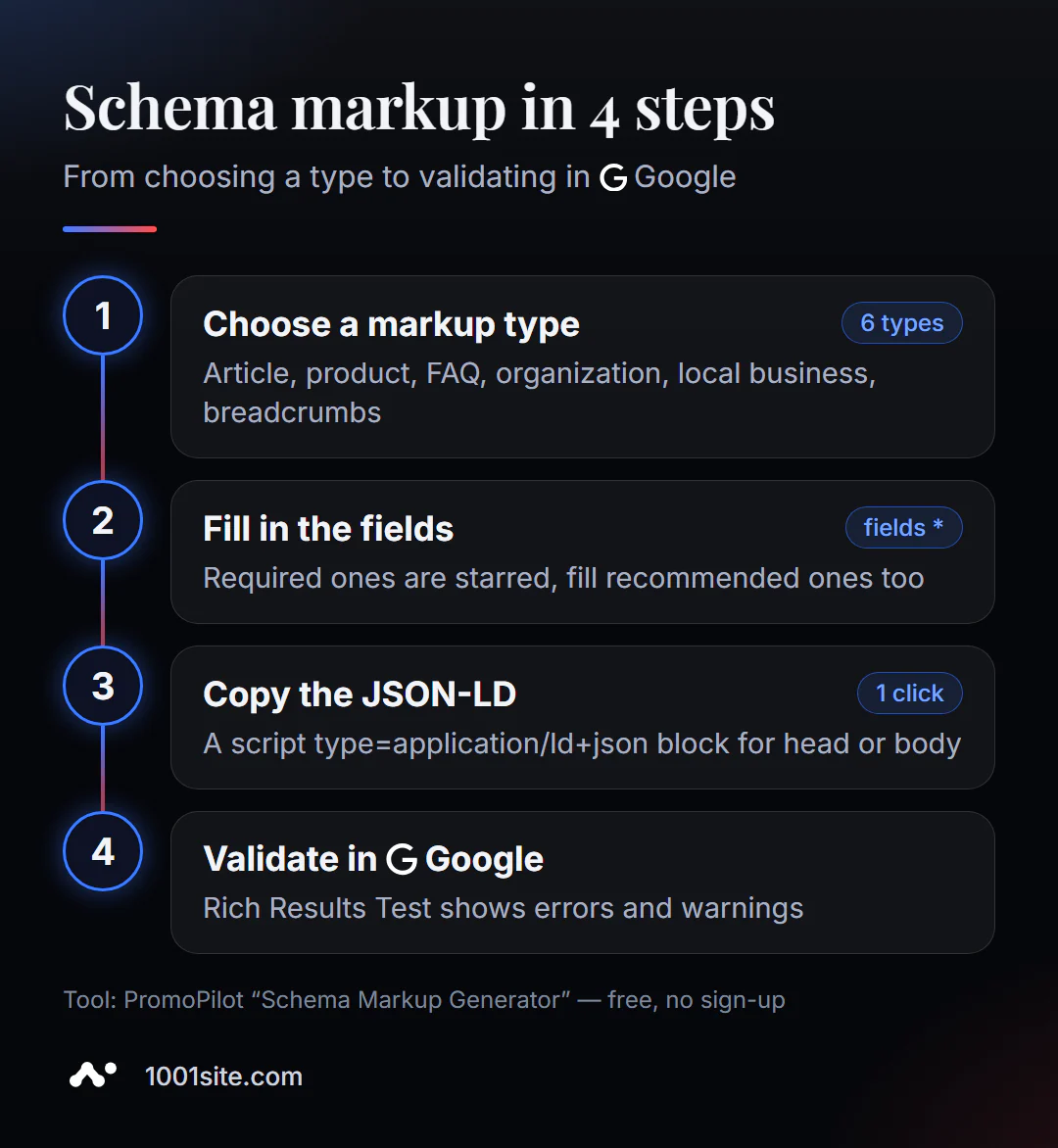
- Open the Schema Markup Generator and select a type from the top row.
- Fill in the required fields (marked with an asterisk) and any recommended ones you know: the more complete the information, the greater the chance of getting an expanded result.
- Copy the code using the "Copy code" button.
- Insert the block into the page —either in
<head>or<body>. In WordPress, you can use the code field in the template or a code insertion plugin; in the builder, you can use the custom code section of the page. - Click "Check in Google Rich Results" below the code and paste the address of the published page.
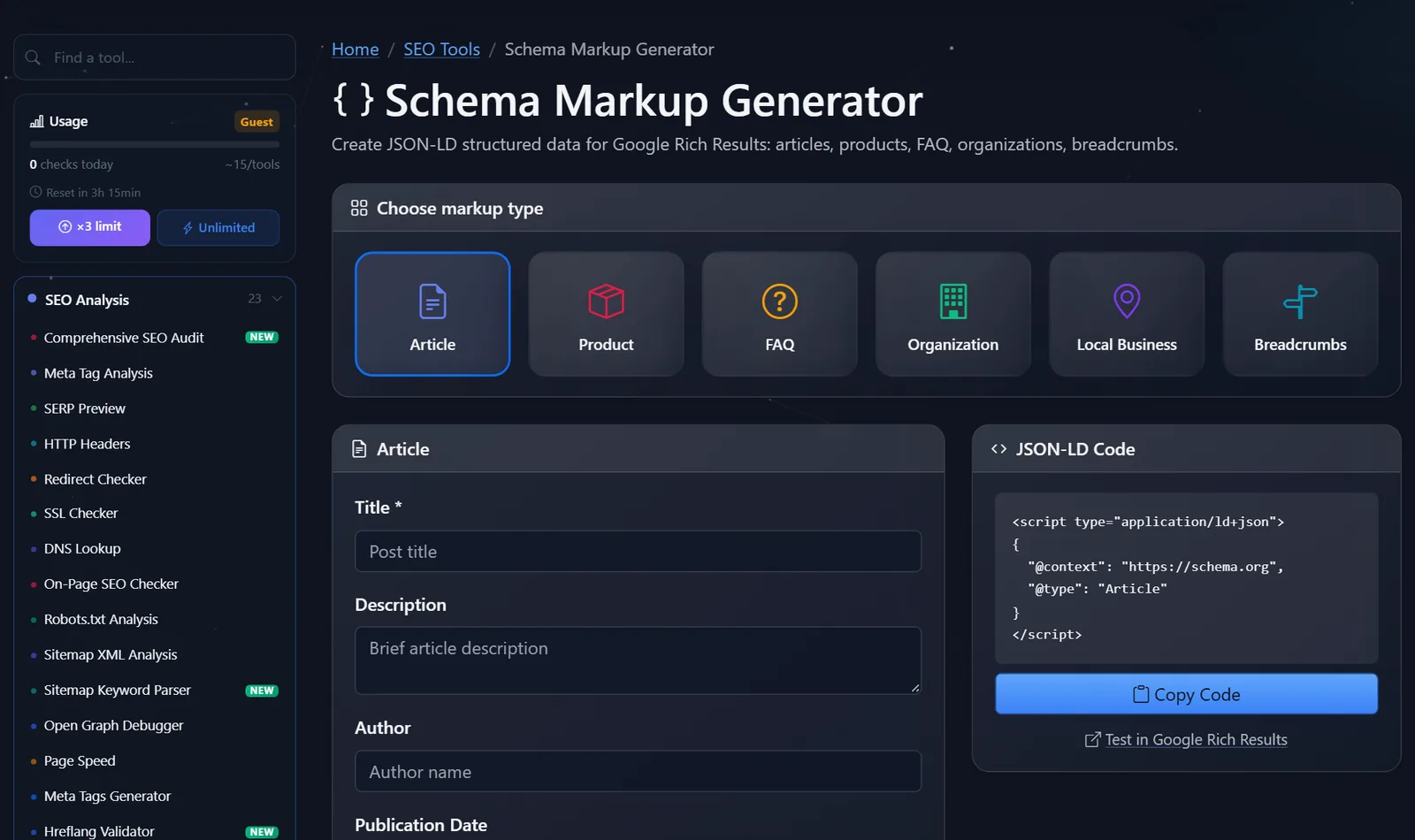
This is what the generator looks like: markup type tiles, field form on the left, and live JSON-LD on the right.
Example of the result for a product card:
{
  "@context": "https://schema.org",
  "@type": "Product",
  "name": "Рюкзак Nord 20 л из кожи",
  "image": "https://example.com/img/nord-20.jpg",
  "offers": { "@type": "Offer", "price": "89.00", "priceCurrency": "EUR", "availability": "https://schema.org/InStock" }
}
What type of markup does your page need?
The most common mistake beginners make is cramming everything onto a page. Markup should describe what's actually on the page. A simple rule for page types:
- Home: Organization (or LocalBusiness if you have an office, salon, or store with an address).
- Contact: LocalBusiness with address, phone number and opening hours.
- Category: BreadcrumbList.
- Product card: Product + BreadcrumbList.
- Blog article: Article + BreadcrumbList.
- Questions Page: FAQ - only if the questions and answers are visible to the visitor on the page.
It's worth being honest about FAQs: since 2023, Google has been showing FAQ snippets primarily to reputable government and medical websites. For regular businesses, FAQ markup is still useful—it structures content for search engines and AI assistants—but you shouldn't count on having questions pop up directly in search results.
What are the most common markup errors?
- The data doesn't match the page. The price in the markup is €79, but on the page it's €89—this is a violation of Google policies and could result in the loss of rich results.
- Markup for invisible content. FAQs with questions that aren't on the page, or reviews that no one has written.
- Invalid value format. Price with a currency symbol (
"89 €"instead of"89.00"and"EUR"), date not in the2026-10-12format. - Relative image addresses. The full address, starting with
https://, is required. - Broken JSON. An extra comma or a herringbone quotation mark after copying it through a text editor—and the entire block is ignored.
- Duplicates. The plugin already displays "Organization," but you pasted a second one with a different name.
How to check markup after pasting?
Verification takes a couple of minutes, but without it, it's easy to leave broken code on your site. My process is as follows:
- Rich Results Test by page address. The tool will show you what types of markup Google found, including critical errors (red) and warnings (yellow). Be sure to correct errors, and warnings if possible: these are usually recommended fields that are not filled in.
- Verify with the visible page. Open the page next to it and check it with your eyes: same price, same name, same address and phone number.
- Search Console will be available in a few days. The improvements section will feature reports on detected markup types—they'll show errors across all site pages, not just one at a time.
If the URL checker doesn't detect the markup, even though the code is inserted, the site's cache or an optimization plugin that is cutting out scripts is most often to blame. Clear the cache and check again.
Comparison: Schema Generator and Alternatives
| Tool | What's free? | Restrictions | Who is it suitable for? |
|---|---|---|---|
| PromoPilot — Schema Markup Generator | JSON-LD for 6 types, one-click copying, go to Google verification | Data is entered manually, one page at a time. | Home, contacts, individual articles, and landing pages |
| Google Rich Results Test | Check markup by URL or code, preview rich results | Doesn't generate markup, only checks types supported by Google | Check after inserting the code |
| Schema Markup Validator | Validate any Schema.org markup | Doesn't say whether there will be a rich snippet in Google | Complex markup of non-standard types |
| WordPress SEO Plugins | Basic markup automatically | Installation is required, the set of types depends on the plugin | WordPress sites |
Conclusion: the generator is for creation, Rich Results Test is for testing, and the plugin or template is for mass markup. In my projects, I use all three at various stages.
PromoPilot's catalog contains 87 free SEO tools. Alongside this article, the series also includes breakdowns of a meta tag generator and an Open Graph debugger: together with Schema, they cover everything a website communicates about itself to search engines and social media.
What are the limitations of the Schema markup generator?
The generator creates code, but doesn't monitor its relevance: if the price or availability changes, you need to update the markup manually. It doesn't check whether the data matches the page—that's your responsibility. And most importantly, correct markup doesn't guarantee a featured snippet. Google decides whether to show one, taking into account the quality of the page and the search query.
When is a free tool not enough?
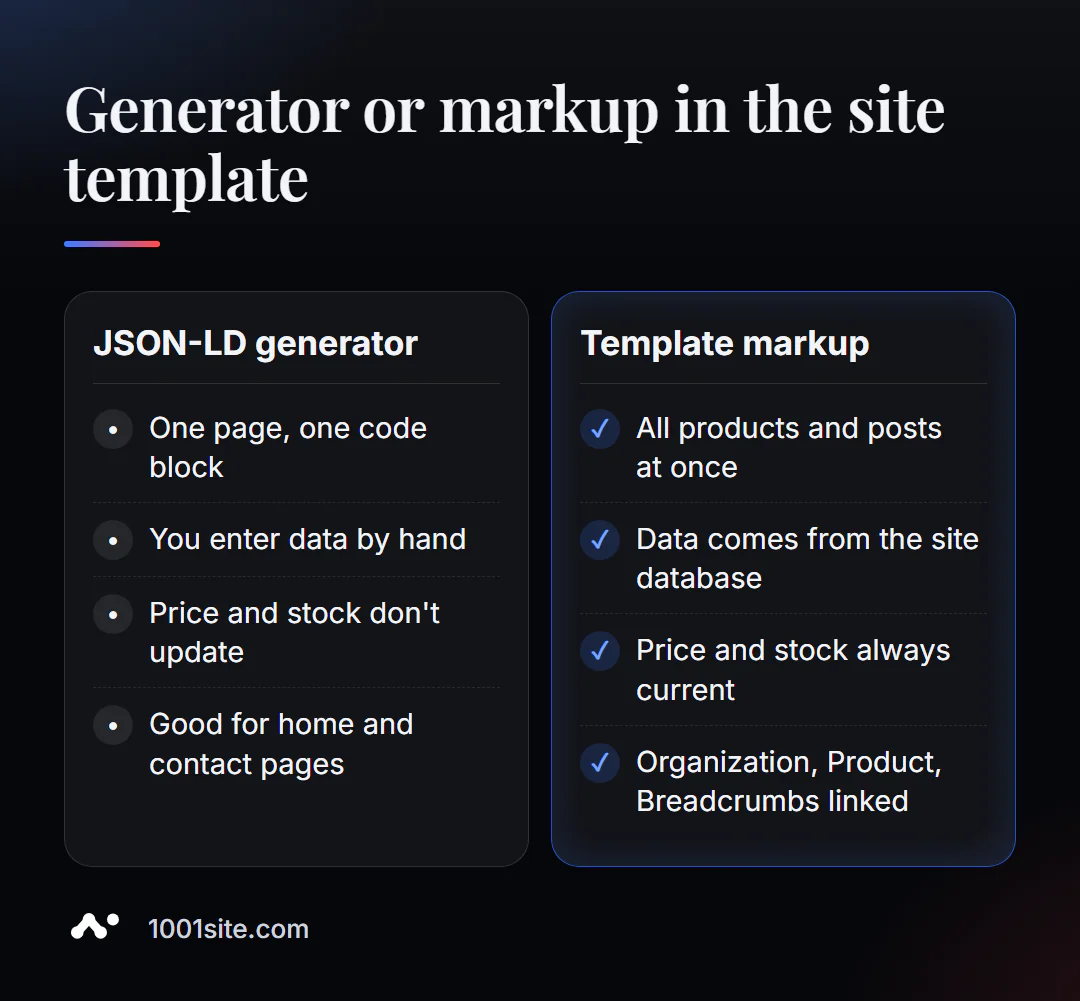
A generator is sufficient for the homepage and contact page. For a store with hundreds of products, it's not. A specialist is needed if:
- Product markup should take price, availability, and rating from the site's database and update itself;
- Search Console shows structured data errors on hundreds of pages;
- a set of markups is needed: Organization, Product, BreadcrumbList and reviews, coordinated with each other;
- You want to be quoted correctly by AI assistants, not just Google.
What can I do for your website?
I'm Valeriy Danyuk, a developer and SEO specialist with 12 years and over 200 clients. I embed structured data into templates so it's collected from the website's database rather than manually.
SEO, Content, and GEO
- Turnkey website SEO audit: I check the markup of all templates, correct errors from Search Console, and link types together.
- How a hotel got featured on ChatGPT, Gemini, and Perplexity in 5 weeks —GEO promotion, where it's crucial for AI assistants to accurately understand business facts.
- An AI-powered SEO blog that brings in organic leads —Article markup is automatically applied to each article.
Websites and online stores
- An online store built on WooCommerce with Product markup and breadcrumbs in the template.
- Dropshipping platform with partner stores.
- On 1001site structured data, sitemaps, and social media previews are configured automatically.
Accounting and AI directories
- Accounting + bookkeeping + a store with 30,000 products - marking up thousands of cards from a single database.
- Vector-based AI guide to equipment repair with a bot.
Send me a link to your website via Telegram, and I'll tell you what markup your key pages are missing.
Result
- The Schema generator creates JSON-LD for six types: Article, Product, FAQ, Organization, LocalBusiness, and Breadcrumbs.
- Only mark up what is visible on the page and keep the data (price, availability, dates) up to date.
- After pasting the code, always check the page in Rich Results Test.
- For a store, the markup is built into the template, or a platform is chosen that already has it, for example, 1001site.
Create Organization markup for your homepage with the free Schema generator —it takes 5 minutes and one block of code.
Sources
- PromoPilot Schema Generator tool page - types, fields, and FAQ.
- Google Search Central - Introduction to Structured Data and FAQPage Guidelines.
- Google Rich Results Test and Schema Markup Validator are official validation tools.