The answer to the question "Tilda or a website with AI" depends on whether the business is growing. If the site is a simple business card or landing page without a product catalog, Tilda or Wix on a paid plan can solve the problem for years: the platform takes care of hosting, updates, and backups. The question arises at a different point—when a product catalog is added, multilingual support is needed, orders are accepted via Telegram, or when it turns out that the domain is disabled first if payment is not made, and website export is only available on the most expensive plan. Further, we'll look at what happens in the event of non-payment, according to the website builder's documentation, what is actually transferred during export, and how the migration of an old website works using a single link.
When is Tilda or Wix enough forever?
For a business card website, a single service, or a landing page without catalog growth, the builder covers the entire task and remains a working configuration for years to come. The subscription fee in this case is a reasonable price for not having to worry about administration (hosting, updates, backups).
LOW/CODE Agency, in its comparison of Webflow and Tilda, admits this directly: "Tilda also lacks advanced CMS features and is not ideal for large-scale content-driven or dynamic sites" (Jesus Vargas, LOW/CODE Agency). But he immediately clarifies: "It's ideal for landing pages, personal sites, event pages, and small business websites." This is precisely the case: a site without a catalog and no plans for growth, where a simple builder is sufficient.
A sign that a move isn't necessary: the site isn't growing in functionality—there are no plans for a product catalog, multilingual support, or accepting orders via messenger.
What actually happens to a website if you don't renew your plan?
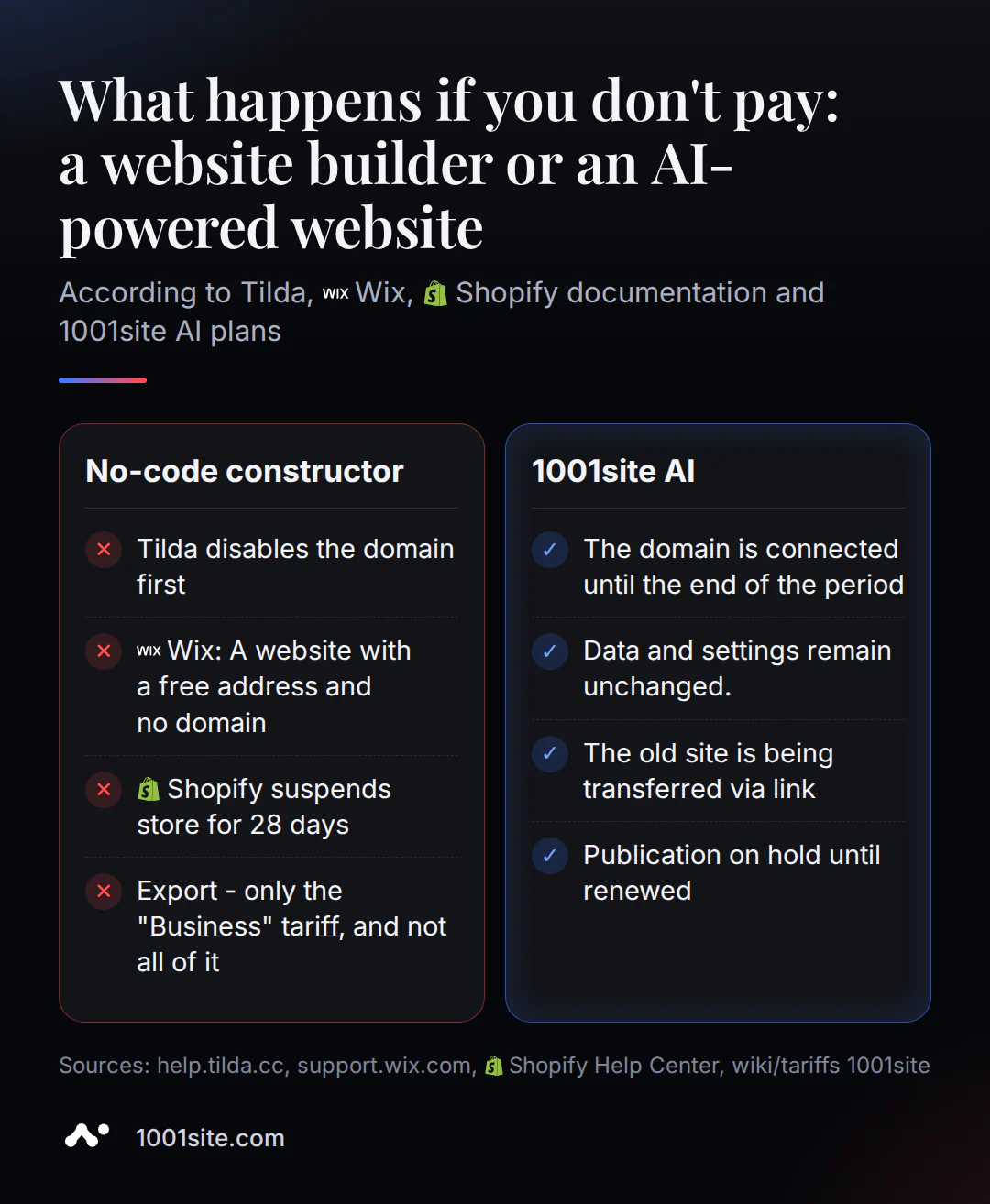
According to the official documentation of all three platforms, content isn't immediately deleted if payment isn't made, but each platform has its own process for website deactivation. Tilda disables the domain first, Wix returns the site to a free URL with ads, and Shopify blocks the entire store after 28 days.
| Platform | What happens if payment is not made? | Is the content saved? |
|---|---|---|
| Tilde | The domain is disconnected from the site, application capture forms and payment acceptance stop working, and some blocks are closed | Yes, the project remains in the account |
| Wix | The site is returned to the free wixsite.com address with Wix advertising; the domain is a separate subscription and is not automatically cancelled with the plan. | Yes, all content remains |
| Shopify | After 28 days from the first unsuccessful payment attempt, the store is completely blocked - neither the owner nor the customers can see the storefront | Yes, but access is closed until payment, sometimes two bills at once |
| 1001site AI | Publishing and paid features are suspended until the plan is renewed. | Yes, the data is saved. |
Tilda Help Center puts it bluntly: "The domain name you assigned to your website in the Site Settings will be disconnected from it." Forms and payment processing are also disabled—the documentation explicitly states that they "won't work anymore, and you won't be able to receive payments via connected payment systems."
Wix is structured differently, and it's easy to get confused with the domain subscription. Wix Support explains: "Canceling your plan does not delete your site content. Your site will revert to the free Wix URL and display Wix ads." However, the domain and email are separate subscriptions: your website plan doesn't affect them, and you need to cancel them yourself. Shopify has a more strict policy: after 28 days from the first unsuccessful payment attempt, the store is completely blocked, and neither the owner nor customers can see the storefront. Reactivation sometimes requires paying two invoices at once.
1001site AI also operates on a subscription basis, and if payment is not made, the site will also stop publishing. The domain remains connected until the end of the paid period, and the data and settings are not touched at all.
Why isn't exporting from the designer "download and transfer"?
Website export from Tilda technically exists, but it's only available on the most expensive "Business" plan—and even there, it's significantly limited. Wix doesn't officially offer export to portable code at all. In practice, this means you won't be able to take your website with you without paying extra and without an agency plan on either platform.
Tilda Help Center's Code Export section states: "This option is only available for Tilda Business Plan subscribers (a pricing plan for five or more websites)"—that is, a plan designed for agencies with five or more websites. For a single store owner, this is an excessive and expensive step simply for export access.
And even there, not everything is exported: "Tilda CRM and Tilda Members cannot be exported. These services are only available on Tilda" and "Product Catalog cannot be exported. This service is only available on Tilda." Only static HTML with images is exported—the product catalog, CRM, and forms remain within Tilda.
Wix's situation is simpler: independent comparisons of Wix with other platforms agree that Wix uses closed, proprietary code that doesn't export cleanly to other platforms. Moving from Wix means rebuilding the site from scratch; existing files can't be transferred.
What do people most often lose when moving on their own?
Moving a website to another platform without a plan often results in a drop in search rankings – usually not due to the platform change itself, but to missed technical indexing steps. Below are five specific areas where link equity and search rankings are most often lost.
- 301 redirects from old URLs aren't configured. Without them, link equity and accumulated rankings don't transfer to the new pages—search engines see them as a completely new site.
- The "old address → new address" mapping isn't created. Some pages without the mapping are converted to regular 404s.
- Page titles and descriptions haven't been migrated. Initially, the new pages won't rank for the same queries as the old ones.
- Robots.txt and sitemap aren't updated. Search engines can't see the new site structure until they receive a current sitemap.
- Redirects are built in a chain: the old address points to an intermediate one, which points to a new one. At each step in the chain, some link value is lost.
A practical guide from independent SEO migration guides: keep the old platform active for 2-4 weeks after the new one's launch, until redirects are set up and reindexing occurs. A temporary 10-20% traffic drop in the first few weeks after the move is expected. Recovery typically takes 4-8 weeks.
How does an AI-powered website take over an old website using just one link?
With 1001site AI, the transfer starts with a single link: to the old website, Instagram profile, TikTok, Facebook, or Telegram channel. Then, the assistant automatically finds what to transfer and displays it before it's published. No programmer or manual block configuration is required.
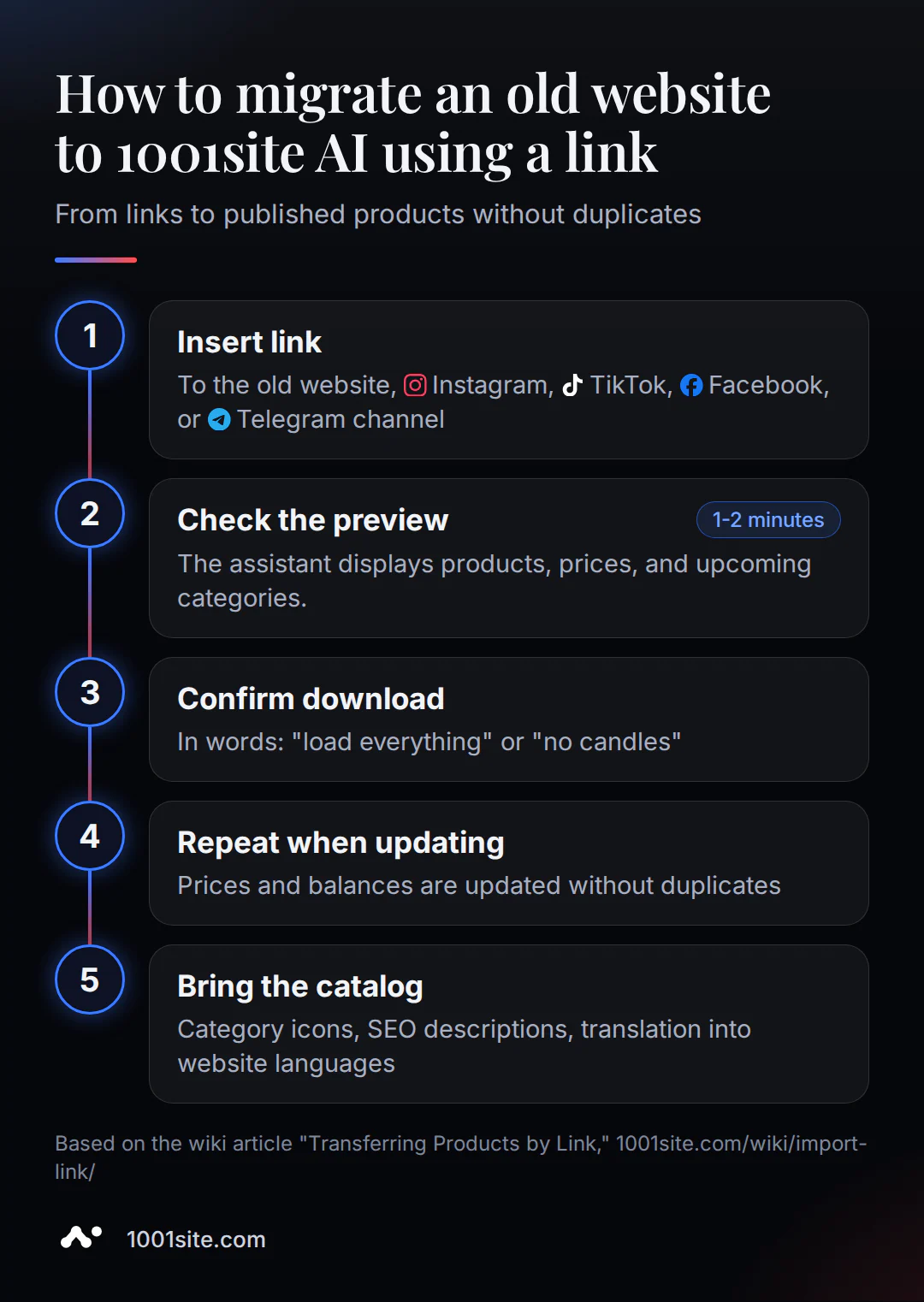
- Open the AI assistant in your dashboard or in the second step of website creation and paste the link to your old website, post, or channel.
- The assistant displays a preview in one or two minutes: how many products it found, several names with prices, and what categories it will create.
- Confirm with "upload everything" or "without candles, take the rest" and the assistant creates categories, downloads photos to your storage, and publishes the products.
- A repeated transfer using the same link updates prices and balances without duplicates - each product has its external source number remembered.
- Next, the assistant offers to generate category icons, write SEO descriptions, or translate the catalog into the site's required languages.
Up to thirty products can be migrated per request, with a maximum of one hundred. For catalogs with several hundred items, the migration is done in parts or via a YML feed. If you want to not only migrate products but also replicate the look of the old site, there's a separate clone mode using a reference: it replicates the style itself and migrates the data along with it. You can begin the migration on the 1001site.com /#create page: the link to the old site is inserted in the second step, before payment.
How much does it cost and what is included in the subscription fee?
1001site AI is also a subscription, and it's fair to call it that: €45 per month, with the first month reduced to €25 with a promo code. The subscription fee remains the same. The difference is in what's included at no extra cost: your own domain with SSL, an AI assistant that edits your website's words, automatic translation into 107 languages, and order acceptance via Telegram and WhatsApp —all included in the basic plan, without any additional add-ons.
There's also a one-time option—the "Turnkey" plan for €1,650, with 12 months of free hosting. In this case, the website is built by a team, not by you. A detailed price comparison between studios, builders, and AI subscriptions is available in a separate article , "How Much Does a Turnkey Website Cost?"; the pricing table is not duplicated here.
Who should move and who should stay with the construction site?
The choice of platform depends on your planning horizon and the task you're facing today. If your website is just a business card with no growth, you can leave the builder alone for years. If you already have a catalog, need multilingual support, or need to accept orders via messaging apps, it's wiser to build the website with AI once than to pay extra for the builder's limits.
- Stick with the builder if your website is a business card, portfolio, or landing page for a single service with no plans for a catalog or growth. In this case, platform administration is truly not your responsibility, and the subscription fee is justified for that purpose.
- You should move if you already have a product catalog or will soon have one, need multilingual support for several countries, accept applications via Telegram or WhatsApp, or are tired of renewing several separate subscriptions: plan, domain, plugins.
- Move early, before your plan or domain expires, if that's the reason you're considering it: link transfer and pre-publication previews take minutes, while setting up redirects and reindexing takes weeks.
If export limits and the designer's subscription fee are starting to hinder your growth, link transfer and free preview are available on the 1001site.com /#create page.
Sources
- Tilda Help Center - Pricing and Payment
- Tilda Help Center - Code Export
- Wix Support - Canceling a Wix Premium or Studio Plan
- Shopify Community - Store frozen due to payment failures
- LOW/CODE Agency - Webflow vs Tilda: 14 Factors Compared 2026
- Transferring goods via link - knowledge base 1001site
- Your Domain and SSL - 1001site Knowledge Base
- 1001site AI Pricing - Knowledge Base