A client messages Instagram at midnight and doesn't receive a response until the morning. A beauty salon website with appointments on Telegram and WhatsApp solves this problem differently: the request is immediately sent to your account, regardless of your availability. Next, we'll explain how to transfer your salon details via a link, set up appointments in both messaging apps, and how much it costs.
Why does a beauty salon need a website if there is Instagram?
83% of small businesses in the US already have a website, and nearly 90% of customers make inquiries or reservations on the company's website—that's how Clutch summarized a survey of 406 small business owners in the summer of 2025. For salons, this means that the website has ceased to be just a business card and has become a place where customers expect to see a booking button.
A common mistake is to have a website, but it only contains an "about us" text, photos of the interior, and a phone number. A visitor who's ready to book an appointment must figure out how to do so themselves: call, search for the messenger app in the footer of the page. Part of the audience leaves at this step. BrightLocal demonstrated the same effect from the other side: 61% of mobile phone users are more likely to contact a local business if it has a mobile-friendly website—and people search for a beauty salon on their phone, and right now.
What's wrong with recording via personal direct message?
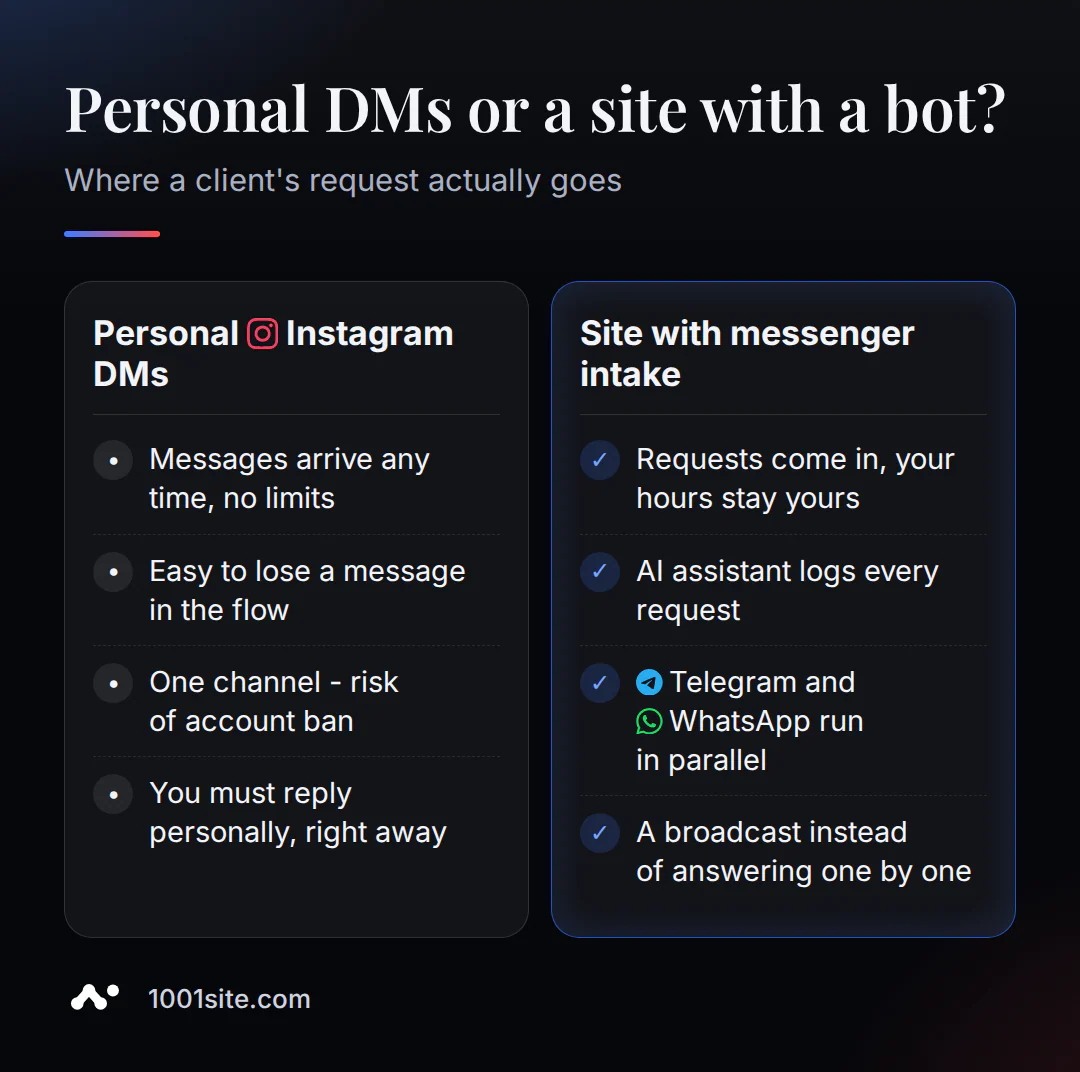
Direct messages on Instagram don't separate the client from the workday: messages can arrive at any time of day, and it feels like you have to respond immediately, otherwise the client will go to a competitor. This turns a stylist's phone into a hotline, open 24/7 and without lunch breaks. On the SalonGeek forum, member misseden described it this way:
"Does anyone else get clients messaging constantly on social media for appointments?.. it could be 9pm or 11pm, I've had them recently at 6am."
- misseden, SalonGeek forum
A member of the same EssexFreelance thread added: she received messages at 1 a.m. on Christmas Day asking for highlights. It's not just the inconvenient time – the constant availability of direct messages is exhausting: you can't ignore the notification, as it could be a complaint or an urgent request.
Relying solely on a single channel like Instagram or Facebook is risky in principle. In another discussion on SalonGeek, forum member BannerPenguin warned:
"...just relying on one avenue (especially Facebook which is 100% out of your control) isn't a good idea... they could close you down at the drop of a hat."
- BannerPenguin, SalonGeek forum
An account can be closed at any time, and the only channel of communication with clients disappears along with it.
How to transfer a salon from Instagram to a website with a single link?
The transfer takes one step: the AI assistant reads the link to your profile or old website and automatically takes over what you would normally type in manually. This works for any website mode. For a salon, the "Landing Page" mode is suitable—a business card website featuring services, where the homepage is assembled from blocks, as opposed to a catalog with product listings.
- In the "Create a website in this style" step, paste the link to your Instagram profile or old website and click "Analyze".
- The AI will extract your name, logo, favicon, business description, contact information, and social media profiles—these will be immediately added to your header and homepage. The AI won't read private accounts—the profile must be public.
- To transfer photos of specific works, open the AI assistant in your account and send a link to the post or Reels containing the work. The text and photos will be added to the website. This is also recommended if the AI didn't transfer all the images from the general profile link.
- Check the preview before confirming and adjust the text on the "Services" and "About Us" pages to suit your salon.
A similar link transfer, but for a product catalog, is discussed in the article "Transferring a Store from Instagram to a Website." The mechanics are the same, but the difference is that a salon requires services, photos of work, and contact information instead of prices and inventory.
You can build such a website yourself, without a developer, using the 1001site AI builder: after payment, the AI agent will create the homepage and pages in the chosen style in 2-7 minutes, then all that remains is to configure the application acceptance system.
How do I set up application reception in Telegram and WhatsApp?
Both channels are enabled in the same section of your account and work in parallel, without a choice of "either/or": some clients are used to writing to Telegram, others to WhatsApp, and the website accepts requests from both simultaneously. The only difference is the connection method: Telegram uses a bot, while WhatsApp uses a QR code from your phone. Let's start with Telegram:
- Create a bot via @BotFather with the
/newbotcommand and copy the token. - In Settings → Telegram and WhatsApp enable the bot's private message feature. The client writes to the bot, and the bot converts the message into a request.
- If you accept entries from a workgroup or channel, add the bot as an administrator and specify the chat_id.
WhatsApp is easier to connect with—using a QR code, just like regular WhatsApp Web. The salon number becomes another device, and messages from personal chats and account groups are sent to your account. If you have a lot of requests, you can create a second number specifically for posting, while the main one only receives them.
You can write your own bot greeting text—here's a working example that you can copy and adjust for your salon:
Hello! Please let me know what service you'd like to book, a convenient date, and your name. I'll record your request, and the technician will confirm the time.
How is Telegram bot different from WhatsApp for booking clients?
Both messaging apps serve the same purpose—accepting requests without a website form—but they're designed differently: Telegram makes it easier to set up a newsletter and mandatory channel subscription, while WhatsApp has a lower barrier to entry for clients, as messaging the salon's number is more familiar than searching for a bot. The table below is for choosing which to activate first if you haven't yet gotten around to both.
| Sign | Telegram | |
|---|---|---|
| Connection | Bot token via @BotFather | QR code from the salon's phone |
| Reception from working groups | Yes, if the bot is an administrator | Yes, from the groups where the number is located |
| Mandatory subscription to the channel before applying | You can turn it on | There is no such function |
| Mailing to everyone who wrote to the bot | Yes, with history and the ability to stop | No built-in mass mailing - only personal responses |
| The second issue is for publication only. | - | Can be connected separately |
For most salons, it makes sense to include both: some clients already message on WhatsApp, some on Telegram, and it's up to the client to decide which channel to message.
Contacts button: one icon instead of separate links in bio and on the map
The website features a floating round button: when clicked, subbuttons appear— WhatsApp, Telegram, phone, and your links. It works in any website mode and solves a specific problem: unrelated links on different platforms, such as when Instagram has one link in the bio and Google Maps has a different number, and the client doesn't know which channel is working.
You can configure it in Settings → Contacts: icon, hover caption, and subbuttons themselves, using formats like tel:+380..., https://wa.me/380..., and https://t.me/username. If nothing is filled in, the button simply won't appear on the website. You can only enable the options you actually check every day.
What does an AI consultant do if there are too many messages?
The growing number of requests sent via messenger is the very same burden that has salon owners complaining on forums that they can't ignore notifications: you're so concerned about their importance that you respond even during your own time. Some of this messaging can be alleviated by setting pre-set rules.
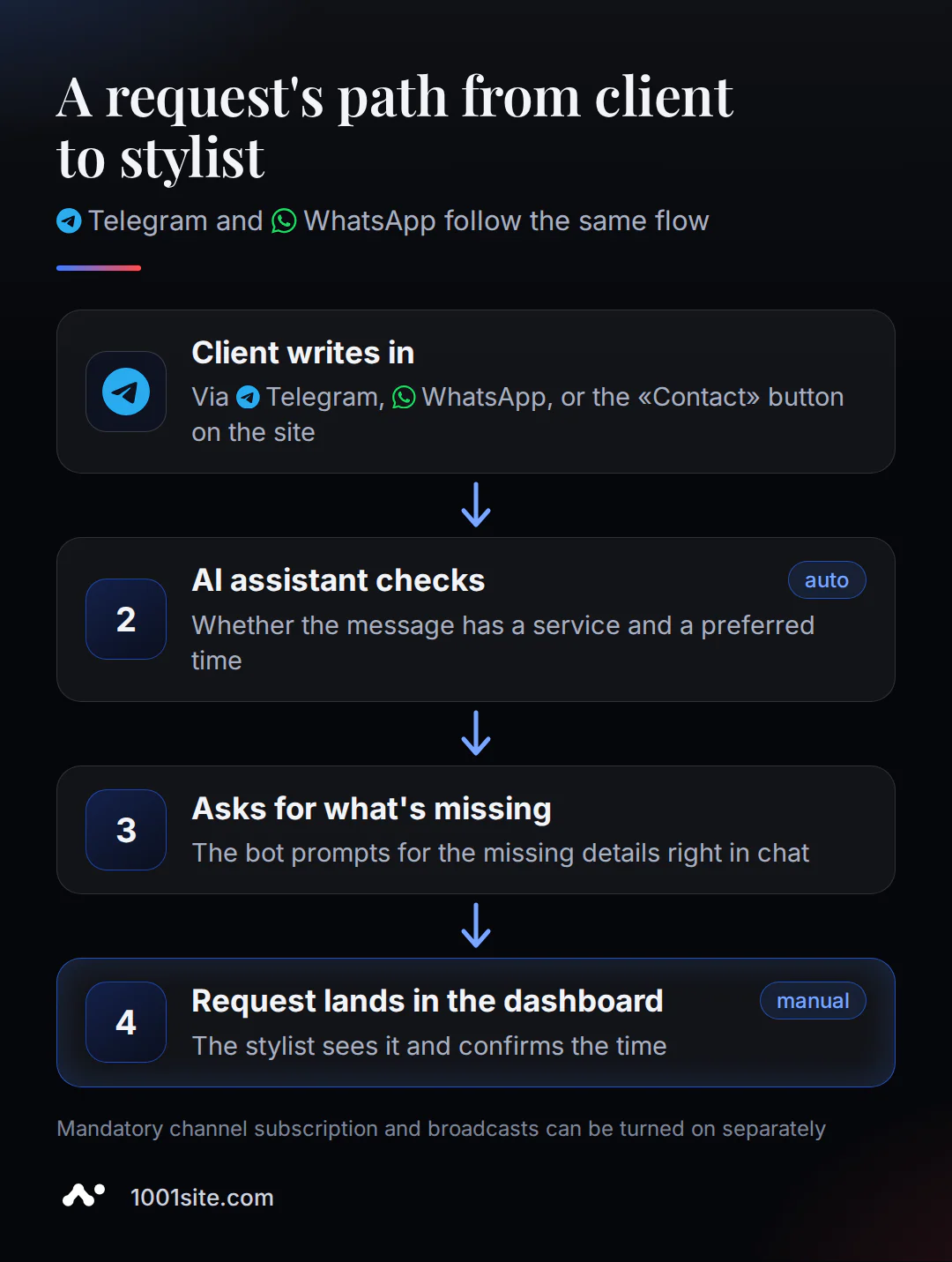
In the "AI Reception Consultant" field (Settings → Telegram and WhatsApp), you can set rules for what must be included in a message before it can be converted into a request—for example, the service and preferred time. The bot will prompt the client for any missing information and extract the resulting text, without sending you the raw correspondence to sort through. You can also enable mandatory channel subscriptions before posting in the bot's private messages and a one-time mailing to all bot subscribers—for example, if you need to notify them of a workday change without having to reply to each one individually.
How much does a website for a beauty salon cost?
1001site 's only AI-powered plan is "All Inclusive": €45 per month, with the first month being €25 with the monthly promo code. There's no trial period or free plan, but you can cancel your subscription at any time, and the site will continue to work until the end of your paid period. Another option is to order a turnkey website build, without any manual intervention.
| Option | Price | What's included |
|---|---|---|
| All inclusive | €25 first month with promo code, then €45/month | AI-powered website, link transfer, Telegram and WhatsApp support; cancel at any time |
| Turnkey | 1650 € one-time | We'll build your website for you: style, text, photos, Telegram / WhatsApp, and training. You only need the domain, with 12 months of hosting free. |
For a detailed breakdown of what goes into the price of a turnkey website and when an AI plan is more cost-effective, see the article "Turnkey Website: How Much It Costs for Small Businesses."
What to do if the site already existed, but there were no applications?
If you've had a bad experience with a website, the likely cause is usually simple: the site was isolated, wasn't connected to the channel that actually brings in clients, and didn't offer a clear booking process. While considerable funds may have been spent on development, the budget has nothing to do with it; it's the connection between the site and the channel that's at play. SalonGeek member FrancesMarie described exactly this experience:
“I wasted a fortune on having a website developed a few years ago and hit had very few hits.”
- FrancesMarie, SalonGeek forum
A website without a recording button, no visible Telegram or WhatsApp, and with generic phrases instead of real photos of work looks the same everywhere—the client has no reason to choose it. The solution is simple: add real photos and a description of services to the link, connect both messengers, and place the "Contact" button in a prominent location where it's immediately visible, rather than embedded in the page's text.
Sources
- Clutch.co - "The State of Small Business Websites in 2025": A survey of 406 small business owners in the US about websites and applications.
- BrightLocal - "61% of Mobile Users Are More Likely to Contact a Local Business With a Mobile-Optimized Site": A survey of 900 consumers about local business mobile sites.
- Modern Salon, Nicole Davis - "Are You a Text-Only Salon?": An industry analysis of salons' shift to texting instead of calling.
- SalonGeek - "Clients using social media for appointments?" and "Website advice": a forum for beauty industry professionals.
A full list of link transfer and application acceptance settings is available in the 1001site knowledge base. You can create a website like this in your own style using the 1001site AI builder.