
OmniFlow: How to shoot batches of videos in Google Flow and Google Vids

This Chrome extension records batches of videos in Google Flow and Google Vids. You describe the scene in text, the extension automatically generates a prompt for the Omni 1.1 model, starts recording clip by clip using your Google AI subscription, and stores the finished files in a folder with numbers and names. I'll explore what OmniFlow consists of and what it looks like in practice, using an example from the channel of the author, who created this tool for himself.
What is OmniFlow and why did the channel's author create it?
OmniFlow is one of several Chrome extensions for automated content creation by the author of the "Business with AI" channel: it integrates Google Flow and Google Vids, while the author also has separate extensions for Dreamina (Seedance 2.5) and TikTok Symphony. The official name in the Chrome Web Store is longer—"Automation - MCP for Google Flow, Google Vids & Claude: AI video autopilot"—and also lists the publisher as lingoflow.pro, a 5.0 out of 5 rating based on six reviews, and 158 users at the time of publication.
The reason is simple: "Many will say this is essentially a duplicate of Google Flow and Google Vids—and they'd be right," the author writes. He created the extension for himself—he didn't want to have to figure out the buttons and intricacies of the new interface every time; he just wanted to chat with Claude and get a finished video. The extension is currently used by over 100 people, including professionals.
How OmniFlow works: three modes - manual, with an assistant, and via Claude MCP
It's the same shooting pipeline that can be launched in three different ways - and switched between them at any time.
- Studio (manual). A map of eight actions: script, prompt, camera, effects, avatar, stitching, audio, and footage. Fill in the required fields, click "Start," and the extension automatically removes the entire queue and downloads clips with clean names. All you need is a license and a standard Google subscription, nothing extra.
- Assistant Director. A standard chat within the extension panel: type "need a coffee shop ad, 30 seconds, vertically" – the assistant asks a few clarifying questions, breaks down the task into scenes, and writes prompts through the same pipeline. Your Anthropic key is stored only in the browser.
- Claude MCP. The "Copy instructions for Claude " button is in the settings. Paste it into the Claude Code or Claude Desktop chat, and it will automatically set up a local bridge and connect. Then, simply type "make a 40-second promo from the photos in the folder" and get ready-made clips.
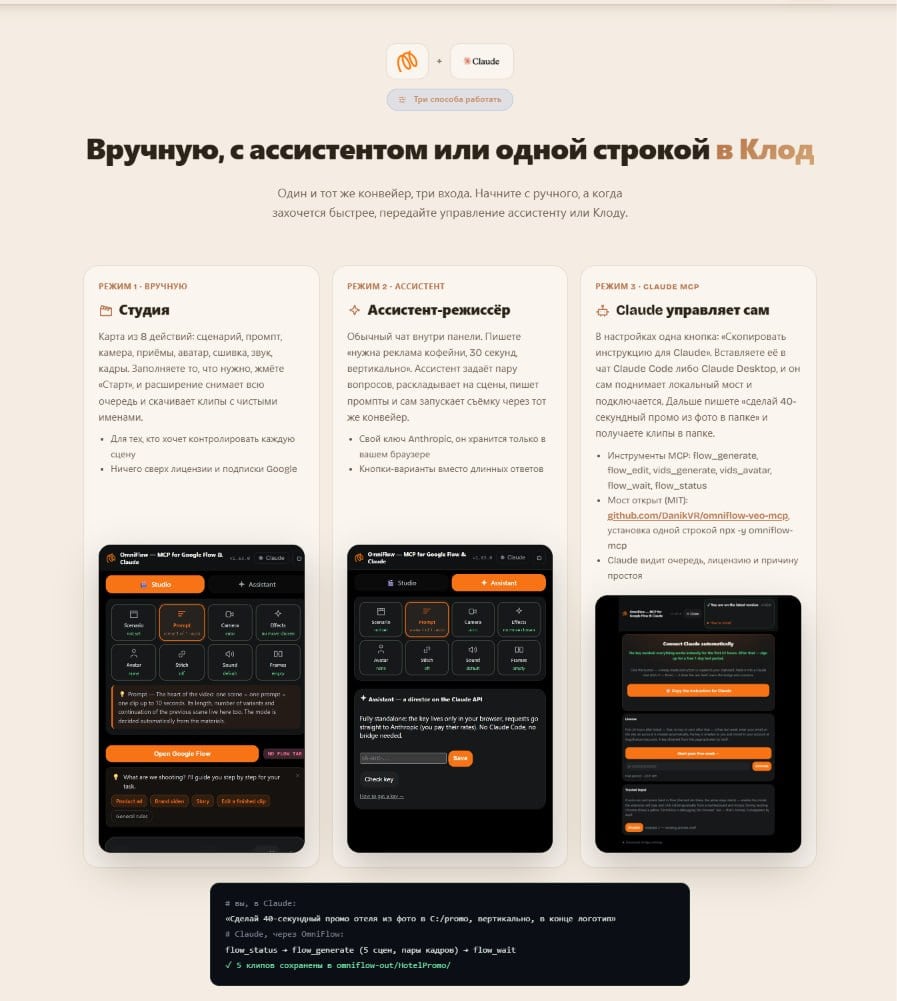
For the third mode, the extension has an open MCP server for Google Flow (MIT license, code on GitHub: omniflow-veo-mcp) with flow_status, flow_generate, flow_wait, flow_edit, and flow_cancel tools; it can be installed with a single command: claude mcp add omniflow -- npx -y omniflow-mcp. At the time of writing, Google Vids management (the second video source and speaking presenter, see below) is available through Studio and Assistant Director in the extension itself; the README for the open MCP bridge doesn't describe it separately. Claude sees the task queue, license, and pause reason—meaning it operates by the same rules as a human behind the screen. Only without manual clicks.
A similar principle—"describe in words what you need, and the AI will deliver the result"—is already built into 1001site AI. The AI assistant edits text, photos, and website pages based on a text command or a submitted screenshot, also using your own Claude, ChatGPT, or Gemini key via MCP.
What Google Vids adds: a second video source and a speaking presenter
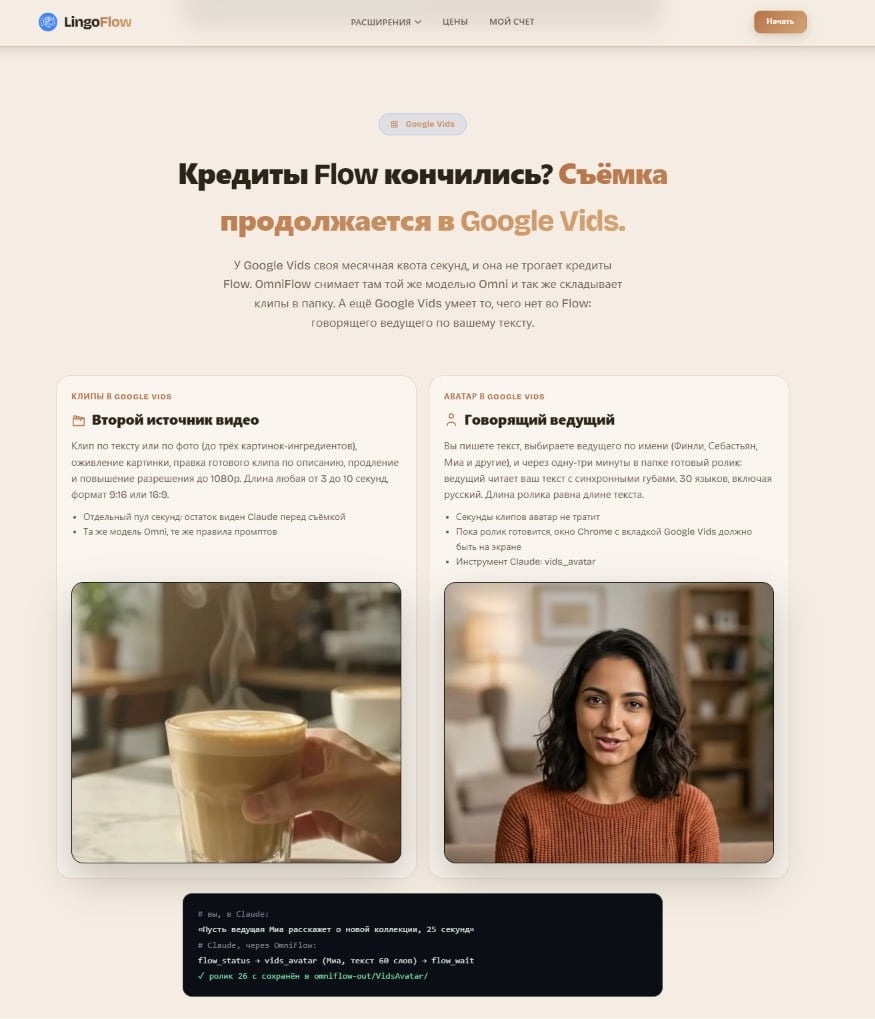
When Google Flow's monthly quota of seconds is exhausted, OmniFlow switches recording to Google Vids, which has a separate quota, independent of Flow. The same Omni model shoots, and the clips are saved to the same folder.
In Google Vids, the extension has two additional tools. The first is a second video source: you can assemble a clip from text or photos, using up to three image components at once, with animation of a still frame, editing of the finished video based on the description, and upscaling to 1080p. The clip length is from 3 to 10 seconds, with a 9:16 or 16:9 format. The second is a speaking presenter: you write the text, choose a presenter by name (Finley, Sebastian, Mia, and others), and in one to three minutes, a finished video with lip-syncing in one of 30 languages, including Russian, will appear in your folder; the video length is equal to the length of the text.
What problems does the extension solve by working directly with Google Flow?
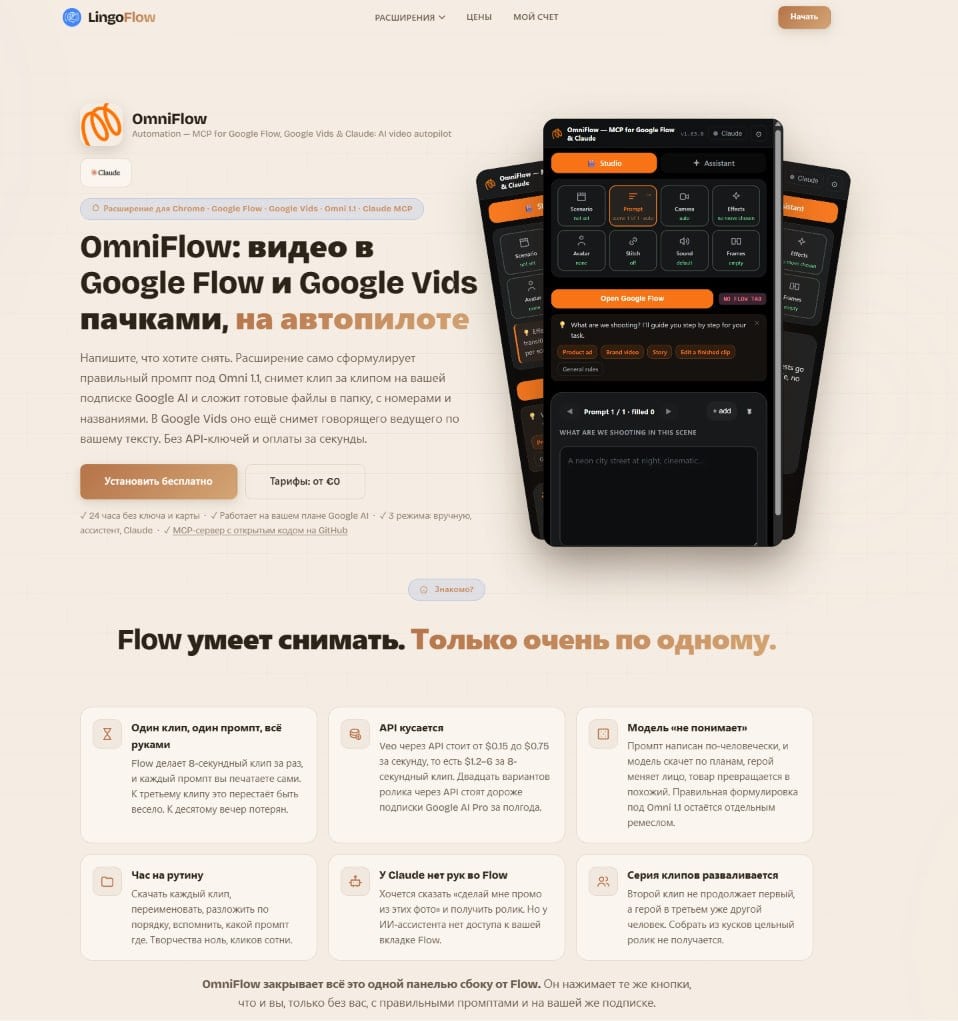
Google Flow itself produces videos honestly, but one clip at a time—and this is what creates all the routine that OmniFlow takes over.
| The problem with working directly with Flow | How OmniFlow solves |
|---|---|
| One clip - one prompt, all by hand; by the tenth clip the evening is lost | The extension automatically formulates prompts and removes a queue of clips in a row. |
| Veo's direct API costs $0.15-$0.75 per second, or $1.2-$6 per 8-second clip—more than a six-month Google AI Pro subscription for twenty video variants. | Filming is done using your regular Google AI subscription, with no API charges. |
| The prompt is written in a human language, but the model “doesn’t understand”: the hero changes his face, the product turns into a similar one | The correct wording for Omni 1.1 is already built into the extension |
| An hour of routine: download each clip, rename it, and sort it in order | Finished files are immediately placed in a folder with numbers and names |
| Claude can't access the Flow tab in his browser. | MCP bridge gives Claude the same commands that a human presses. |
| The second clip doesn't continue the first; the hero in the third is a different person. | The shared pipeline maintains scene context between clips in the same queue. |
"OmniFlow hides all of this in a single panel to the side of Flow. It presses the same buttons you do, only without you, with the right prompts, and within your subscription," is how the author describes the extension's concept on the product landing page.
Bonus: Prompt Motion library of ready-made animations
The extension comes with the Prompt Motion library: hundreds of videos compiled by Claude Opus 5.5 (product interfaces, kinetic text, music, shapes, particles, graphics, characters, and other categories), each with a prompt and a skill to replicate it. After registering the extension, the library is yours: choose a ready-made animation, insert your text and logo, and insert it into your video.
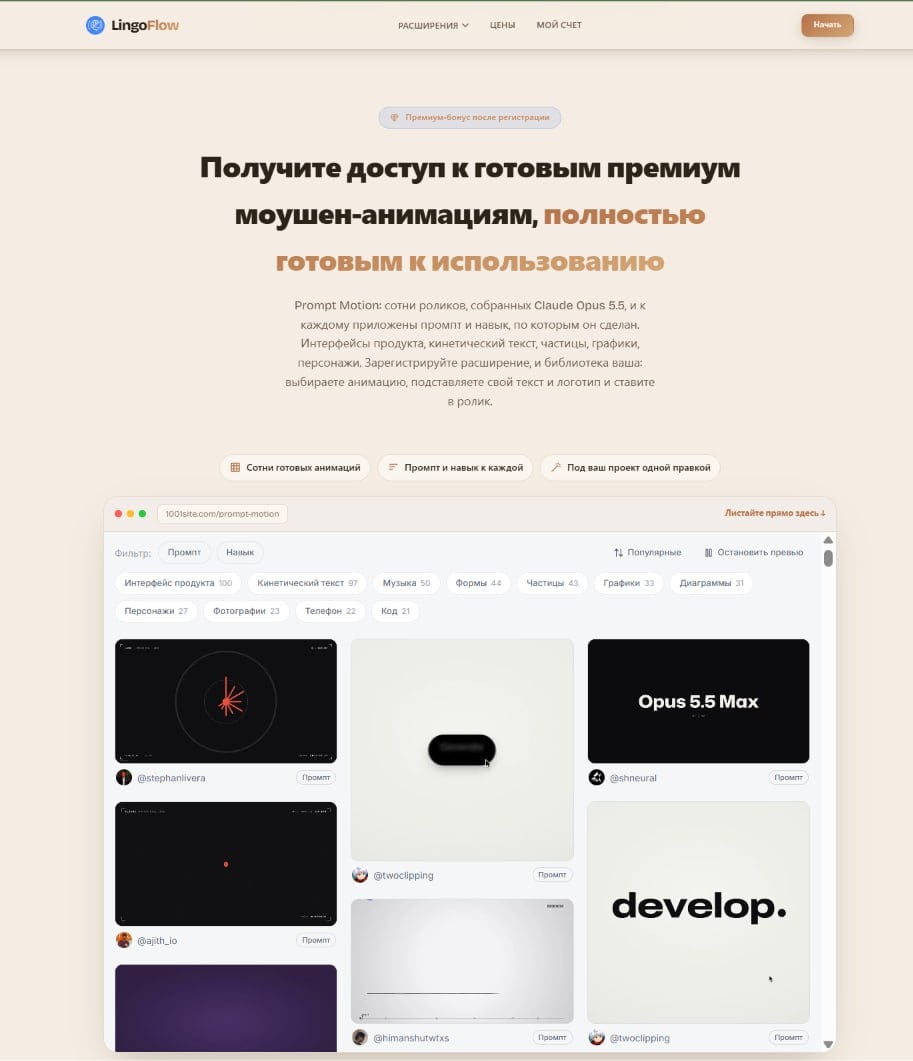
The library opens at 1001site.com /prompt-motion - it is maintained by the same author, but on the 1001site domain.
What the finished product looks like: a case study advertising Dansoy sauce
The only visual test of the extension in the post is a remix of someone else's video, which the author liked. He gave the task, via OmniFlow, to replace the setting—a clothing boutique—with a Polish supermarket, replace the character's raincoat with a bottle of Dansoy sauce, and build a plot around his love for this sauce.
Technically, this is the same “up to three pictures of ingredients” feature from Google Vids: the Carrefour supermarket logo and a photo of a Dansoy bottle were used as references.

The author describes the result briefly: "It turned out very well." The video itself is a native Telegram video without a separate link, so it can't be shown here, but the idea is clear. Instead of re-shooting the video from scratch, you give the extension a ready-made reference image and two replacement images, and then it handles the story and editing automatically.
Who is this approach to video creation suitable for?
If you regularly create videos for advertising, social media, or product pages, you're always faced with the same choice: manually select a prompt for Flow or pay for an API that increases in price with each clip. OmniFlow solves this chore—a text command instead of a set of buttons, a regular subscription instead of a token counter.
For those who don't have time to figure it out themselves and need a ready-made, turnkey video, the author in the same post suggests hiring his team as a separate service - this is a separate offer from the channel's author, not related to 1001site.
For those who want to manage their website in a similar way using words, 1001site AI is a good choice. Its AI agent builds a website using an Instagram link, an old website, or a spreadsheet, and then the dashboard's AI assistant edits the text and photos based on text commands. It's the same "describe what you need and get results" principle—only for an online store, landing page, or classifieds board.
Sources
- Post from the "Business with AI" channel: https://t.me/promtvibeadd/455
- OmniFlow official website: https://lingoflow.pro/omniflow
- Extension in the Chrome Web Store: https://chromewebstore.google.com/detail/automation-%E2%80%94-mcp-for-goog/kljcdogggnjabpcffmbjbpaeahmkinik?hl=ru
- Open source MCP bridge omniflow-veo-mcp (MIT): https://github.com/DanikVR/omniflow-veo-mcp
- Prompt Motion Library: https://1001site.com/prompt-motion/
Project links
Discussion
Post and comments in Telegram channelБизнес с ИИ | Через замочную скважину · 24 October 2026
Questions and Answers
What is OmniFlow?
A Chrome extension from the author of the "Business with AI" channel: it records videos in batches in Google Flow and Google Vids. You describe the scene in text, the extension automatically generates a prompt for the Omni 1.1 model, starts recording, and saves the finished clips in a folder with descriptive names.
Do I need my own API key to get started?
No. The basic Studio mode works with a standard Google AI subscription—no keys or maps required for the first 24 hours. Your Anthropic key is only required for the Assistant Director mode, and it's stored exclusively in your browser.
Can I use my photos as reference for the video?
Yes, Google Vids has a second video source: a clip can be created from text or photos—up to three images of ingredients. For example, in the sauce ad example, the supermarket logo and the product bottle were substituted for the original images.
Where can I find the library of ready-made Prompt Motion animations?
After registering the extension, the library opens at 1001site.com - there are hundreds of videos collected by Claude Opus 5.5, and each one comes with a prompt and a skill that allows you to repeat it.
Subscribe to my Telegram channel
In the channel « Бизнес с ИИ | Через замочную скважину», I watch and talk about how clients who have contacted me use AI in their businesses. I encourage discussion—let me know in the comments, and I'll respond directly.
Similar projects
TrendTraffic: How to Make AI-Powered TikTok Videos 4X Cheaper
Case Study: How a Chrome extension connected HeyGen, Google Flow, and NotebookLM with the TrendTraffic video editor for TikTok and Instagram, dramatically reducing the cost of AI-powered video.
Landing page with a 3D cost calculator for one evening: ARCON case study
A landing page with 3D hangar models and a real-time cost calculator, created through 1001site in one evening for advertising on Facebook and Google.
Import from 1C for auto dismantling: residuals and barcodes without duplicates
The fourth CRM case for Audi Resource: synchronization with 1C via GUID, balances without duplicates, barcodes and label printing, automatic publication on bulletin boards.