
Import from 1C for auto dismantling: residuals and barcodes without duplicates
The fourth case study of the same CRM for Oleg's auto dismantling business, Audi Resource, Lutsk. Last time, we implemented multi-currency accounting using his own formula. This time, the challenge was different: synchronizing the warehouse with 1C, which the business has been using for many years, without touching the system itself or requiring anyone to retrain.
We'll discuss these improvements in full in our Telegram channel.
Why didn't Oleg's auto dismantling company leave 1C?
In short: 1C has accumulated years of accounting, tax, and balance sheet data, and the risk of breaking something during a complete migration to another system outweighs the inconvenience of the old interface - so we left the accounting system as is and synchronized the data with it.
For many businesses that have been keeping records for decades, 1C is the home of all accounting, tax reporting, and balance history for several years. Switching to another system carries risks: something might get lost during the migration, the accountant must retrain, and the warehouse might be dispersed during the transition, along with the actual figures.
Therefore, Oleg's solution was to combine both systems: 1C remains the accounting system, and Audi Resource CRM receives products and balances from it automatically - without manual transfer.
How does CRM know that the product from 1C is the same?
In short: CRM identifies a product by its internal 1C GUID—a technical identifier that doesn't change when the article number or code changes—so renumbering codes in 1C doesn't create a second card for the same product in CRM.
Codes and SKUs in 1C change over time: products are moved to a different category, numbered differently during inventory, or items are merged. If the CRM relied on the code, each such change would create a duplicate. Instead, the system uses the internal 1C technical identifier (GUID), which never changes for a product, and uses it to identify the product when reloading.
When loading from an Excel spreadsheet, the "Code" column plays the role of this identifier: this is a permanent row key by which a repeated load identifies the product and updates its card without creating a new one.
Which fields are transferred from 1C, and which remain in CRM?
In short: the name, number, manufacturer, price, category, weight, dimensions, and description are sent from 1C to CRM, but an empty field in 1C does not overwrite one already filled in the CRM - the system only takes the data if it actually exists.
List of fields and rule for each:
- Name, number, manufacturer, price, category, weight and dimensions, description - taken from 1C with each load.
- An empty field in 1C doesn't erase a completed field in CRM. If a manager manually added a description in CRM, and the field is empty in 1C, uploading it won't delete it.
- The CRM automatically determines the car make and model from the product name, but only the first time a card is created. Subsequently, this field is not recalculated each time a card is loaded.
This logic protects manual warehouse operations: a manager can clarify or add something in the CRM, and the next synchronization with 1C will not overwrite it.
How does CRM calculate balances when reloading?
In short: the first load sets the balance exactly as in 1C, and then the CRM only takes into account the balance change from the previous load—this protects against double write-offs during sales, which occur at different rates in different systems.
An error in balance logic directly impacts costs, so in Audi Resource CRM it's structured like this:
- The first load sets the quantity of goods exactly as in 1C - the starting point.
- Each subsequent download only verifies the change in the balance in 1C since the previous time.
- A sale processed in the CRM but not yet posted in 1C is not returned to the warehouse the next time it's loaded. Once posted in 1C, it won't be written off again.
- The same works for returns.
- Items no longer available in 1C are removed from the warehouse in the CRM. This is always the case for 1C backups; when loading from Excel, a separate "full list" checkbox is used for this.
Without this logic, the data in the two systems—1C and CRM—would quickly diverge: what was sold in CRM would arrive in 1C as a second write-off, and the inventory on the display would no longer match the actual warehouse.
What's going on with barcodes and label printing?
In short: barcodes that 1C has already assigned to products are preserved during synchronization - the scanner in the warehouse finds the part using them in the same way as it would find it in 1C itself.
If a product already has a 1C barcode sticker (with a characteristic prefix like "2000..."), the CRM doesn't assign a new code to the product—the scanner continues to find it using the old one. You can print the same barcode tag separately from the product card in 58x40 format.
In a warehouse where hundreds of tags have already been applied, there is no need to re-apply them simply because the data is now managed in two systems simultaneously.
What can't be transferred from 1C - and why?
In short: services, complete goods, and photographs are not transferred from 1C. The reason for photographs is purely technical: the 1C database only stores paths to files on disk, not the images themselves.
Fair synchronization boundaries - three points:
- Services are not transferred.
- Items that are in stock are not transferred completely - the CRM only contains what is actually in stock.
- Photos are not transferred —the 1C database only stores paths to files on the local drive or company server; the images themselves are not stored there. Only images physically present in the database can be transferred, so photos are uploaded to the CRM separately.
Separately: publishing products on message boards after uploading is not enabled automatically - this is a separate action within the CRM, not a consequence of importing from 1C.
What does this look like in the CRM interface?
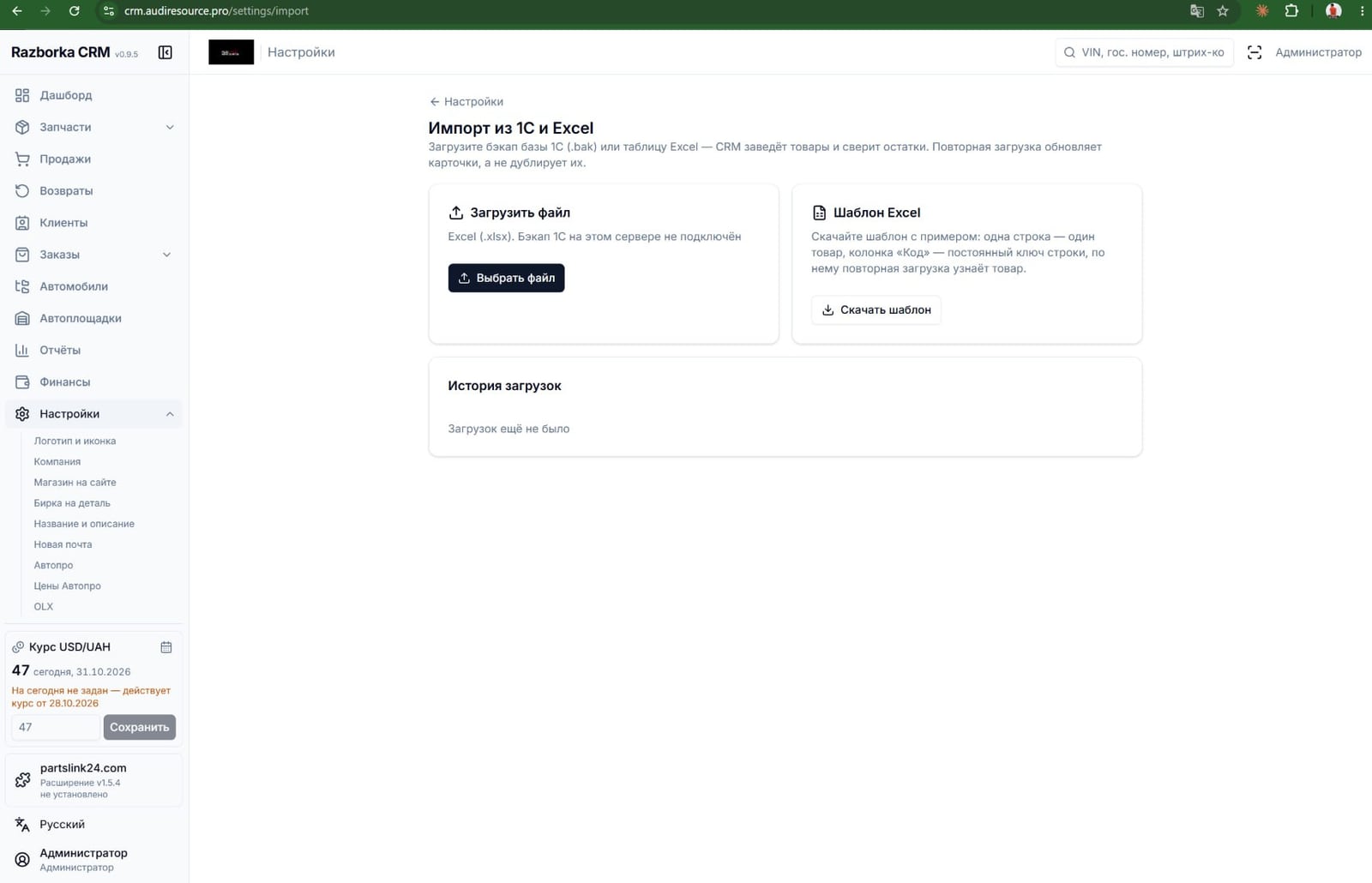
Briefly: in the Audi Resource CRM settings, there is a separate screen called "Import from 1C and Excel" - this is where you can upload a 1C backup (.bak) or a table using a ready-made template, and the upload history is also visible there.
The import screen offers two options: upload an Excel file using a template (one product, one row, the "Code" column is a permanent key) or a backup of the 1C database, if access to the 1C server is configured. Next to it is a button with the downloadable template and a download history log so you can see when and what was last synced.
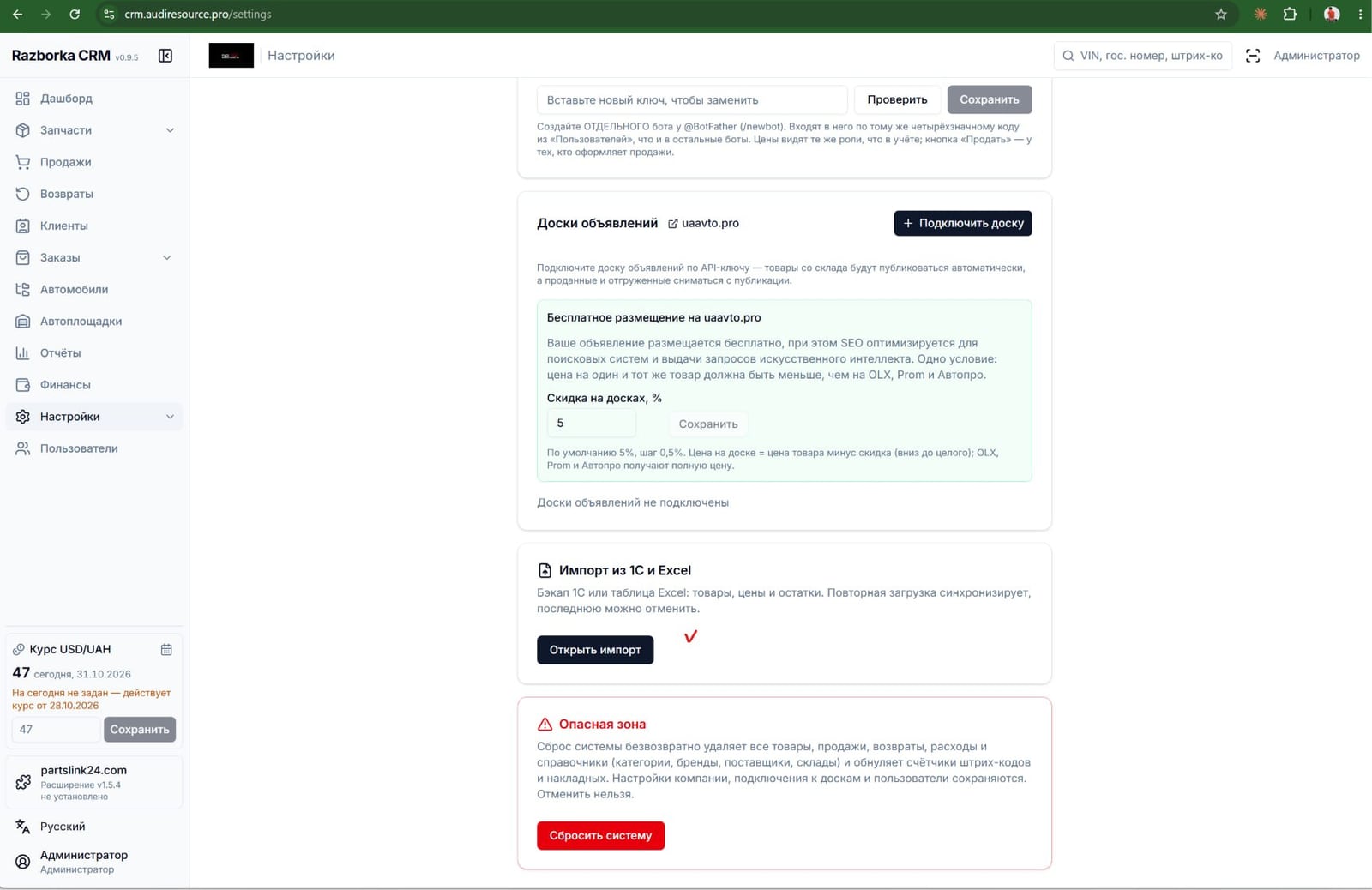
The same CRM has a ready-made integration with the uaavto.pro classifieds board: posting is free, with one condition: the price must be lower than on OLX, Prom, and Avtopro. At the time of this case study, Audi Resource had not yet integrated the classifieds boards, but the feature is already built into the interface and can be activated without development, with just one click.
Why synchronize 1C at all if it’s easier to switch to another system?
In short: synchronization is a practical interim step. It relieves managers of the manual input of inventory balances right now, and then the downloaded data can be used for whatever you want: analyzing sales using AI, monitoring employee tasks, or simply maintaining an up-to-date website and job boards without duplicating the work.
The idea behind this upgrade is simple: there's no need to rush into things. If completely abandoning 1C is unavoidable—due to accounting, taxes, or fear of breaking something during a relocation—you can first automate data exchange between 1C and other systems. Then, you can do whatever you like with this data: some integrate AI sales analysis, others monitor employee performance, and still others simply stop wasting time manually transferring balances to the CRM and website every week.
If you have a similar task—transferring data from 1C to a modern accounting system with AI analysis—the case author can custom-design this synchronization for your database.
How is this different from the three previous cases of the same CRM?
In short: the platform is the same for all four cases, but each time a specific set of functions is added for a specific client - from part recognition by photo to synchronization with 1C.
| Case | Client | Major revision |
|---|---|---|
| Case 1 | Adam, razborkaua.pro | Part recognition by photo, video, and voice via Telegram bot |
| Case 2 | Alexander | Auto prices from avto.pro, Nova Poshta invoices, automatic publication on 3 sites |
| Case 3 | Oleg, Audi Resource | Multicurrency accounting using the exchange rate-income-expense-adjustment formula |
| Case 4 (this one) | Oleg, Audi Resource | Synchronization with 1C: products and balances without duplicates, barcodes, notice boards |
The last two cases are for the same client: first, multi-currency accounting was implemented for Audi Resource, and then, through a separate upgrade, synchronization with 1C. The platform's foundation remains unchanged: it solves one specific task at a time, without unnecessary modules that would clutter the warehouse.
If you need a simpler website with a catalog and order acceptance via Telegram and WhatsApp —without 1C synchronization or custom inventory logic—you can build it using 1001site AI. You choose the style, the AI populates the site based on your link or description, and the "Online Store" mode manages the cart and orders without registration.
Who is this type of synchronization with 1C suitable for?
In short: this bundle makes sense for businesses that have several of the conditions below in place simultaneously, rather than for anyone who simply uses 1C.
The combination makes sense if you have both:
- Accounting has been conducted in 1C for years, and moving to another system is risky or simply unnecessary.
- The balances change every day, and no one has time to manually duplicate them in the CRM or on the website.
- The products already have 1C barcodes, and I don't want to re-stick them in the warehouse.
- It is necessary that the same data be posted on both the website and the message boards without manual work.
If the only thing relevant from this list is a simple website with a single currency and order acceptance, without synchronization with 1C, such a bundle can be assembled in 1001site AI's "Online Store" mode without custom development.
Readers' Questions
What happens if you download the same 1C backup twice?
The CRM will not create a second product card. The product is identified by its internal 1C GUID (in Excel, by the "Code" column), so re-uploading updates the existing record and does not create a duplicate.
Will product photos be transferred from 1C?
No. The 1C database only stores paths to files on disk, not the images themselves, so there's no way to transfer photos—they are uploaded to the CRM separately.
Do I need to give up 1C to get a modern warehouse and website?
No. 1C remains the accounting system, and the CRM synchronizes with it from above: it takes inventory and balances, while the accounting and familiar reports in 1C remain.
How is this case different from the three previous ones about the same CRM?
The first three cases covered part recognition by photo and voice (Adam), auto prices and invoices (Alexander), and multi-currency accounting (Oleg). This one is about transferring data from 1C without migration and without manually entering balances.
Sources
- The author's post on Telegram channel: https://t.me/promtvibeadd/456
- Predecessor case: multi-currency accounting for the same auto dismantling yard (Audi Resource): https://1001site.com/blog/multivalyutnyj-uchet-dlya-avtorazborki/
- Case: ERP + website + Telegram bot for auto dismantling (razborkaua.pro): https://1001site.com/blog/erp-sajt-telegram-bot-ii-dlya-avtorazborki/
- Case Study: Automotive Dismantling Auto Prices and Invoices: https://1001site.com/blog/avtomatizaciya-avtorazborki/
- 1001site AI Online Store mode, inventory control: https://1001site.com/wiki/mode-shop/
Other improvements to the same CRM are in the razborkaua.pro and Audi Resource multi-currency accounting case studies. And if your business doesn't have 1C and its own logistics, 1001site AI builds a website with a catalog and order acceptance via Telegram and WhatsApp in just a few minutes, without data synchronization.
Project links
- Predecessor case: Multi-currency accounting for the same auto dismantling company (Audi Resource)
- Case Study: ERP + Website + Telegram Bot for Auto Dismantling (razborkaua.pro)
- Case Study: Automotive Dismantling Automotive Prices and Invoices
- 1001site AI Online Store Mode, Warehouse Management
- The author's Telegram channel
- 1001site Style Catalog
Discussion
Post and comments in Telegram channelБизнес с ИИ | Через замочную скважину · 31 October 2026
Questions and Answers
What happens if you download the same 1C backup twice?
The CRM will not create a second product card. The product is identified by its internal 1C GUID (in Excel, by the "Code" column), so re-uploading updates the existing record and does not create a duplicate.
Will product photos be transferred from 1C?
No. The 1C database only stores paths to files on disk, not the images themselves, so there's no way to transfer photos—they are uploaded to the CRM separately.
Do I need to give up 1C to get a modern warehouse and website?
No. 1C remains the accounting system, and the CRM synchronizes with it from above: it takes inventory and balances, while the accounting and familiar reports in 1C remain.
How is this case different from the three previous ones about the same CRM?
The first three cases covered part recognition by photo and voice (Adam), auto prices and invoices (Alexander), and multi-currency accounting (Oleg). This one is about transferring data from 1C without migration and without manually entering balances.
Subscribe to my Telegram channel
In the channel « Бизнес с ИИ | Через замочную скважину», I watch and talk about how clients who have contacted me use AI in their businesses. I encourage discussion—let me know in the comments, and I'll respond directly.
Similar projects
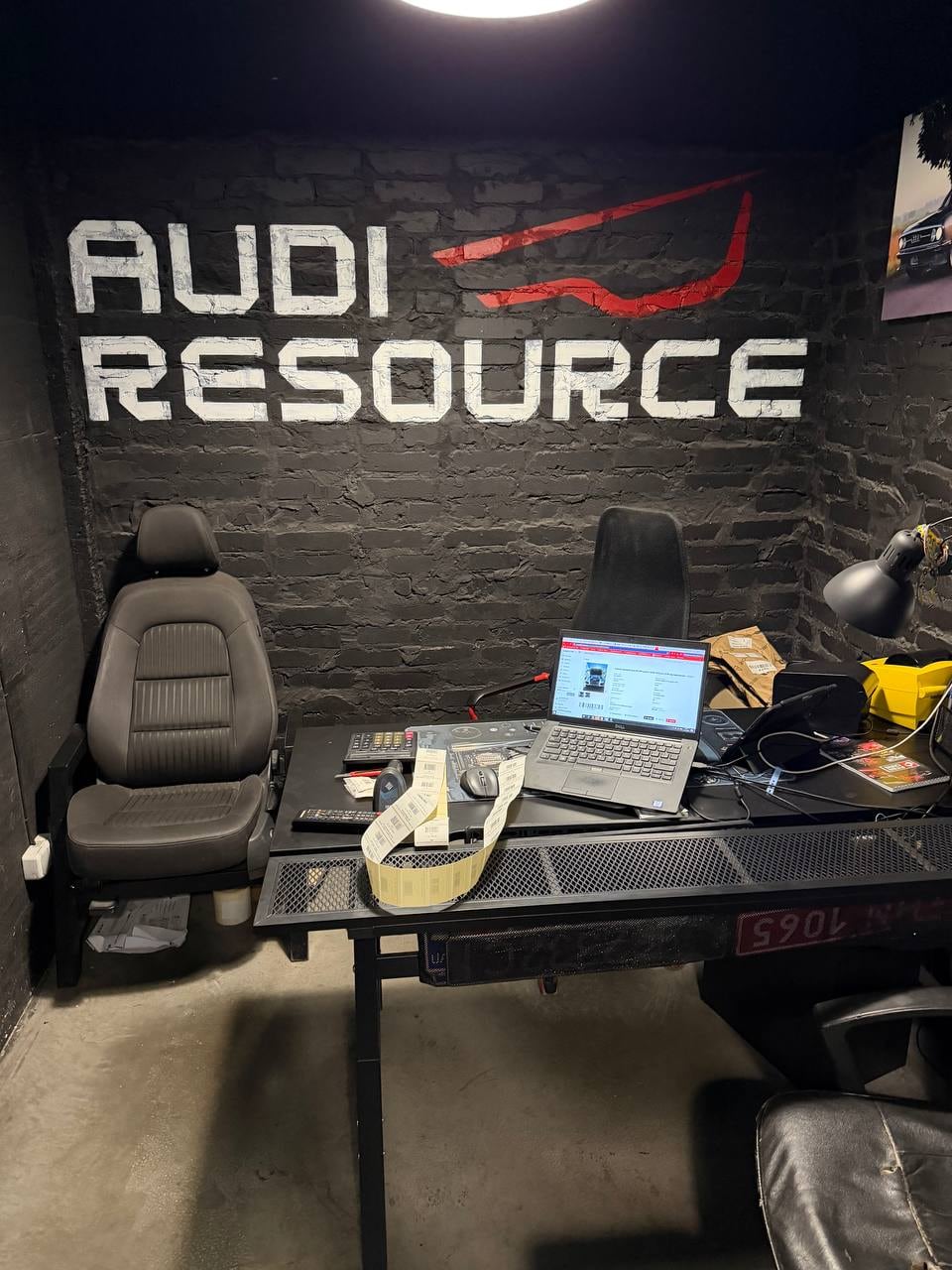
Multi-currency accounting for auto dismantlers: a formula for replacing currency chaos
Oleg from Lutsk developed a multi-currency accounting formula for an Audi auto dismantling company, which we implemented in the CRM: daily exchange rate, receipts, expenses, Nova Poshta, and Telegram bot.

Automotive dismantling automation: CRM automatically calculates prices and prints invoices
The second client found a CRM for a car dismantling business on YouTube. The system automatically selects prices on avto.pro, prints Nova Poshta invoices, and posts ads on OLX.

ERP + website + AI-powered Telegram bot for auto dismantling in 6 days
How they built an ERP system, a website with an app, and an AI-powered Telegram bot that records auto parts using photos and voices in just 6 days: a case study by razborkaua.pro.