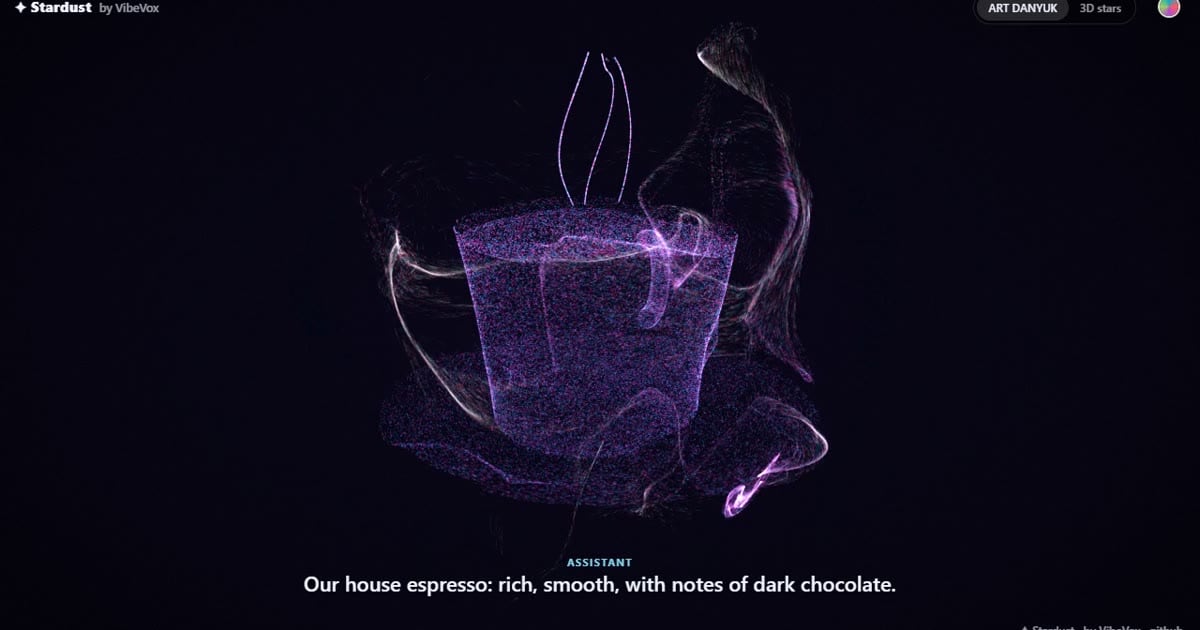
Almost all AI voice assistants have the same thing on their screen: a pulsating sphere. Less commonly, they feature a "talking head," a video avatar of a person moving their lips. I created a third variant and called it ART DANYUK: while the AI speaks, thousands of glowing particles coalesce into a 3D figure of the subject being spoken about—a coffee cup, a sofa, a dolphin—and then disperse again as a stream of data. Below is a live demo; you can touch it right here. This article will be useful if you're choosing an AI assistant for your website or creating your own voice agent and want it to be remembered.
Try it right in the article
Tap any object at the bottom of the window or type your own word in English—for example, "telescope" or "guitar." The ▶ Tour button launches a short dialogue: the visitor asks about coffee, sweets, a sofa, horses, and a boat trip; the AI responds, and particles assemble each object. Tapping creates a wave, swiping rotates the scene, and long-pressing scatters the object, which reassembles it. The round button in the corner changes the palette.
If the window does not load, open the demo separately: vibevox.pro/stardust-demo.
Why is no face better than a ball and a talking head?
The sphere only shows what the AI is saying. A talking head shows who's speaking, but it's expensive and easily falls into the "uncanny valley"—when a near-human image is more frightening than a clear drawing. A faceless avatar reveals the conversation, and that's memorable.
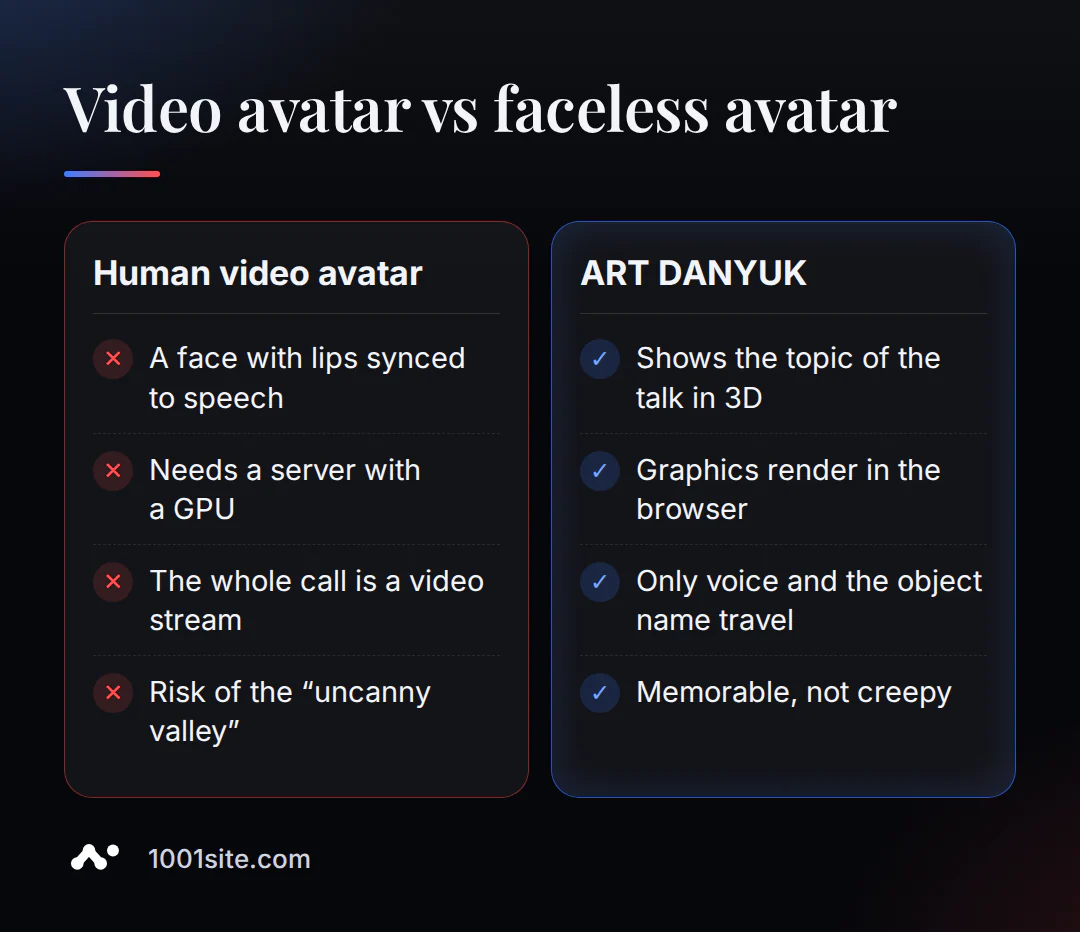
| Option | What the visitor sees | Where is the picture counted? |
|---|---|---|
| Pulsating ball | abstract animation | in the browser, almost without load |
| Human video avatar | face and lips in time with speech | On a server with a video card, the entire conversation is a video stream. |
| ART DANYUK | subject of conversation in 3D | in the visitor's browser, over the network - only the voice and the name of the item |
Two styles: ART DANYUK and 3D stars
ART DANYUK - a data sculpture. Up to 131,000 particles flow like a cocoon, an object is born inside, lingers for a few seconds, and then dissolves again. Palettes: "Auto" (a slow blend of all colors), Ocean, Coral, Nebula, Garden. Requires WebGL2, which is included in almost all recent phones.
3D stars – a spiral galaxy in a nebula. The stars arc together to form a three-dimensional, illuminated figure that rotates like a real object. Works on any phone, and ART DANYUK automatically switches to this style if your device isn't up to par.
In both styles, the particles "breathe" in time with the AI's voice: the louder the phrase, the brighter and more vibrant the picture.
How does it work from the inside?
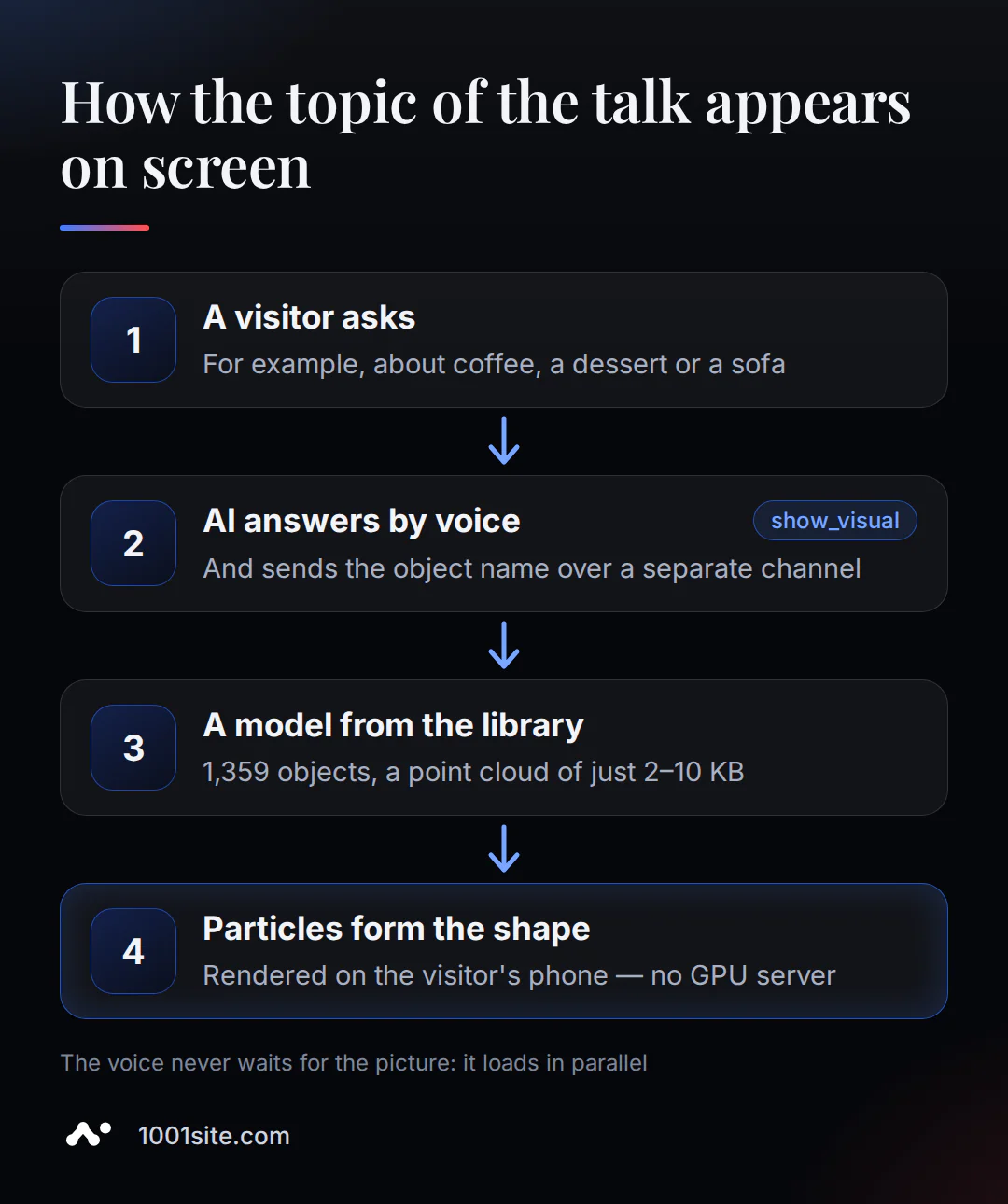
- An AI tool. The model calls show_visual ("show object") with an English name—for example, "coffee cup"—and continues speaking. The voice never waits for an image: it's a separate, tiny data channel.
- A library of 1,359 models. Food, furniture, animals, plants, transportation, tools, cosmetics, jewelry, electronics, and sports. All source models are under a free CC0 license, and I've converted them into point clouds of 2-10 KB. Each one is downloaded upon first use and then cached in your browser.
- Safety net. AI models sometimes "forget" to call a tool. Therefore, after a second and a half of answering, the lightweight model automatically selects the item from the visitor's phrase and the beginning of the answer. It skips greetings, small talk, and people.
- Camera. The visitor can point the product at the camera and click "Recognize." The AI will name the item, and the particles will assemble its shape.
What does the visitor see during the call?
- While the call is connecting, the particles form the inscription VibeVox, and in your project - the name of your brand.
- The AI says hello, and the cloud of particles breathes in time with its voice: a pause - the picture fades away, the phrase comes to life.
- The conversation reached the subject - particles gather into his figure, hold it while the AI talks, and then spread back out.
- The figure can be rotated by swiping and broken by long pressing, so waiting for an answer turns into a game.
- The volume is adjusted using the slider in the top ringtone bar, and the camera can be turned on and off at any time.
The AI consultant responds in the visitor's language. I discussed how to make the website itself multilingual so it's visible to search engines in my article about a multilingual website without a translator.
Where is this useful for business?
- A coffee shop or pastry shop – a consultant talks about espresso and desserts, and the guest sees a cup and a cupcake.
- Furniture store - "compact sofa for a small apartment" immediately turns into a sofa on the screen.
- Tourism and excursions - a boat trip with dolphins becomes a dolphin, and a booking becomes a basket.
- A store selling cosmetics, tools, and electronics —lipstick, screwdrivers, and headphones—is available in the library.
- Exhibitions and showcases - a screen that displays what visitors ask about and gathers people around.
I demonstrated how an AI agent that guides customers to their orders differs from a regular chatbot in my analysis of e-commerce agents.
How to put it on your website?
There are three options, depending on whether you need a ready-made consultant, the entire website, or just graphics.
| What is needed | How to get |
|---|---|
| A ready-made AI consultant with voice and 3D view | VibeVox widget - in the settings, select "3D figures" or ART DANYUK and the assistant's voice |
| A website with a built-in AI assistant | 1001site AI: All-inclusive plan - €45 per month, first month with promo code of the month - €25 |
| Just graphics for your voice AI | Stardust engine on GitHub: free for personal projects, commercial license for companies |
How to enable and configure the AI assistant in your 1001site account is described in the knowledge base.
For developers, the connection takes one tool in the model settings and one line in the browser - examples for Gemini Live, OpenAI Realtime, ElevenLabs, LiveKit, and Pipecat are in the Stardust repository.
If you'd like to have an AI consultant like this but don't want to figure it out yourself, message me on Telegram @GuruAppSheet: I'll create an agent for your catalog and show you a demo using your products.