WordPress with Elementor and a ready-made website powered by AI solve the same problem differently: in the former, you or your developer are responsible for hosting, plugin updates, and security yourself, while in the latter, the service handles this work. For a developer and experienced user, a standalone WordPress solution is a perfectly acceptable workflow. For a small business owner without a second career, the difference in workload can be crucial. Here's an honest analysis of where this difference manifests itself and how much it costs in time and money.
How much does WordPress with Elementor actually cost per year?
Advertisements typically list the price of a theme or plugin separately, but the actual annual bill consists of five expense items: domain, hosting, theme or Elementor Pro, paid plugins, and an SSL certificate (the lock icon in the address bar that secures the connection). If we add up the ranges for each item from an independent analysis by FreshySites, a non-technical owner spends €360-€1,080 per year on infrastructure alone, not including maintenance time.
| Expense item | Range per year |
|---|---|
| Domain | 9-45 € |
| Managed hosting | 22-90 €/month |
| Elementor Pro (1 site) | 53-75 € |
| SSL certificate | free from the hoster or 45-90 € |
| Paid plugins (SEO, cache, backup, security, forms) | 180-360 € |
A separate expense, often overlooked in advertising, is maintaining an existing website. Independent British WordPress consultant Jamie Grand quotes her basic support price as starting at €55 per month, while the market generally sees agency support costing between €180 and €455 per month. This expense is often omitted from calculations of "how much a WordPress website costs."
What could go wrong after updating the plugin?
Elementor plugin update can break a website's entire design without warning—this is one of the most frequently asked questions on WordPress support forum. User chartsheets described a typical case: "After updating your plugin, my entire website broke, and I had to roll it back" ( wordpress.org). Another participant in the same thread, bocapa, added: "Lots of broken sites spent hours trying to fix... Really bad update."
Sometimes, it gets worse—the entire site crashes. User hollywoodonlocation wrote in a support thread: "Site is down. Bluehost says it's because of Elementor plugin. Had to disable the plugin. Now everything is down except the header." ( wordpress.org)—the diagnosis here was made by the hosting provider. A common cause of this failure is the "white screen of death": a plugin conflict that can only be resolved through the hosting file manager and renaming the plugin folder—an impossible task without technical expertise.
There's also a more gradual problem: the developer who set up the site eventually leaves, leaving the structure of nested Elementor widgets opaque to the next person. Hosting provider FatLab Web Support, which fixes such sites in practice, puts it bluntly: "When they leave, they leave behind a relatively complex system that no one else can pick up."
If such breakdowns and the "black box" after the developer's departure sound tiresome, the site style is selected in the "Create a site" pop-up - the service then takes care of platform updates.
How Secure is WordPress for Small Businesses in 2026?
WordPress itself is as secure as any other popular platform, but the burden of security updates falls entirely on the owner—and 91% of new vulnerabilities are found there. According to Patchstack's "State of WordPress Security in 2026" report, 11,334 new vulnerabilities were discovered in 2025—a 42% year-over-year increase—and 91% of them were in plugins. Only six vulnerabilities were found in WordPress core itself, all low-risk. Forty-six percent of the discovered issues did not have a patch at the time of public disclosure.
The speed with which this is being exploited is confirmed by an independent analysis by Colorlib: the median time to widespread exploitation of a new vulnerability is 5 hours, and 45% of vulnerabilities are exploited within the first 24 hours. According to Colorlib, thousands of WordPress sites are hacked every day, and no one tracks the exact total. Hosting-level protection blocks only 12% WordPress -specific attacks; after that, the onus shifts to whether the owner has updated each of the 20-30 installed plugins.
Since September 11, 2026, Article 14 of the EU Cyber Resilience Regulation has been in effect: developers of commercial plugins are required to report actively exploited vulnerabilities to EU authorities within 24 hours, with fines for violations reaching up to €15 million or 2.5% of turnover ( LyntonWeb). These obligations do not directly affect small website owners. They are still at risk: any of their plugins may be removed from distribution without warning if the developer fails to respond in time.
What can Elementor do in 2026—and what still requires a developer?
Elementor is the most popular page builder for WordPress, with over 10 million active installations and 5.07% of the world's top million websites, according to BuiltWith ( Wikipedia). In 2026, the company added an AI agent, Angie, which builds custom widgets, writes PHP code, and performs bulk database edits and SEO fixes based on text queries ( Elementor).
To access the website's database and files, Angie requires explicitly enabling a separate, full-privilege mode. This is precisely the area where a non-technical owner won't want to go: editing the database without understanding the consequences wastes time far more than it saves. Angie also doesn't write text or generate images itself. The visual builder also has a technical cost: each Elementor block is wrapped in additional markup, so the final page is typically heavier and more complex in structure than the same layout created using WordPress built-in block editor.
What's easier to manage: WordPress with Elementor or a website with AI?
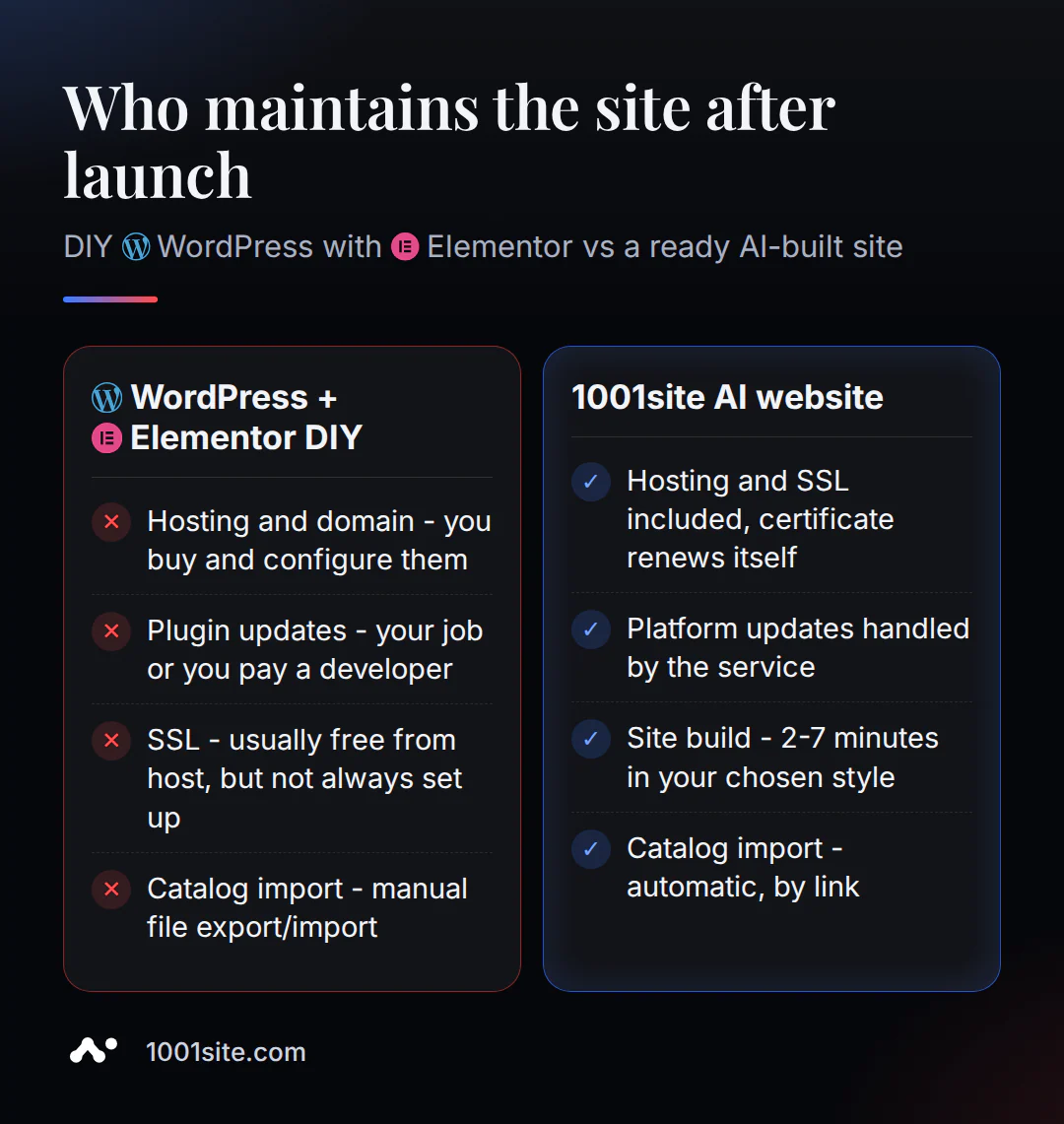
The main difference is who is responsible for hosting, updates, and security after launch. On WordPress with Elementor, this responsibility always falls to the website owner or developer; on a ready-made website with 1001site AI, it falls to the service.
| WordPress + Elementor | 1001site AI | |
|---|---|---|
| Hosting and SSL | buy and set up yourself | included, SSL renews itself |
| Updates | your concern or payment to the developer | on the service side |
| Website assembly | manual layout | AI agent, 2-7 minutes |
| Transferring a directory | manually with a file | by link, automatically |
| Payment | Hosting + theme + plugins separately | 45 €/month, no extra charges |
If this setup is feasible and you're more interested in maintaining control of the entire stack, this is a reasonable choice. If you'd rather start with a finished product, the rest of the article covers both directory migration and domain connection without this burden.
How to migrate a WooCommerce store to an AI-powered website in one evening?
Migrating your catalog from WooCommerce is easy, without manually exporting files—a website link is all you need. The AI assistant automatically finds products, prices, photos, and availability, displays a preview, and waits for confirmation before uploading.
- Open the AI assistant in your account (button in the lower right corner).
- Insert the link to the store: "Transfer products from the site https://мой-магазин.com ".
- Check the preview - the assistant will show you how many products it found and what categories it will create.
- Confirm the download by saying "download everything" or specify what to leave, for example "no sale".
- Improve your catalog: ask your assistant to write SEO descriptions or translate products into the required languages.
Up to 30 products can be transferred per request, with a maximum of 100—large catalogs should be transferred in parts. Photos are downloaded to a dedicated storage location, so they won't be lost if the old site goes down, and re-inserting the same link updates prices and inventory without duplicates. A detailed explanation of the process is available in the product transfer knowledge base at this link.
How to connect a domain and SSL without a hosting panel?
A ready-made AI-powered website already has hosting enabled, so you only need to point your domain to the server—no separate hosting panel typically required for this with WordPress.
- In your domain's DNS panel, add two A-records (technical addresses that tell the internet where to find the site) to
@andwww, pointing to the IP address of the 1001site server. - Please wait for the DNS changes to take effect - this may take anywhere from a few minutes to a few hours.
- In the website settings, enter the domain without
https://and withoutwwwand save. - Click "Issue SSL Certificate" - verification and issuance takes up to 30 seconds.
After this, the site opens on your domain with automatic HTTPS, and the certificate renews automatically—without any reminders from the hosting company or the risk of it expiring unnoticed. The previous technical address, such as asd.vibevox.pro/имя continues to work and redirects to the new domain. Details are available in the domain and SSL knowledge base.
What does the solution cost, honestly?
To make a fair comparison, you need to consider not only the price of the theme and hosting, but also the update time, risk of downtime, and launch speed.
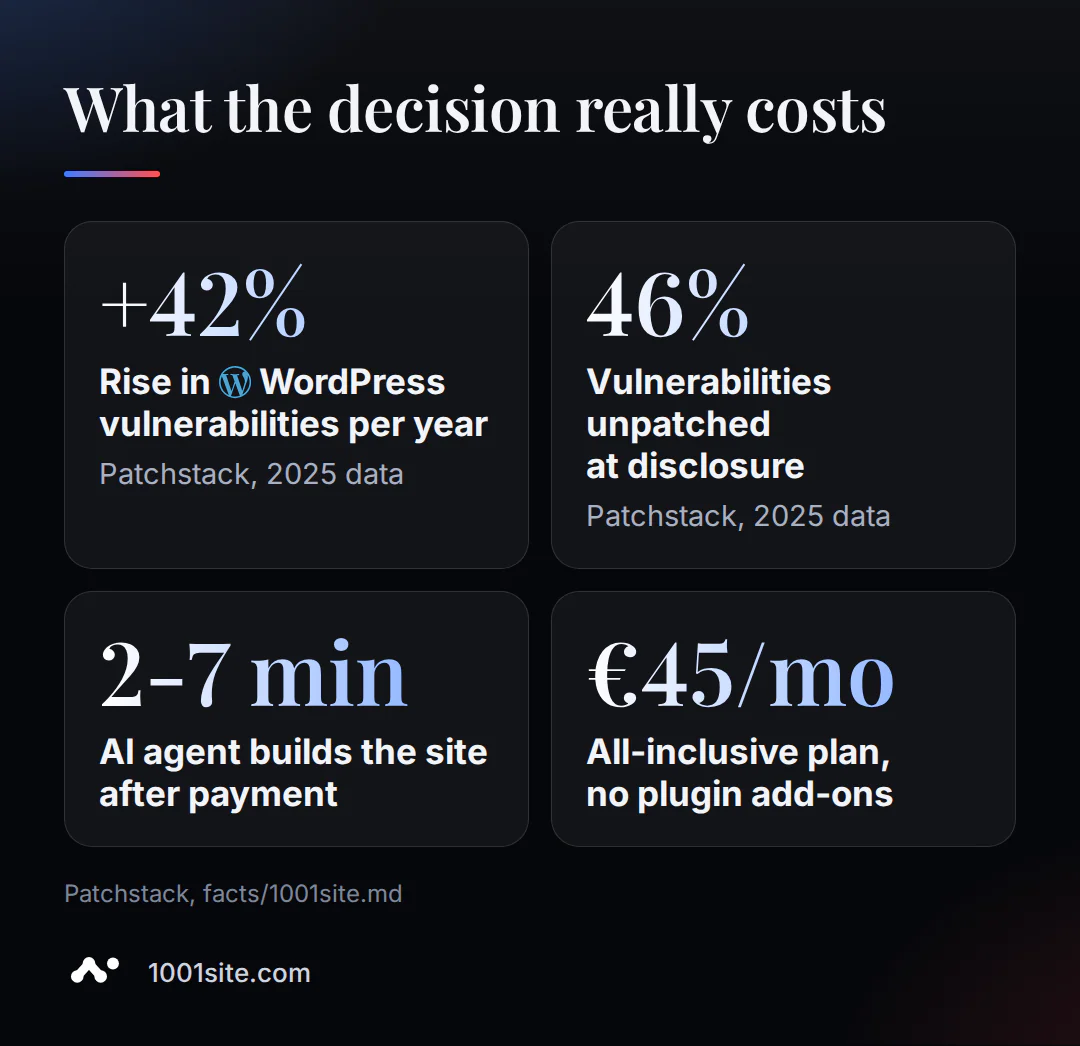
Here they are:
- +42% - this is the increase in the number of new WordPress plugin vulnerabilities in 2025 (Patchstack).
- 46% of new WordPress plugin vulnerabilities in 2025 were unpatched at the time of public disclosure (Patchstack).
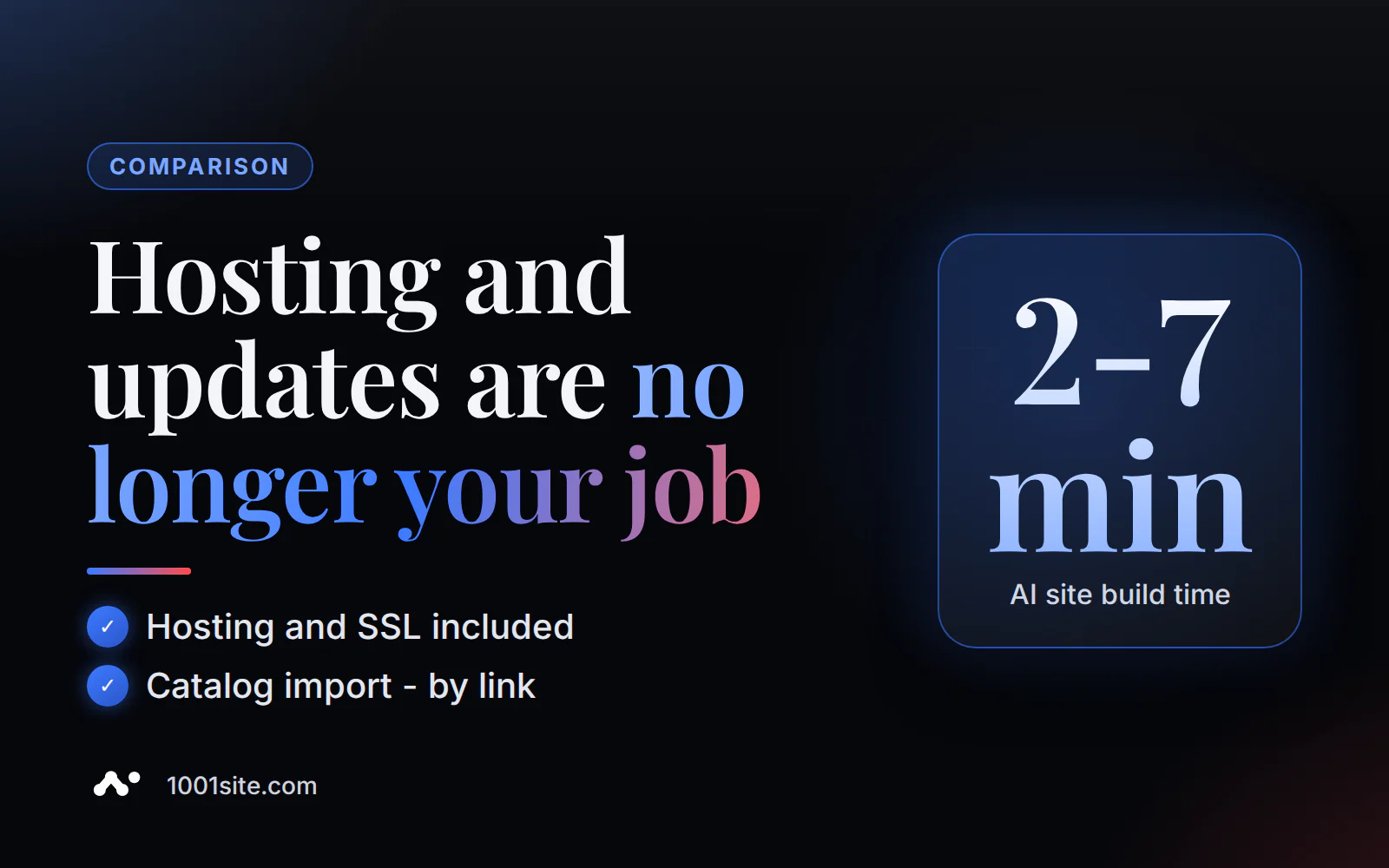
- 2-7 minutes – how long does it take for the AI agent to build a website on 1001site after payment?
- 45 €/month - All-inclusive plan on 1001site (25 € first month with promo code), no extra charges for plugins and hosting.
A similar calculation for other builders can be found in the article "Wix or Shopify: When is it more profitable to switch to your own website with AI?", and a detailed breakdown of turnkey pricing plans can be found in the article "How much does a turnkey website cost?"
Who should stay on WordPress with Elementor?
If you already know how to administer WordPress yourself, have a developer on hand, or your site requires functionality that only a specific plugin from WordPress ecosystem provides, sticking with your current stack makes more sense than migrating for the sake of migrating. Open source and a vast plugin ecosystem are a real advantage for those who need custom development.
The decision to move is worth it when tasks like "update a plugin," "check a backup," and "figure out why the site crashed" start to take up time that's needed for the business itself.
Frequently asked questions
Is it possible to migrate a store from WooCommerce to an AI-powered website without losing inventory?
Yes. The AI assistant reads the WooCommerce store link and automatically finds the name, price, photo, and availability of products—along with Shopify, Tilda, OpenCart, PrestaShop, and other migration sources. Up to 30 products can be migrated at a time, with a maximum of 100 per request, and re-inserting the same link updates prices and inventory without duplicates.
Is WordPress a Bad Choice for Small Businesses?
No, WordPress is a working tool used by millions of websites. The difference lies in who handles hosting, plugin updates, and security: on WordPress, it's always the website owner or developer; on a ready-made AI-powered website, it's the service.
How long does it take to migrate from WordPress to an AI-powered website?
The actual website assembly in the chosen style takes 2-7 minutes after payment. Transferring a catalog via a link takes up to a minute for analysis and a preview check. Domain connection usually takes the longest: DNS updates take anywhere from a few minutes to several hours, and the SSL certificate is then issued in up to 30 seconds.
What happens to my domain if I leave WordPress hosting?
A domain and hosting are separate purchases, so the domain remains yours no matter where it's registered. You just need to point the A records to the new server—the domain itself doesn't disappear and doesn't require repurchase.
Sources
- WordPress, support forum, topic: " Elementor update broke my site and its entire design!" - https://wordpress.org/support/topic/elementor-update-broke-my-site-and-its-entire-design/
- WordPress, support forum, topic "SITE DOWN because of ELEMENTOR Plugin" - https://wordpress.org/support/topic/site-down-because-of-elementor-plugin/
- Patchstack, “State of WordPress Security in 2026” - https://patchstack.com/whitepaper/state-of-wordpress-security-in-2026/
- Colorlib, “35+ WordPress Hacking Statistics” - https://colorlib.com/wp/wordpress-hacking-statistics/
- LyntonWeb, “The Hidden Cost of WordPress Security Debt” - https://www.lyntonweb.com/library/wordpress-security-debt
- FatLab Web Support, Shane Larrabee, “ Elementor Review 2026: An Honest Take from a WordPress Host” - https://fatlabwebsupport.com/blog/wordpress-development/elementor-review/
- FreshySites, “How much does a WordPress site cost? 2026 pricing guide" - https://freshysites.com/blog/how-much-does-a-wordpress-site-cost/
- Jamie Grand, "The Hidden Plugin Tax" - https://jamiegrand.co.uk/blog/wordpress-maintenance-cost-plugin-tax/
- Elementor, “What Is Agentic AI for WordPress ” - https://elementor.com/blog/what-is-agentic-ai-for-wordpress/
- Wikipedia, " Elementor " - https://en.wikipedia.org/wiki/Elementor
Learn more about transferring a directory and connecting a domain in the 1001site knowledge base. You can create a website in your chosen style without having to manage your hosting yourself using the "Create a Website" pop-up in the 1001site.com directory.